

Repository Pattern?
In most of the applications/processes, we have to perform CRUD (Create, Read, Update and Delete) operation. A repository basically works as a bridge between logic layer and data access layer of our application
Benefits
- Centralizes data/service layer.
- Can adopt new changes easily
Generic Repository Pattern?
Generic Repository is a pattern by which we can use single repository for accessing the data of all models. Generally, we use one repository for one model to access all the data.
Benefits
Generic Repository is a pattern by which we can use single repository for accessing the data of all models. Generally, we use one repository for one model to access all the data.
Benefits
- Reduce redundancy of code
- Force developer to work same pattern
- Easy to maintain
- Less code so Less error
Here, I have used -
- Visual Studio 2015
- Entity Framework 6.1.3
Step 1
Create a WebAPI project and create edmx.

Configure connection string in web.config -by default it will happen while creating edmx. If you want to change, you may go and change in web.config file.

Create a WebAPI project and create edmx.
Configure connection string in web.config -by default it will happen while creating edmx. If you want to change, you may go and change in web.config file.
Step 2
Create a folder in Web API as repository and add interface as IRepository.cs.

Step 3
Create generic CRUD Interface methods.
- public interface IRepository < T > where T: class
- {
- IEnumerable < T > GetAll();
- T GetById(object Id);
- T Insert(T obj);
- void Delete(object Id);
- T Update(T obj);
- void Save();
- }
step 4
Create Repository.cs file under Repository folder to implement the interface methods to do the CRUD operations
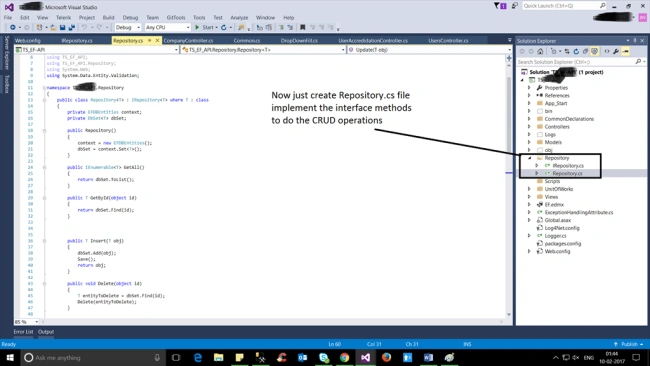
Create Repository.cs file under Repository folder to implement the interface methods to do the CRUD operations
- public class Repository < T > : IRepository < T > where T: class {
- private EFDBEntities context;
- -- -- -- -- -- -- -- -- -- -- - > represent edmx context name
- private DbSet < T > dbSet;
- -- -- -- -- -- -- -- -- -- -- -- -- -- - > represent respective table to perform certain operations
- public Repository() {
- context = new EFDBEntities();
- dbSet = context.Set < T > ();
- }
- public IEnumerable < T > GetAll() -- -- -- -- -- -- -- -- -- > To get all data from respective table {
- return dbSet.ToList();
- }
- public T GetById(object id) -- -- -- -- -- -- -- -- -- -- -- -- - > To get particular row data based on id(this id field should be the primary key field) {
- return dbSet.Find(id);
- }
- public T Insert(T obj) -- -- -- -- -- -- -- -- -- -- -- -- -- -- -- -- > Add new record to respectiv table {
- dbSet.Add(obj);
- Save();
- return obj;
- }
- public void Delete(object id) -- -- -- -- -- -- -- -- -- -- > Delete respective record from respective table based on primarykey id {
- T entityToDelete = dbSet.Find(id);
- Delete(entityToDelete);
- }
- public void Delete(T entityToDelete) -- -- -- -- -- -- -- -- -- > this is to record the state as detached
- while we deleting data from table {
- if (context.Entry(entityToDelete).State == EntityState.Detached) {
- dbSet.Attach(entityToDelete);
- -- -- -- -- -- -- -- -- -- -- -- -- > it add the row like in particular table, particular field, particular value has been deleted with timestamps.
- }
- dbSet.Remove(entityToDelete);
- }
- public T Update(T obj) -- -- -- -- -- -- -- -- -- -- -- -- -- -- -- -- -- -- -- > it 's to update the existing record {
- dbSet.Attach(obj);
- context.Entry(obj).State = EntityState.Modified;
- -- -- -- -- -- - > same to record the modified state and where, what and when
- Save();
- return obj;
- }
- public void Save() {
- try {
- context.SaveChanges();
- -- -- -- -- -- -- -- -- -- -- -- -- -- -- -- -- -- -- -- -- - > to keep changing the entityframe as well db
- } catch (DbEntityValidationException dbEx) {
- foreach(var validationErrors in dbEx.EntityValidationErrors) {
- foreach(var validationError in validationErrors.ValidationErrors) {
- System.Console.WriteLine("Property: {0} Error: {1}", validationError.PropertyName, validationError.ErrorMessage);
- -- - > you just put the log to know the errors
- }
- }
- }
- }
- protected virtual void Dispose(bool disposing) -- -- -- -- -- -- -- - > this dispose method after very instance {
- if (disposing) {
- if (context != null) {
- context.Dispose();
- context = null;
- }
- }
- }
- }
Step 5
Create Controller under Coontrollers folder,
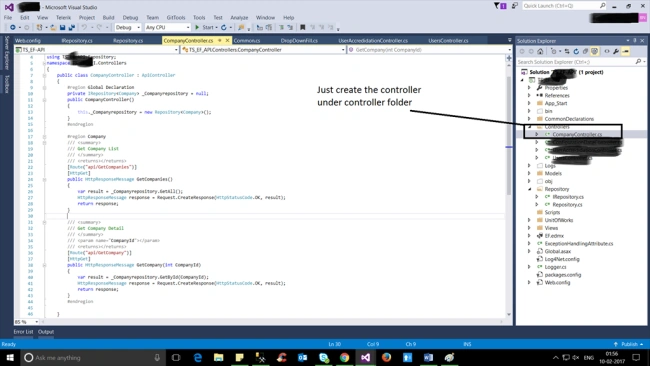
Create Controller under Coontrollers folder,
Getall details from table
- public class CompanyController: ApiController {#
- region Global Declaration
- private IRepository < Company > _Companyrepository = null;
- public CompanyController() {
- this._Companyrepository = new Repository < Company > ();
- }#
- endregion# region Company
- /// <summary>
- /// Get Company List
- /// </summary>
- /// <returns></returns>
- [Route("api/GetCompanies")]
- [HttpGet]
- public HttpResponseMessage GetCompanies() {
- var result = _Companyrepository.GetAll();
- HttpResponseMessage response = Request.CreateResponse(HttpStatusCode.OK, result);
- return response;
- }
- /// <summary>
- /// Get Company Detail
- /// </summary>
- /// <param name="CompanyId"></param>
- /// <returns></returns>
- [Route("api/GetCompany")]
- [HttpGet]
- public HttpResponseMessage GetCompany(int CompanyId) {
- var result = _Companyrepository.GetById(CompanyId);
- HttpResponseMessage response = Request.CreateResponse(HttpStatusCode.OK, result);
- return response;
- }
- /// <summary>
- /// Delete Company Detail
- /// </summary>
- /// <param name="CompanyId"></param>
- /// <returns></returns>
- [Route("api/DeleteCompany")]
- [HttpGet]
- public HttpResponseMessage DeleteCompany(int CompanyId) {
- var result = _Companyrepository.Delete(CompanyId);
- HttpResponseMessage response = Request.CreateResponse(HttpStatusCode.OK, result);
- return response;
- }
- /// <summary>
- /// UpdateCompany Detail
- /// </summary>
- /// <param name="CompanyId"></param>
- /// <returns></returns>
- [Route("api/UpdateCompany")]
- [HttpGet]
- public HttpResponseMessage UpdateCompany(Company CompanyDetails) {
- var result = _Companyrepository.Update(CompanyDetails);
- HttpResponseMessage response = Request.CreateResponse(HttpStatusCode.OK, result);
- return response;
- }#
- endregion
- }
and now, you can perform CRUD operation by calling this API.
This article introduced the generic repository pattern with Entity Framework.
Christophe RoccoPosted Sep 27, 2018, 1:52 AM
Thanks for sharing !!
Laxmi KattiPosted Jul 18, 2018, 4:03 AM
Hello sir instead of httpresponemessage i want to return class object please explain code for it
Rajesh KadamPosted Mar 29, 2017, 5:10 AM
Truly awesome and generic...Thanks for sharing..