

Let us start with a sample demo. Open Visual Studio. Create one empty web application. Add a web form. Write the following HTML mark up in the page.
- <%@ Page Language="C#" AutoEventWireup="true" CodeBehind="Index.aspx.cs" Inherits="GetFileExtension.Index" %>
- <!DOCTYPE html>
- <html xmlns="http://www.w3.org/1999/xhtml">
- <head runat="server">
- <title></title>
- </head>
- <body>
- <form id="form1" runat="server">
- <div>
- <asp:FileUpload ID="FileUp" runat="server" /><br /><br />
- <asp:Button ID="BtnGetExtension" runat="server" Text="Get Extension" /><br />
- <asp:Label ID="LblExtension" runat="server" style="color:red"></asp:Label>
- </div>
- </form>
- </body>
- </html>
- using System;
- usingSystem.Collections.Generic;
- usingSystem.Linq;
- usingSystem.Web;
- usingSystem.Web.UI;
- usingSystem.Web.UI.WebControls;
- namespaceGetFileExtension
- {
- public partial class Index: System.Web.UI.Page
- {
- protected void Page_Load(object sender, EventArgs e)
- {
- }
- protected void BtnGetExtension_Click(object sender, EventArgs e)
- {
- if (FileUp.HasFile)
- {
- stringInputFile = string.Empty;
- InputFile = System.IO.Path.GetExtension(FileUp.FileName);
- LblExtension.Text = "The extension of the file is: " + InputFile;
- }
- else
- {
- LblExtension.Text = "Please upload a file!!";
- }
- }
- }
- }
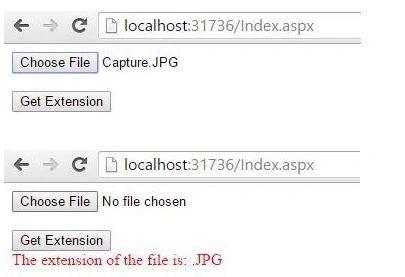
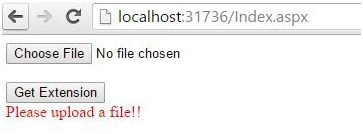
We got the correct extension of the file uploaded previously. In case the user directly clicks the button without uploading the file then the below error should appear.
Join the conversation! Your thoughts help the community grow.