

Before reading this, please visit my previous blog at http://www.c-sharpcorner.com/blogs/get-sharepoint-list-item-and-apply-search-filter-using-angularjs
Step 1 - Create .JS file custom code, as shown below.
var spApp = angular
.module("spApp", [])
.controller("viewItemController", function ($scope, $http) {
var url = _spPageContextInfo.webAbsoluteUrl + "/_api/web/lists/getByTitle('Product%20Sales')/items";
$http(
{
method: "GET",
url: url,
headers: { "accept": "application/json;odata=verbose" }
}
).success(function (data, status, headers, config) {
var dataResults=data.d.results;
$scope.contacts = dataResults;
}).error(function (data, status, headers, config) {
});
})
<html>
<head>
<script type="text/javascript" src="/SiteAssets/angular.min.js"></script>
<script type="text/javascript" src="SiteAssets/angularGet.js"></script>
</head>
<body>
<h3>View Contacts</h3>
<hr/>
<div ng-app="spApp">
<div ng-controller="viewItemController">
<input type="text" placeholder="searchProductItem" ng-model="searchText.Product"/>
<input type="text" placeholder="searchSalesTargetItem" ng-model="searchText.Sales_x0020_Target"/>
<input type="checkbox" ng-model="exactMatch"/>Exact Match
<br/><br/>
<table>
<tr>
<th>Product</th>
<th>Total Sales</th>
<th>Sales Target</th>
</tr>
<tr ng-repeat="contact in contacts|filter:searchText:exactMatch">
<td>{{contact.Product}}</td>
<td>{{contact.Total_x0020_Sales}}</td>
<td>{{contact.Sales_x0020_Target}}</td>
</tr>
<br />
</table>
</div>
<hr />
</body>
</html>
Step 3 - After completion of .html file and uploading into our SharePoint library, insert one content editor Web part any SharePoint page and ref this .html file into that Web part. Now, we can get the method given below.
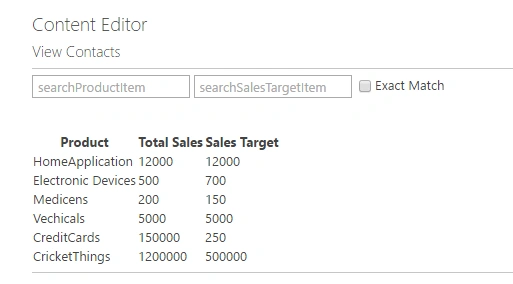
Step 4 - From the above image, we can search two items -- product and sales target items only. If we select check box and enter exact data in both the text boxes, the result will be displayed.
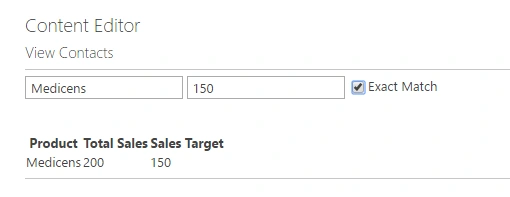
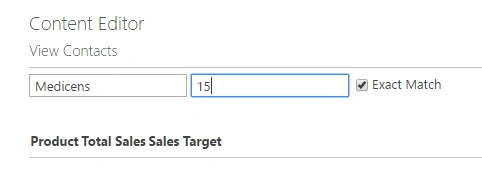
Step 5 - If the data does not match in both the items, when we select Exact Match option, the result will be shown empty.
Note
If anything is required from my side, please comment.
Tejesh BarmaPosted Feb 10, 2017, 5:44 AM
I will work on that and post as early as possible here.
Tarun DPosted Feb 10, 2017, 5:24 AM
Hi Tejesh Barma Thanks for the Nice Article. How to implement the same search for Lookup filed and People or Group column..