Step 1
Create one table named Employee.
The table script is given below.
- CREATE TABLE [dbo].[Employee](
- [Name] [nvarchar](50) NULL,
- [Address] [nvarchar](50) NULL,
- [Age] [int] NULL,
- [ID] [int] IDENTITY(1,1) NOT NULL,
- CONSTRAINT [PK_Employee] PRIMARY KEY CLUSTERED
- (
- [ID] ASC
- )WITH (PAD_INDEX = OFF, STATISTICS_NORECOMPUTE = OFF, IGNORE_DUP_KEY = OFF, ALLOW_ROW_LOCKS = ON, ALLOW_PAGE_LOCKS = ON) ON [PRIMARY]
- ) ON [PRIMARY]
-
- GO
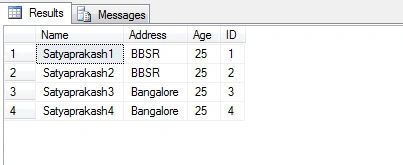
I entered some dummy data.
Step 3
Create one stored procedure named Sp_EmployeeFullQuery.
- Create procedure Sp_EmployeeFullQuery
- (
- @ID VARCHAR(200)
- )
- as
- begin
- DECLARE @FullQuery NVARCHAR(MAX)
- set nocount on;
- SET @FullQuery='select * from Employee where Employee.ID=' + CAST(@ID AS VARCHAR) + ''
- end
- PRINT @FullQuery
- EXEC (@FullQuery)
In this procedure, I defined one parameter called @ID.
Declare one variable @FullQuery.
- DECLARE @FullQuery NVARCHAR(MAX)
Now, put all SQL query inside @FullQuery variable.
- SET @FullQuery='select * from Employee where Employee.ID=' + CAST(@ID AS VARCHAR) + ''
At last, whatever parameter value is passed, this will show through @FullQuery variable by using last two parts.
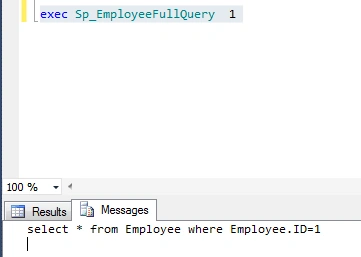
- PRINT @FullQuery
- EXEC (@FullQuery)
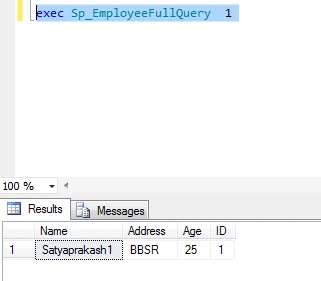
- exec Sp_EmployeeFullQuery 1
Here, 1 means AutoGenerate ID column value, which will show the related column data by filtering this ID value.
You will get all the details of SQL query with already passed parameter value.
Summary
Create procedure.
Using primary key, autogenerate id column value showing the records.
Also, generate SQL query, which is defined in stored procedure by passing parameter value.


Join the conversation! Your thoughts help the community grow.