
Step 1 : Create one list and add items in it .
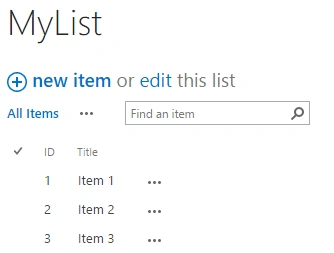
Step 2 : Download jQuery Reference file from the link ,given below (you can select version as per your requirement).

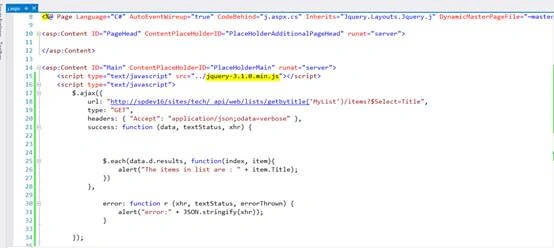
Step 3: Open Visual Studio, create SharePoint new project and add Application page in it. Add downloaded jQuery file reference in it and write the following code in it .
Code
- <script type="text/javascript">
- $.ajax({
- url: "SiteUrl/_api/web/lists/getbytitle('ListName')/items?$Select=Title", // ur site url goes here
- type: "GET",
- headers: {
- "Accept": "application/json;odata=verbose"
- },
- success: function(data, textStatus, xhr) {
- $.each(data.d.results, function(index, item) {
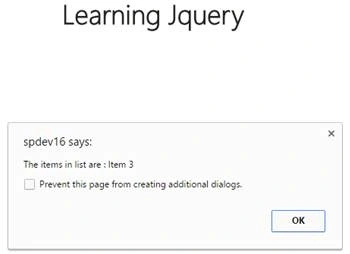
- alert("The items in list are : " + item.Title);
- })
- },
- error: function r(xhr, textStatus, errorThrown) {
- alert("error:" + JSON.stringify(xhr));
- }
- });
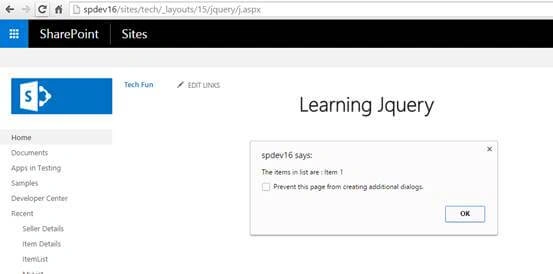
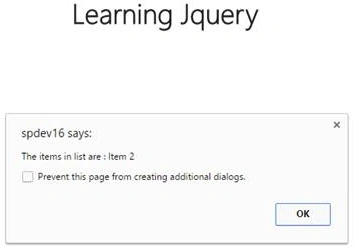
Step 4 : Deploy the solution and see the result.
Join the conversation! Your thoughts help the community grow.