
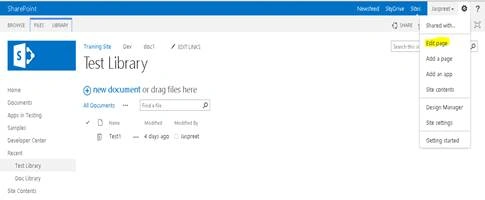
Step 1: Open the Library and edit the Library Page .
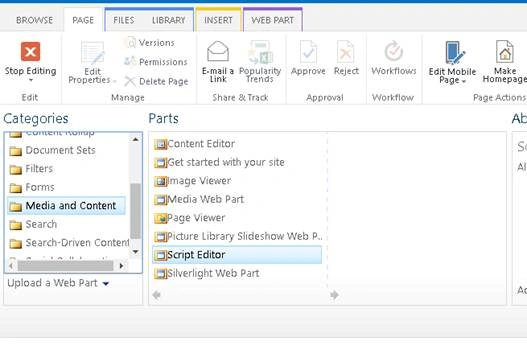
Step 2: Add Script Editor Web Part (Always add script web part below document web part) .
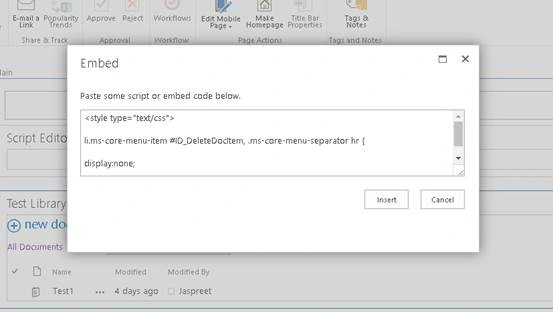
Step 3: Edit the snippet and paste the Below Code in web part for hiding the required button from ECB Menu Item using the Button ID (Replace ID value after # ).
Code
- <style type="text/css">
- li.ms-core-menu-item #ID_DeleteDocItem,
- .ms-core-menu-separator hr
- {
- display: none;
- }
- </style>
Note
Button Id can be found by Opening Core.js file (use ctrl+F to find the required ID) using the name of Menu Item . For eg if you want to hide Delete option , paste Delete in ctrl+F and get the reqiured ID.
Path for Core.js file: C:\Program Files\Common Files\microsoft shared\Web Server Extensions\15\TEMPLATE\LAYOUTS
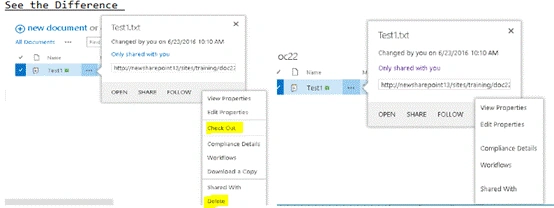
Screen Shot: Hided CheckOut, Download & Delete option using button ID.
Join the conversation! Your thoughts help the community grow.