
Create a Visual webpart and add the code, as shown below.
- public partial class VisualWebPart1: WebPart
- {
- [Personalizable(PersonalizationScope.Shared), WebBrowsable(true),
- WebDisplayNameAttribute("Street name"), WebDescription("Can store street value as string"), CategoryAttribute("Address")
- ]
- public String Street {
- get;
- set;
- }
Now, deploy the Visual webpart. The property will be as shown below:
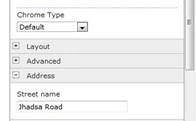
Now, how to get that property in Visual WebPart? Here is the code:
Code
- protected void Page_Load(object sender, EventArgs e) {
- if (!Page.IsPostBack) {
- lblStreet.Text = this.Street;
- }
- }
Key points to create a property:
Personalizable()- This attribute is used to specify that the property is saved in content database. It accepts two arguments,
- PersonalizationScope.Shared – It specifies that all users share common property.
- PersonalizationScope.User – It specifies that different users can have different properties.
Default value is PersonalizationScope.Shared
WebBrowsable() – It specifies that property is editable via editor pane if Browser Default value is true.
WebBrowsable() – It specifies that property is editable via editor pane if Browser Default value is true.
WebDisplayNameAttribute("Street name") – It specifies the display name Default value is property name if WebDisplayNameAttribute is not mentioned.
WebDescription("Can store street value as string") – describes about property, below, we can see WebDisplayNameAttribute which is street and WebDescription.
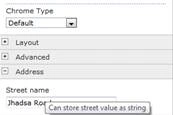
CategoryAttribute("Address") – Street comes under address category.
If no category is given for a property, then property will appear under miscellaneous section.
Types of properties
If no category is given for a property, then property will appear under miscellaneous section.
Types of properties
- Boolean – CheckBox
- DateTime – TextBox
- Text – TextBox
- Integer – TextBox
- Enum - DropDown
How can dropdown be used as a property?
Code
- public enum MyCityName {
- Gurgaon,
- GuruGram
- };
- [Personalizable(), WebBrowsable(), Category("Address")]
- public MyCityName CityOption {
- get;
- set;
- }
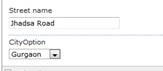
As shown below, we can get selected dropdown value.
- protected void Page_Load(object sender, EventArgs e) {
- if (!Page.IsPostBack) {
- lblCity.Text = this.CityOption.ToString();
- }
- }
Join the conversation! Your thoughts help the community grow.