

Introduction
In this article we will discuss about how to avoid ELSE-IF Statement in stored procedure in SQL Server. As we all know that stored procedure is faster than LINQ, so we will fetch data from database using stored procedure.
Background
Here we have to use condition with where clause instance of ELSE-IF Statement in stored procedure. Consider we will fetch Unit Price and Current Stock of values from InvStockMaster table in Database by @CompanyID,@DepartmentID, @ItemID, @GradeID and Other Condition we will fetch same values from Same table and Database by @CompanyID, @ItemID, @DepartmentID, @SupplierID, @BatchID,@GradeID,@LotID. Now firstly we will use ELSE-IF Statement and secondly we will avoid ELSE-IF Statement in stored procedure.
Let’s go for it.
Step 1
Right button click on Databases and Click New Database and give database named InventoryDB. Below is the following picture.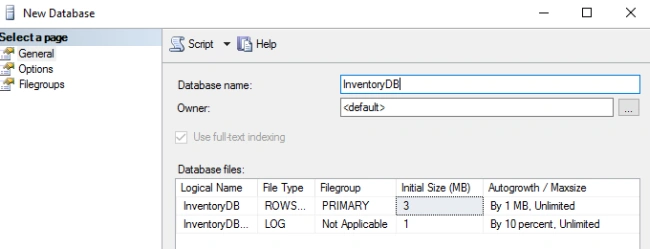
Fig: Create Database
OR below is the following query,
- CREATE DATABASE InventoryDB;
Now we will create table named InvStockMaster.
Right button click on Tables and click New and once Click Table… Below is the following picture.
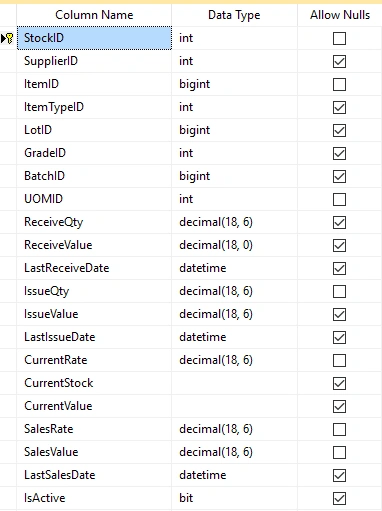
Fig: InvStockMaster
OR below is the following query,
- CREATE TABLE [dbo].[InvStockMaster](
- [StockID] [int] IDENTITY(1,1) NOT NULL,
- [SupplierID] [int] NULL,
- [ItemID] [bigint] NOT NULL,
- [ItemTypeID] [int] NULL,
- [LotID] [bigint] NULL,
- [GradeID] [int] NULL,
- [BatchID] [bigint] NULL,
- [UOMID] [int] NOT NULL,
- [ReceiveQty] [decimal](18, 6) NULL,
- [ReceiveValue] [decimal](18, 0) NULL,
- [LastReceiveDate] [datetime] NULL,
- [IssueQty] [decimal](18, 6) NOT NULL,
- [IssueValue] [decimal](18, 6) NULL,
- [LastIssueDate] [datetime] NULL,
- [CurrentRate] [decimal](18, 6) NOT NULL,
- [CurrentStock] AS ([ReceiveQty]-[IssueQty]),
- [CurrentValue] AS ([ReceiveValue]-[IssueValue]),
- [SalesRate] [decimal](18, 6) NOT NULL,
- [SalesValue] [decimal](18, 6) NOT NULL,
- [LastSalesDate] [datetime] NULL,
- [IsActive] [bit] NULL,
- [CompanyID] [int] NULL,
- [DepartmentID] [int] NOT NULL,
- CONSTRAINT [PK_InvStockMaster] PRIMARY KEY CLUSTERED
- (
- [StockID] ASC
- )WITH (PAD_INDEX = OFF, STATISTICS_NORECOMPUTE = OFF, IGNORE_DUP_KEY = OFF, ALLOW_ROW_LOCKS = ON, ALLOW_PAGE_LOCKS = ON) ON [PRIMARY]
- ) ON [PRIMARY]
- GO
Here is some demo Data.
- GO
- INSERT [dbo].[InvStockMaster] ([StockID], [SupplierID], [ItemID], [ItemTypeID], [LotID], [GradeID], [BatchID], [UOMID], [ReceiveQty], [ReceiveValue], [LastReceiveDate], [IssueQty], [IssueValue], [LastIssueDate], [CurrentRate], [SalesRate], [SalesValue], [LastSalesDate], [IsActive], [CompanyID], [DepartmentID]) VALUES (1, 222, 7478, 1, 0, 1, 0, 3, CAST(1000.000000 AS Decimal(18, 6)), CAST(10000 AS Decimal(18, 0)), CAST(N'2016-09-19 17:02:22.820' AS DateTime), CAST(10.000000 AS Decimal(18, 6)), CAST(100.000000 AS Decimal(18, 6)), CAST(N'2016-10-05 00:00:00.000' AS DateTime), CAST(10.000000 AS Decimal(18, 6)), CAST(0.000000 AS Decimal(18, 6)), CAST(0.000000 AS Decimal(18, 6)), NULL, 1, 1, 10)
- GO
- INSERT [dbo].[InvStockMaster] ([StockID], [SupplierID], [ItemID], [ItemTypeID], [LotID], [GradeID], [BatchID], [UOMID], [ReceiveQty], [ReceiveValue], [LastReceiveDate], [IssueQty], [IssueValue], [LastIssueDate], [CurrentRate], [SalesRate], [SalesValue], [LastSalesDate], [IsActive], [CompanyID], [DepartmentID]) VALUES (2, 225, 7475, 1, 6, 0, 15, 3, CAST(54000.000000 AS Decimal(18, 6)), CAST(54000 AS Decimal(18, 0)), CAST(N'2016-09-20 10:36:55.440' AS DateTime), CAST(10.000000 AS Decimal(18, 6)), CAST(100.000000 AS Decimal(18, 6)), CAST(N'2016-10-05 00:00:00.000' AS DateTime), CAST(10.000000 AS Decimal(18, 6)), CAST(0.000000 AS Decimal(18, 6)), CAST(0.000000 AS Decimal(18, 6)), NULL, 1, 1, 10)
- GO
- INSERT [dbo].[InvStockMaster] ([StockID], [SupplierID], [ItemID], [ItemTypeID], [LotID], [GradeID], [BatchID], [UOMID], [ReceiveQty], [ReceiveValue], [LastReceiveDate], [IssueQty], [IssueValue], [LastIssueDate], [CurrentRate], [SalesRate], [SalesValue], [LastSalesDate], [IsActive], [CompanyID], [DepartmentID]) VALUES (3, 984, 7481, 4, 12, 0, 10, 3, CAST(1000.000000 AS Decimal(18, 6)), CAST(10000 AS Decimal(18, 0)), CAST(N'2016-09-20 00:00:00.000' AS DateTime), CAST(10.000000 AS Decimal(18, 6)), CAST(100.000000 AS Decimal(18, 6)), CAST(N'2016-10-05 00:00:00.000' AS DateTime), CAST(10.000000 AS Decimal(18, 6)), CAST(0.000000 AS Decimal(18, 6)), CAST(0.000000 AS Decimal(18, 6)), NULL, 1, 1, 10)
- GO
- USE [InventoryDB]
- GO
- /****** Object: StoredProcedure [dbo].[Get_LSCurrentStock] Script Date: 10/14/2016 2:36:14 PM ******/
- SET ANSI_NULLS ON
- GO
- SET QUOTED_IDENTIFIER ON
- GO
- -- =============================================
- -- Author: <Author,,Name>
- -- Create date: <Create Date,,>
- -- Description: <Description,,>
- -- =============================================
- --EXEC [Get_LSCurrentStock] 1,7474,10,0,0,0,0
- Create PROCEDURE [dbo].[Get_LSCurrentStockWithELSEIF]
- @CompanyID INT=0
- ,@ItemID BIGINT=0
- ,@DepartmentID INT=0
- ,@SupplierID BIGINT=0
- ,@BatchID INT=0
- ,@GradeID INT=0
- ,@LotID INT=0
- AS
- BEGIN
- IF(@CompanyID!=0 AND @ItemID!=0 AND @DepartmentID!=0 AND @SupplierID!=0 AND @BatchID!=0 AND @LotID!=0)
- BEGIN
- SELECT TOP 1 ISNULL(ItemID,0) ItemID, ISNULL(CurrentRate,0) UnitPrice, ISNULL(CurrentStock,0) CurrentStock
- from InvStockMaster
- WHERE ItemID=@ItemID AND DepartmentID=@DepartmentID AND CompanyID=@CompanyID
- AND BatchID=@BatchID AND SupplierID=@SupplierID AND LotID=@LotID
- END
- ELSE IF(@CompanyID!=0 AND @ItemID!=0 AND @DepartmentID!=0 AND @GradeID!=0)
- BEGIN
- SELECT TOP 1 ISNULL(ItemID,0) ItemID, ISNULL(CurrentRate,0) UnitPrice, ISNULL(CurrentStock,0) CurrentStock
- from InvStockMaster
- WHERE ItemID=@ItemID AND DepartmentID=@DepartmentID AND CompanyID=@CompanyID
- AND GradeID=@GradeID
- END
- END
In software engineering, don't repeat yourself (DRY) is a principle of software development
Let's go for code explanation.
In the above codes we can see that we have used ELSE-IF statements which are some condition.
- IF(@CompanyID!=0 AND @ItemID!=0 AND @DepartmentID!=0 AND @SupplierID!=0 AND @BatchID!=0 AND @LotID!=0)
- BEGIN
- END
- ELSE IF(@CompanyID!=0 AND @ItemID!=0 AND @DepartmentID!=0 AND @GradeID!=0)
- BEGIN
- SELECT TOP 1 ISNULL(ItemID,0) ItemID, ISNULL(CurrentRate,0) UnitPrice, ISNULL(CurrentStock,0) CurrentStock
- from InvStockMaster
- WHERE ItemID=@ItemID AND DepartmentID=@DepartmentID AND CompanyID=@CompanyID
- AND BatchID=@BatchID AND SupplierID=@SupplierID AND LotID=@LotID
- USE [InventoryDB]
- GO
- /****** Object: StoredProcedure [dbo].[Get_LSCurrentStock] Script Date: 10/14/2016 2:36:14 PM ******/
- SET ANSI_NULLS ON
- GO
- SET QUOTED_IDENTIFIER ON
- GO
- -- =============================================
- -- Author: <Author,,Name>
- -- Create date: <Create Date,,>
- -- Description: <Description,,>
- -- =============================================
- Create PROCEDURE [dbo].[Get_LSCurrentStock]
- @CompanyID INT=0
- ,@ItemID BIGINT=0
- ,@DepartmentID INT=0
- ,@SupplierID BIGINT=0
- ,@BatchID INT=0
- ,@GradeID INT=0
- ,@LotID INT=0
- AS
- BEGIN
- SELECT TOP 1 ISNULL(ItemID,0) ItemID, ISNULL(CurrentRate,0) UnitPrice, ISNULL(CurrentStock,0) CurrentStock
- from InvStockMaster
- WHERE ItemID=@ItemID AND DepartmentID=@DepartmentID AND CompanyID=@CompanyID
- And Convert(varchar, BatchID) Like Case When @BatchID = 0 Then '%' Else CONVERT(varchar, @BatchID) End
- And Convert(varchar, SupplierID) Like Case When @SupplierID = 0 Then '%' Else CONVERT(varchar, @SupplierID) End
- And Convert(varchar, GradeID) Like Case When @GradeID = 0 Then '%' Else CONVERT(varchar, @GradeID) End
- And Convert(varchar, LotID) Like Case When @LotID = 0 Then '%' Else CONVERT(varchar, @LotID) End
- END
- SELECT TOP 1 ISNULL(ItemID,0) ItemID, ISNULL(CurrentRate,0) UnitPrice, ISNULL(CurrentStock,0) CurrentStock
- from InvStockMaster
- WHERE ItemID=@ItemID AND DepartmentID=@DepartmentID AND CompanyID=@CompanyID
- And Convert(varchar, BatchID) Like Case When @BatchID = 0 Then '%' Else CONVERT(varchar, @BatchID) End
- And Convert(varchar, SupplierID) Like Case When @SupplierID = 0 Then '%' Else CONVERT(varchar, @SupplierID) End
- And Convert(varchar, GradeID) Like Case When @GradeID = 0 Then '%' Else CONVERT(varchar, @GradeID) End
- And Convert(varchar, LotID) Like Case When @LotID = 0 Then '%' Else CONVERT(varchar, @LotID) End
Convert
The CONVERT() function is a general function that converts an expression of one data type to another.
Ex Convert(varchar, BatchID)
Like
The LIKE operator is used to search for a specified pattern in a column.
Ex Like Case When @BatchID = 0 Then '%' Else CONVERT(varchar, @BatchID) End
Case Statement
The CASE statement has the functionality of an IF-THEN-ELSE statement. You can use the CASE statement within a SQL statement.
Ex Case When @BatchID = 0 Then '%' Else CONVERT(varchar, @BatchID) End
Conclusion
Code repeat is problem in software engineering. In this article we have learned how to avoid code repeat and always we will try to avoid using ELSE-IF Statement.
Join the conversation! Your thoughts help the community grow.