
In the previous tutorial, we already saw how to get started with node.js. We also created basic web APIs in Node JS using express framework.
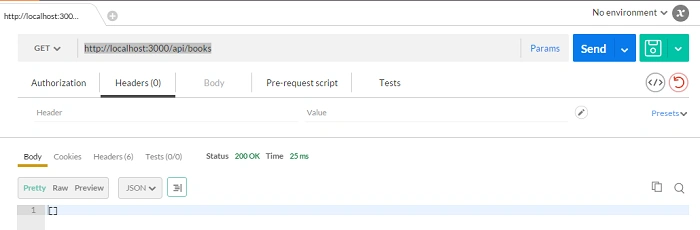
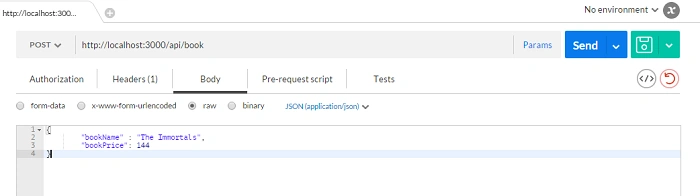
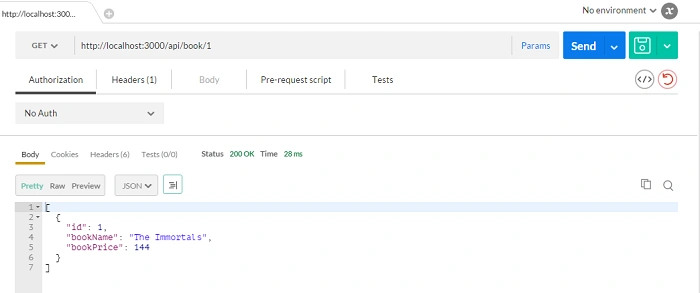
Here, we are going to see how to connect to MySQL database using Sequlize. We will create a web API for a book library. So, a user will be able to fetch, add, update, and delete books. Again, we will be using postman for testing our APIs.
Software needed-
1. Node JS - Environment
2. MySQL – Your database provider
3. Postman – Used for creating http requests like GET, PUT, POST, DELETE
4. Sublime/Notepad++ - IDE for writing code.
Install MySQL from official website according to your platform (Win/ Mac/ Linux). It is recommended that you use some Integrated Development Environment so that it easy to read and interpret code.
Throughout these courses, we will be using sublime which is a cool IDE.
Before starting tutorial, I would like you to create a user and a database in your MySQL.
We will be continuing with the previous tutorial example. It is strongly encouraged that you watch previous tutorial before continuing.
- MySQL Configuration – Create a config.json file in your project directory and paste the following snippet. You need to add the database name, username, and password so that express can talk to your database.
- "dev": {
- "driver": "mysql",
- "user": "user of database",
- "database": "your database name",
- "password": "your database password"
- }
-
Installing Dependencies - You need to install the following packages in your node.js project. Sequelize is ORM through which you can connect and run sql queries on your MySql Database. It is actually a wrapper on mysql package. It is very easy to learn and has got excellent documentation on their website.
Body-parser will help you to read body content of http requests.
- npm install sequelize
- npm install body-parser
- npm install mysql
-
Setting up- Paste the following code snippet.
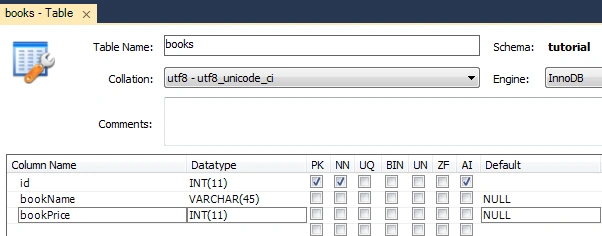
You need to create a table in MySQL. In the database, you added in config.json. Name the table as books and add 3 rows - id (datatype int), bookName (datatype varchar(25) and bookPrice (datatype int)
- var express = require('express');
- var Sequelize = require('sequelize');
- var config = require('./config.json');
- var bodyParser = require('body-parser');
- var password = config.password ? config.password : null;
- var sequelize = new Sequelize(
- config.database,
- config.user,
- config.password, {
- logging: console.log,
- define: {
- timestamps: false
- }
- }
- );
- var app = express();
- var port = 3000;
- var router = express.Router(); // will help in adding routes
- app.use(bodyParser.urlencoded());
- app.use(bodyParser.json());
Join the conversation! Your thoughts help the community grow.