

- Open VS studio 2008/2010 ----file ---new project---windows form
- Now on form Take 1 button and give some color on button if u want
- Now double click on Button and write code as follow befor that add Namespace System.Drawing
{
This.Close();
}
- Now double click on Form Load and write code as follow
{
System.Drawing.Drawing2D.GraphicsPath myp = new System.Drawing.Drawing2D.GraphicsPath();
myp.AddPolygon(new Point[]{new Point(0,0),new Point(0,this.Height),new Poi(this.Width,0)});
Region myreg=new Region(myp);
this.Region=myreg;
}
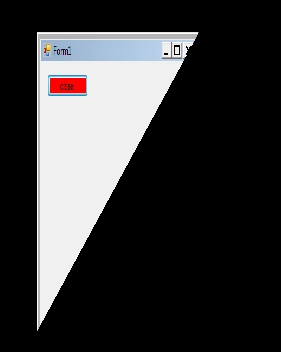
Now Run application output will come like this
Join the conversation! Your thoughts help the community grow.