

Introduction
With the introduction of SharePoint V2 REST API for Managed Metadata services, it has become very easy to create a term in term store using REST API. But what if we would like to automate things? In such cases we can use the help of Power Automate.
In the automation, we would create a simple custom SharePoint list with only title field, and when a user enters the item in the list we would create a term for that particular title.
Steps to be used to create flow using Power Automate
Step 1 - Select the trigger (when an item is created)
We require this flow to trigger when a new item is created in the list, so we select the trigger as "when an item is created". Once we have selected the trigger we need to select the site collection where the list is present and the list for which we need this trigger to work,

Step 2 - Create variables (Initialize variable)
We will create two variables with the step named "Initialize variable"
Let us set the name of the variables as mentioned below:
- GroupId
- TermSetId
We will use string as the type of both the variables.
We can provide the value as Group Id and TermSet Id.
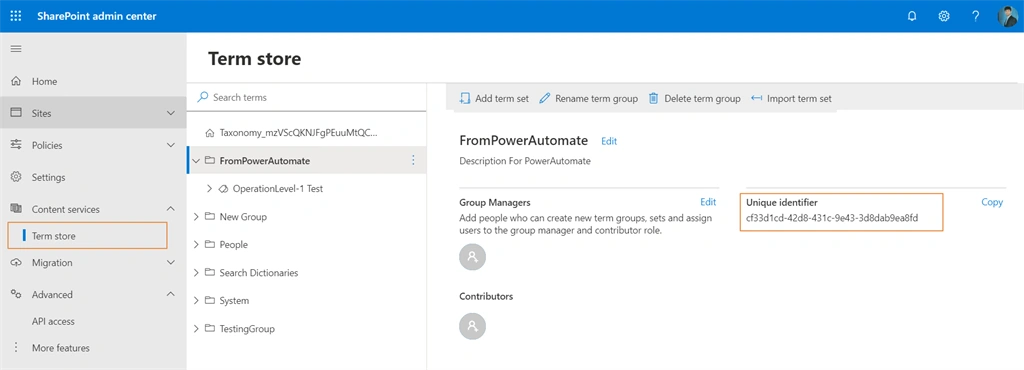
To fetch the Id of group and term set we can navigate to the SharePoint admin center and expand the content service section present in the left navigation and click on Term store.
Click on the group under which we need to create the term and copy the "Unique identifier" field value. In the same process for the term set, we can select the term set under which we need to create the term and copy the "Unique identifier" field value.


Ruth McintoshPosted May 5, 2021, 5:28 PM
How would you change the uri if you had parent terms nesting child terms? Would it be: _api/v2.1/termStore/groups/@{variables('GroupId')}/sets/@{variables('TermSetId')}/parents/@{variables(ParentTermId')}/children
Samir PatelPosted Oct 29, 2020, 4:49 AM
This helped me a lot, is there a way to add sub terms? i.e. sub term under the child?
Nick MumbyPosted Jun 14, 2020, 7:20 AM
Can you suggest a good way to sync a product list from an azure database to a SharePoint term store? I can access the database in flow and add all the entries to a SharePoint list, but it needs to have full synchronisation. i.e. if something is added modified or removed from the database, this needs to be duplicated in the term store. Thanks!