

Introduction
Sometimes we want to apply some business logic like show loader/spinner while calling API until API responds. So for this, we will call a Graph API to get lists from the root site, and until API responds we will show Loader. We will use an Office UI fabric Spinner.
For more details refer to this.
So, in this article, we will see step-by-step implementation with SPFx webpart.
Implementation
Open a command prompt.
Move to the path where you want to create a project.
Create a project directory using,
md spfx-loader
Move to the above-created directory using,
cd spfx-loader
Now execute the below command to create an SPFx solution,
yo @microsoft/sharepoint
It will ask some questions, as shown below,
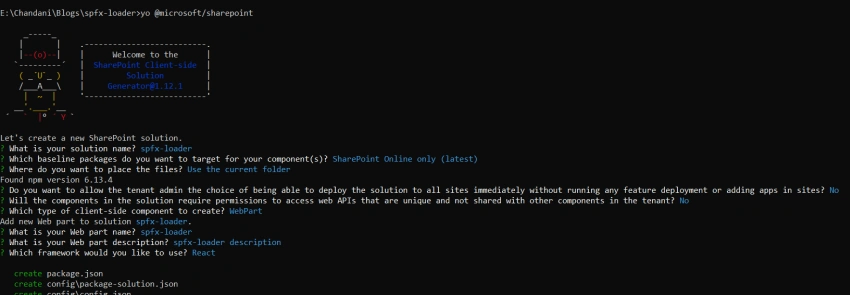
After a successful installation, we can open a project in any source code tool. Here, I am using the VS code, so I will execute the command,
code .
Now go to the src > webparts > webpart > components > I{webpartname}Props.ts file,
Here we will create a property for graph Client as below,
import { MSGraphClient } from "@microsoft/sp-http";

export interface ISpfxLoaderProps {
  description: string;
  graphClient: MSGraphClient;
}
Move to the {webpartname}.ts file. Here we will get the graph client and set it to the property,
import * as React from 'react';
import * as ReactDom from 'react-dom';
import { Version } from '@microsoft/sp-core-library';
import {
  IPropertyPaneConfiguration,
  PropertyPaneTextField
} from '@microsoft/sp-property-pane';
import { BaseClientSideWebPart } from '@microsoft/sp-webpart-base';

import * as strings from 'SpfxLoaderWebPartStrings';
import SpfxLoader from './components/SpfxLoader';
import { ISpfxLoaderProps } from './components/ISpfxLoaderProps';
import { MSGraphClient } from '@microsoft/sp-http';

export interface ISpfxLoaderWebPartProps {
  description: string;
}

export default class SpfxLoaderWebPart extends BaseClientSideWebPart<ISpfxLoaderWebPartProps> {

  private graphClient: MSGraphClient;

  public onInit(): Promise<void> {
    return new Promise<void>((resolve: () => void, reject: (error: any) => void): void => {
      this.context.msGraphClientFactory
        .getClient()
        .then((client: MSGraphClient): void => {
          this.graphClient = client;
          resolve();
        }, err => reject(err));
    });
  }

  public render(): void {
    const element: React.ReactElement<ISpfxLoaderProps> = React.createElement(
      SpfxLoader,
      {
        description: this.properties.description,
        graphClient: this.graphClient,
      }
    );

    ReactDom.render(element, this.domElement);
  }

  protected onDispose(): void {
    ReactDom.unmountComponentAtNode(this.domElement);
  }

  protected get dataVersion(): Version {
    return Version.parse('1.0');
  }

  protected getPropertyPaneConfiguration(): IPropertyPaneConfiguration {
    return {
      pages: [
        {
          header: {
            description: strings.PropertyPaneDescription
          },
          groups: [
            {
              groupName: strings.BasicGroupName,
              groupFields: [
                PropertyPaneTextField('description', {
                  label: strings.DescriptionFieldLabel
                })
              ]
            }
          ]
        }
      ]
    };
  }
}
Join the conversation! Your thoughts help the community grow.