

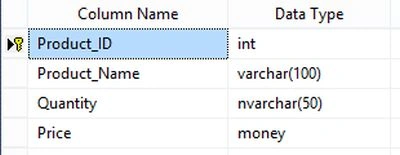
Database Structure
Query:
Create table tbl_bulkupload(Product_ID int primary key,Product_Name
varchar(100),Quantity nvarchar(50),Price money)
Design:
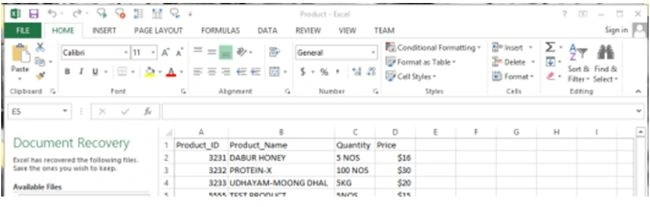
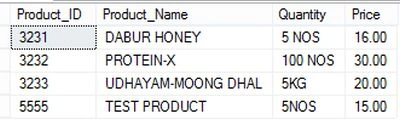
Now create a Excel sheet using valid columns in a database.
Add these connecting strings to webconfig for creating an excel connection.

Bulkupload.aspx:
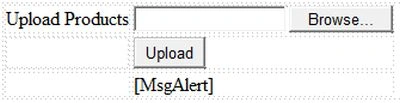
- <asp:Label ID=”lblproduct” runat=”server” Text=”Upload Products”></asp:Label>
- <asp:FileUpload ID=”FileUploadProduct” runat=”server” />
- <asp:Button ID=”btnupload” runat=”server” Text=”Upload” OnClick=”btnupload_Click” />
- <asp:Label ID=”MsgAlert” runat=”server”></asp:Label>
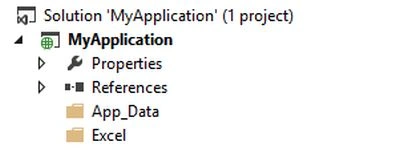
Create a folder inside the project for storing a uploaded Excel file.
Bulkupload.aspx.cs
Add these namespaces in C# page:
- using System.Data.Common;
- using System.Data.OleDb;
- using System.Data.SqlClient;
- protected void btnupload_Click(object sender, EventArgs e)
- {
- if (FileUploadProduct.HasFile)
- {
- try
- {
- string path = string.Concat(Server.MapPath(“~/Excel/” + FileUploadProduct.FileName));
- FileUploadProduct.SaveAs(path);
- string excelConnectionString = string.Format(“Provider=Microsoft.ACE.OLEDB.12.0;Data Source={0};Extended Properties=Excel 8.0″, path);
- OleDbConnection connection = new OleDbConnection();
- connection.ConnectionString = excelConnectionString;
- OleDbCommand command = new OleDbCommand(“select * from [Sheet1$]”, connection);
- connection.Open();
- DbDataReader dr = command.ExecuteReader();
- string sqlConnectionString = @”Data Source=.;Initial Catalog=Wordpress;Integrated Security=True”;
- SqlBulkCopy bulkInsert = new SqlBulkCopy(sqlConnectionString);
- bulkInsert.DestinationTableName = “tbl_bulkupload”;
- bulkInsert.WriteToServer(dr);
- MsgAlert.Text = “Product uploaded successfully”;
- connection.Close();
- }
- catch (Exception ex)
- {
- MsgAlert.Text = ex.Message;
- }
- }
Screen 1:
Screen 2:
Jayesh Babu A VPosted Jun 2, 2018, 3:44 AM
Great tutorial sir. I have a doubt. Im using mysql database on wamp server. So, what should be my excelConnectionString ?
Manav PandyaPosted Jan 27, 2018, 5:32 AM
Great share sir .....
Ratan SinghPosted Oct 11, 2017, 12:16 PM
Can you please share the code for windows form application
Vinodh NarayananPosted Oct 9, 2015, 1:10 PM
@saber shaikh Thanks a lot
Saber ShaikhPosted Jan 5, 2015, 12:16 AM
good