Introduction
In this post, we will discuss how to work with indexes in SQL and explain the concepts with an example in a simple way. I hope this is very useful for beginners and intermediates to help them understand the basic concept.
Why do we need indexes?
We use indexes to increase the performance of the application and fetch the data very quickly from the table. Normally, after project deployment, we are facing some performance issues, usually in reporting if there are lakhs of records. We have to re-write the queries to increase the performance. The SQL server uses the index and views (selected and required columns) to find the data quickly. Indexes are applied to the column or view.
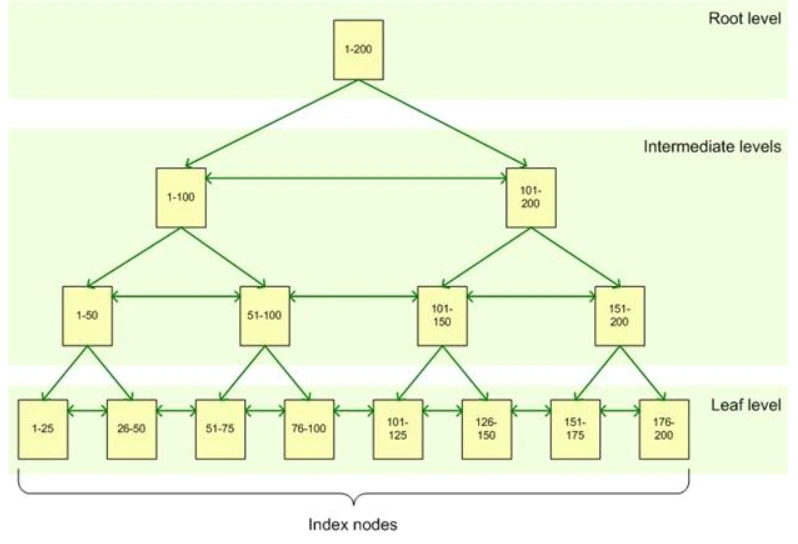
Whenever you create indexes in a table, internally, B-Tree is created like the below image.
(Image Reference: Google)
If we don't use an index, when we have a huge amount of data in order to search a record, each row will be scanned in the table and this affects the overall performance of the application. Hence, the use of an index is encouraged in such a scenario and by using indexes, we can save time and can improve the performance of database queries and applications.
Index in SQL is a similar index that we find in the book. Indexes are created on table and views and indexes can help the query to find the data quickly.
Table basically can contain four types of indexes.
- Clustered
- Composite Index
- Non- Clustered
- Unique Index
Advantages
- To improve the performance of the query.
- Indexes are used to fast retrieve the data result set from table
Disadvantages
- Non clustered index is stored separately from the table, so it requires additional disk space.
Cluster index
The cluster index determines the physical order of the data in a table and stored or sequenced the data in ascending order by default. For this reason, a table can have only one clustered index per table. Whenever you are creating a table with primary key automatically, the clustered index is created.
Hence, a clustered index should be applied to a column, having unique values. Also, much less modification is done on these values. Usually, it is applied to the primary key column of the table.
A table can have only one clustered index, however, the index can contain multiple columns. The way telephone directory is organized is by the last name and the first name.
Syntax
- CREATE CLUSTERED INDEX IndexName ON TableName(ColumnName)
Let’s take an example. We have a customer table without a primary key.
Example
- CREATE TABLE Customer
- (
- Id int,
- Name varchar(50),
- Balance money
- )
Now, we are going to insert the record and after executing the below statements, we get the following output.
- INSERT INTO Customer values(5,'A1',25000), (3,'B1',25000), (4,'C1',25000), (1,'D1',25000), (2,'E1',25000)
- Select * from Customer
Output
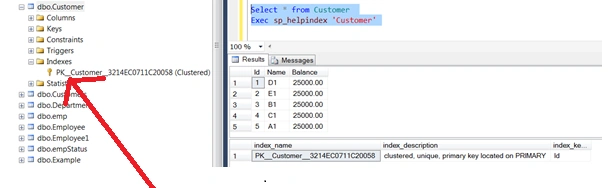
We are checking if there are any indexes created or not with the below ‘sp_helpindex’ procedure.
Explicitly create a cluster index using the command
We are going to explicitly create a clustered index on customer table. After executing the query, you will get the result in ascending order and see the output below.
- CREATE CLUSTERED INDEX PK_Customer_CLUSTERED_INDEX ON Customer(ID)
- Select * from Customer
- Exec sp_helpindex 'Customer'
Output
Primary Key with Cluster Index
Whenever we are creating a primary key, the clustered index is automatically created.
Let’s take another example. We are creating a customer table with primary key. Please ensure that you drop the created customer table first.
Example
- Drop table Customer
- CREATE TABLE Customer
- (
- Id int primary key,
- Name varchar(50),
- Balance money
- )
Then again, we are going to the insert the same record.
- INSERT INTO Customer values(5,'A1',25000), (3,'B1',25000), (4,'C1',25000), (1,'D1',25000), (2,'E1',25000)
Output
We are trying to create one more cluster index on customer table but we cannot create more than one cluster index in a table.
Example
- CREATE CLUSTERED INDEX PK_Customer_Balance_CLUSTERED_INDEX ON Customer(Balance)
Output

According to this error, we cannot create more than one clustered index in a table.
With Primary Key Table
Example
- CREATE TABLE Example
- (
- Id int primary key identity,
- Example varchar(50),
- Description varchar(50)
- )
- EXECSP_HELPINDEXExample
Output
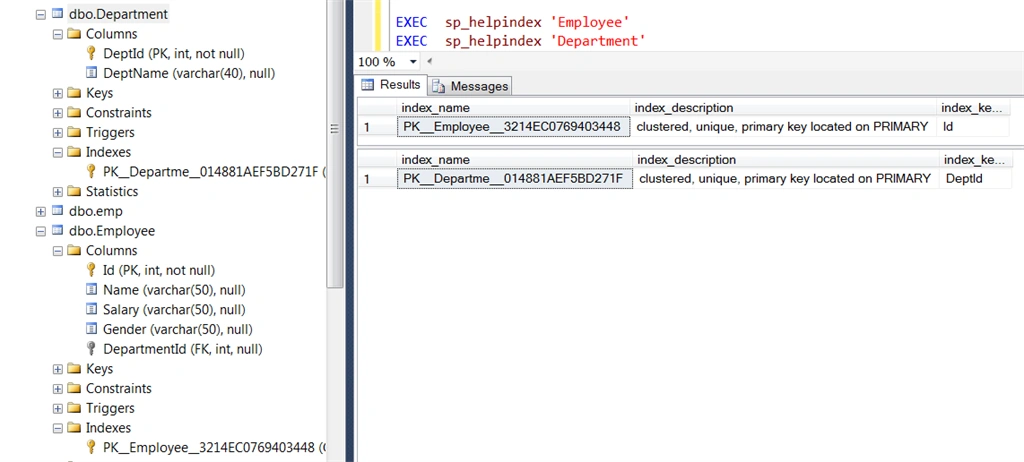
In a similar way, we have created Employee and Department tables as output shown in the below screen.
Syntax
- EXEC sp_helpindex 'TableName'
Example
- EXEC sp_helpindex 'Employee'
- EXEC sp_helpindex 'Department'
Output
Index_Name
Syntax Name of the index or on which table index is created
Index_Description
What type of index it is and its description
Index_Keys
Field or a column on which index is created.
Without Primary Key Table and Indexes
- CREATE TABLE Example
- (
- Id int ,
- Example varchar(50),
- Description varchar(50)
- )
Output
Composite index or Composite Clustered Index
We can create a composite clustered index on Name and Balance Column. We have to delete the previously created index.
And now we are again creating a composite primary key constraint.
- CREATE CLUSTERED INDEX Composite_PK_Customer_Balance_CLUSTERED_INDEX ON Customer(Name, Balance)
Output

To find specific database in all indexes.
- select * from [DatabaseName].SYS.INDEXES
Example
- Select * from ExampleDB.sys.indexes
To find the indexes of specific table in database,
Syntax
- select * from sys.indexes
- where object_id = (select object_id from sys.objects where name = 'TABLENAME')
Example
- select * from sys.indexes
- where object_id = (select object_id from sys.objects where name = 'Employee')
Non Clustered Index
Whenever we are dealing with large tables, Non-cCustered Indexes are very useful. Assume the above table has millions of records and you want to read the data; in that case the Non-Clustered Index will help in increasing the performance. The Non-Clustered index is stored separately from actual data, a table can have more than one non clustered index that can accept duplicate values in the column. The data is stored in one place and the index is stored in another place. The indexes have pointers to the storage location of data. A table can have multiple Non-Cluster indexes on it.
Syntax
- CREATE NONCLUSTERED INDEX Index_Name ON Customer(column_name)
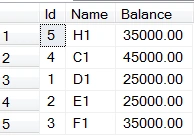
We have deleted all the indexes from a table before creating non-clustered indexes output like below.
Output
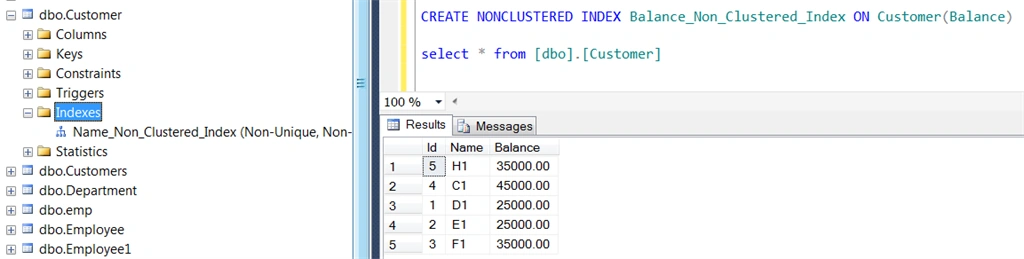
We are going to create a non-clustered index on ‘Name’ column.
Example
- CREATE NONCLUSTERED INDEX Non_Clustered_Index ON Customer(Name)
Output
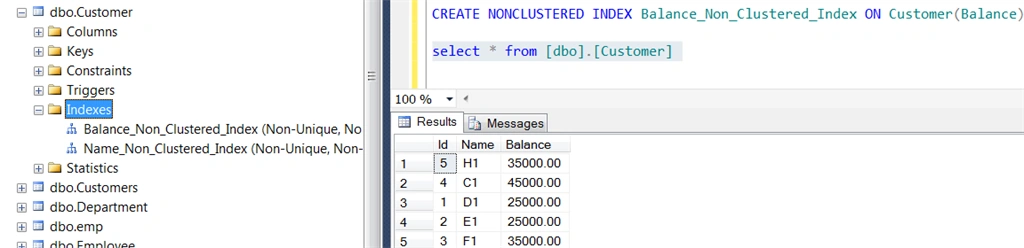
We can create more than one non-clustered index on a table. We can store duplicate values as well in Non-Clustered index column.
Output
Unique Index
We can create a unique index using the below commands for uniqueness or records in the table.
Syntax
- CREATE UNIQUE INDEX IndexName ON TableName(Conumn Name)
Example
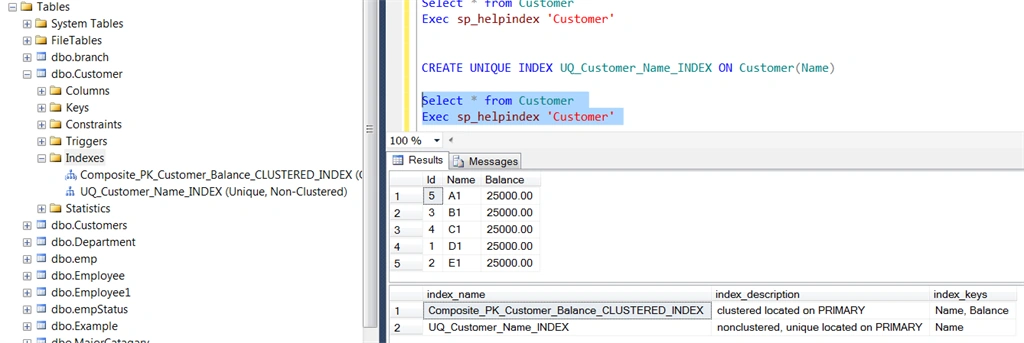
- CREATE UNIQUE INDEX UQ_Customer_Name_INDEX ON Customer(Name)
Output
We create a Unique Index to provide Uniqueness of Index Column values. When a Primary Key or Unique Constraint is used on a table row, a Unique Index will get created automatically to avoid Duplicity.
Drop Indexes
We can drop indexes two ways,
Using command
Syntax
- DROP INDEX IndexName ON TableName
Example
- DROP INDEX UQ_Customer_Name_INDEX ON Customer
- Directly delete index from index folder from object explorer

Difference between cluster Index and Non – cluster Index
- We can have only one cluster index per table but we can have more than one non clustered index on a table.
- As a clustered index refers back to the table, Cluster index is faster than a non-clustered index, non-clustered index is stored in another place.
- Non - clustered index is stored separately from the table, so it requires additional disk space and Cluster index doesn’t require additional disk space. It determines the storage order in the table.






Pravas RanjanPosted Sep 12, 2018, 5:45 AM
Can you please explain how this index work internally with diagram so it will be very helpful for interview perspective thank you.
Pravas RanjanPosted Sep 12, 2018, 5:43 AM
Good one Jitendra bhai
Vineet DubeyPosted Sep 6, 2018, 5:49 AM
I think this article is very helpful for every persons
Jignesh KumarPosted Aug 30, 2018, 10:58 AM
Nice article ...