TimeSpan is a class in C#, used for time interval operations.
TimeSpan class can be instantiated by any one of the following methods,
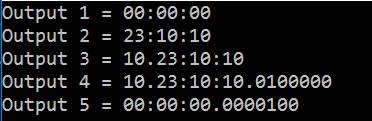
Simple Object Creation with no parameters
- TimeSpan ts = new TimeSpan();
- Console.WriteLine(ts.ToString());
This creates an empty TimeSpan object with zero value.
By passing hours, minutes and seconds.
- TimeSpan ts1 = new TimeSpan(23, 10, 10);
By passing days, hours, minutes and seconds.
- TimeSpan ts2 = new TimeSpan(10, 23, 10, 10);
By passing days, hours, minutes, seconds and milliseconds.
- TimeSpan ts3 = new TimeSpan(10, 23, 10, 10, 10);
By passing number of ticks.
- TimeSpan ts4 = new TimeSpan(100);
Why TimeSpan? Is it necessary when we already have “DateTime” Class for Date & Time operations?
TimeSpan is used to get the interval between two DateTime values. You can get the interval difference in TimeSpan, Days, Hours, Minutes, Seconds, Milliseconds, Ticks.
- DateTime startDateTime = DateTime.Now;
- DateTime endDateTime = DateTime.Now.AddDays(10);
- TimeSpan difference = endDateTime - startDateTime;
- Console.WriteLine("Difference from \n {0} \n and \n {1} \n = \n
- {2}",endDateTime, startDateTime, difference);
TimeSpan Components
-
- Console.WriteLine("Days = " + difference.Days);
-
-
- Console.WriteLine("Total Days = " + difference.TotalDays);
-
-
- Console.WriteLine("Hours = " + difference.Hours);
-
-
- Console.WriteLine("Total Hours = " + difference.TotalHours);
-
-
- Console.WriteLine("Minutes = " + difference.Minutes);
-
-
- Console.WriteLine("Total Minutes = " + difference.TotalMinutes);
-
-
- Console.WriteLine("Seconds = " + difference.Seconds);
-
-
- Console.WriteLine("Total Seconds =" + difference.TotalSeconds);
-
-
- Console.WriteLine("Milliseconds = " + difference.Milliseconds);
-
-
- Console.WriteLine("Total Milliseconds =" + difference.TotalMilliseconds);
-
-
-
- Console.WriteLine("Ticks = " + difference.Ticks);
FIELDS
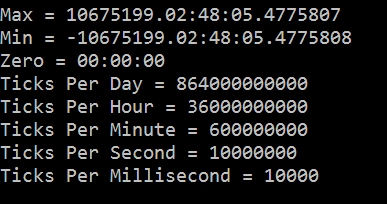
TimeSpan has many static fields that can be accessed directly.
- To get Maximum Value
TimeSpan.MaxValue
- To get Minimum Value
TimeSpan.MinValue
- To assign a null object or zero ticks
TimeSpan.Zero
We can get the number of Ticks in a day/hour/minute/second/millisecond. This value is a constant.
- TimeSpan.TicksPerDay
- TimeSpan.TicksPerHour
- TimeSpan.TicksPerMinute
- TimeSpan.TicksPerSecond
- TimeSpan.TicksPerMillisecond
So, technically Ticks is 10,000 times a Millisecond.
Conclusion
So, we have seen how to create a TimeSpan object and how useful it will be to us. I hope you have enjoyed the article.




Gyorgy FlorekPosted Aug 15, 2020, 3:01 AM
Thank you for this explanation!
Logesh PalaniPosted Jul 27, 2019, 1:59 PM
Thank for well explanation. :)
sherwin kuizonPosted Aug 22, 2018, 12:05 AM
Thank you for this
Viknaraj ManogararajahPosted Jul 21, 2018, 10:59 PM
Nice Article, Thank you for sharing
Bhavesh JadavPosted May 21, 2018, 7:36 AM
Yes, it was a good.