

Introduction
In this blog, I will demonstrate the Live Notification (refreshing in every 3 seconds) in MVC.
What is Live Notification?
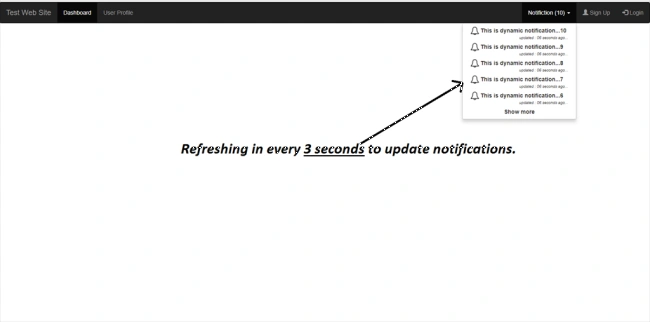
Live notification is just like an alert when accessing a web application. If the notification is not updating or updating only when a page is refreshed, to update the client or users to indicate the changes on the web application.
Here, I have created a simple demo that shows the notification on the right top corner and updates every three seconds. It updates the notification number and notification dropdown.
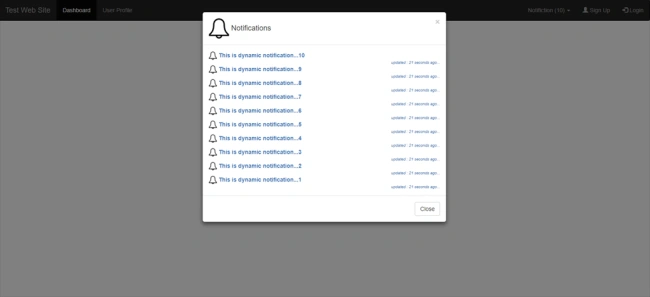
You can see five notifications at a time and can show all notifications by clicking on "Show more" links, as given below.
Code
We can update the notification by calling the setInterval() function in jQuery.
- setInterval(function () {
- //Function to be called in every 3(3000 Milisecond/1000) seconds
- }, 3000);
Below is the jQuery code that helps you to update notification and showing them in Notification Area.
- $(document).ready(function () {
- setInterval(function () {
- UpdateNotifications();
- }, 3000);
- });
- function UpdateNotifications() {
- $.ajax({
- type: "GET",
- url: "/Home/GetNotifications",
- data: '{}',
- contentType: "application/json; charset=utf-8",
- dataType: "json",
- success: function (response) {
- console.log(response);
- if (response != null) {
- var j = ""; var p = 0; var Q = "";
- $.each(response, function (k, v) {
- p++;
- if (p < 6) {
- j += "<li><a><img src='assets/img/nty.png' style='height:20px;width:20px'/> <strong> " + v.Notification.toString() + " </strong> <br /> <div style='text-align:right;font-size:smaller;font-style:italic'> <i style='font-size:smaller'> updated : " + v.LastUpdated.toString() + "</i></div></a></li>";
- }
- Q += "<a><img src='assets/img/nty.png' style='height:20px;width:20px'/> <strong> " + v.Notification.toString() + " </strong> <br /> <div style='text-align:right;font-size:smaller;font-style:italic'> <i style='font-size:smaller'> updated : " + v.LastUpdated.toString() + "</i></div></a>";
- });
- $('#myNotifyList').html("");
- j += "<li><a data-toggle='modal' data-target='#myModal'><div style='text-align:center'><strong> Show more </strong></div></li>";
- $('#myNotifyList').append(j);
- $('#countNotify').html("<span>" + p + "</span>");
- $('#myAllNotifications').html("");
- $('#myAllNotifications').append(Q);
- }
- },
- failure: function (response) {
- alert(response.d);
- }
- });
- }
William OniszkoPosted Sep 26, 2022, 3:50 PM
Would this still apply to MVC5 in ASP.NET Core 6?
Sabari MPosted Jan 7, 2020, 6:56 PM
Nice blog...
Sridhar YelagandhulaPosted Jan 26, 2019, 10:40 AM
How to Apply same Notifications in web Api ?
Gaurav RajPosted Oct 12, 2018, 1:01 AM
Hi Mohammad Shahid Solanki , Is it better than signalr code?
Ivin Raj SPosted Mar 23, 2018, 8:12 AM
On page load we are done manually to display notification count. We are having notification message whenever we insert new record in the database. Only unread message should be displayed read message should be disappear. any idea?
Sachin HingePosted Nov 27, 2017, 7:22 AM
Why you are not using SingalR ?
Laxmidhar SahooPosted Nov 25, 2017, 4:21 AM
A asynchomonos call and dynamic format is good idia