

Hello guys, how are you? As per your request, I am going to make a login page in AngularJS and ASP. NET.
I am trying to make this article as simple as I can .Hope you like it. Your valuable feedback is always welcome.Thanks.
Let's start.
Please follow these steps to make this application.
Step 1
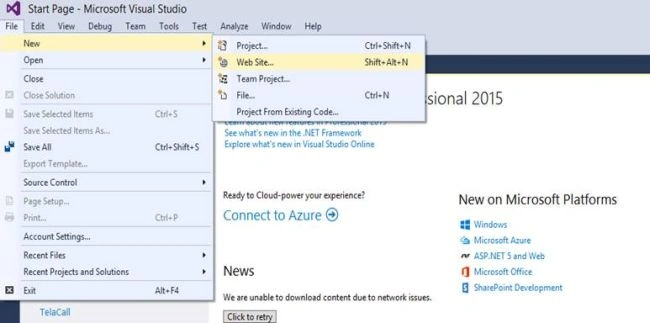
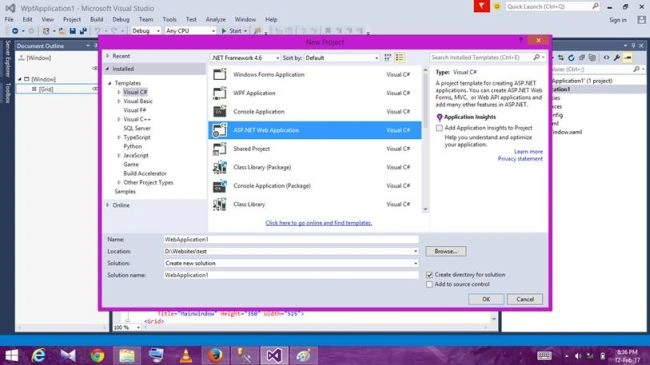
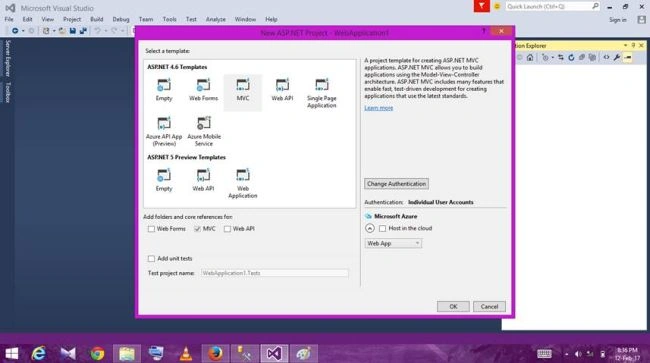
First, open your Visual Studio -> File -> New -> Project -> ASP.NET Web Application and click OK. Now, select MVC and OK.
Now, you have created the basic project structure.
You can go though the screenshot given below for help.
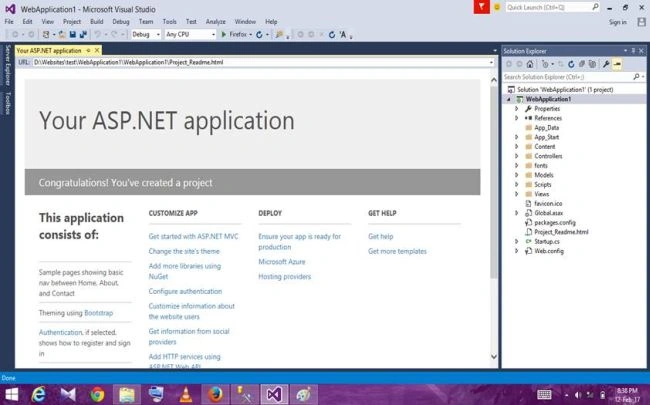
You will have the Directory given below.
Step 2
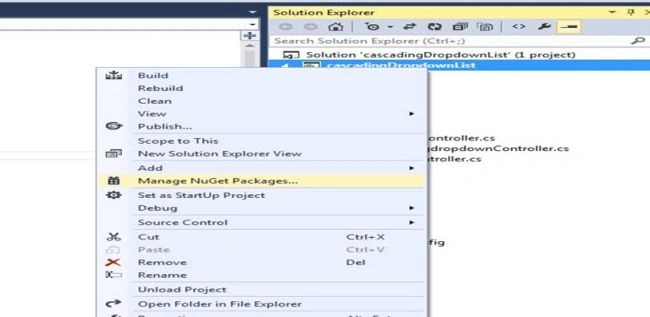
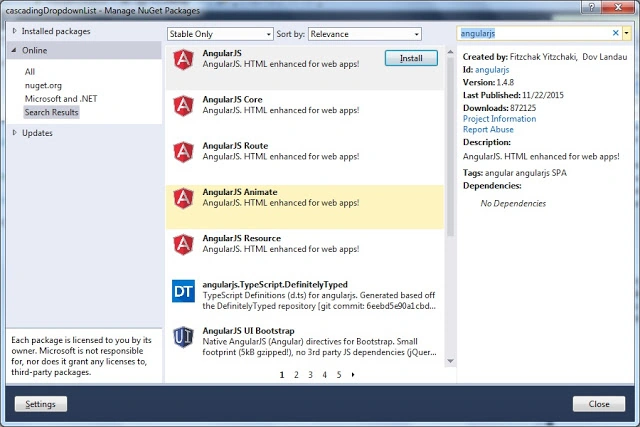
Install the Angular package in your project, as shown in the screenshot given below.
Step 3
In Views folder loginpage, paste the code given below in login.cshtml.
- @{
- ViewBag.Title = "Login Using Angular";
- }
- <h2>Login Using Angular</h2>
- <div ng-controller="LoginController">
- <form name="myForm" novalidate ng-submit="LoginForm()">
- <div style="color:green">{{msg}}</div>
- <table ng-show="!IsLoggedIn" class="table table-horizontal">
- <tr>
- <td>Email/UserName :</td>
- <td>
- <input type="email" ng-model="UserModel.Email" name="UserEmail" ng-class="Submited?'ng-dirty':''" required autofocus class="form-control"/>
- <span style="color:red" ng-show="(myForm.UserEmail.$dirty || Submited ) && myForm.UserEmail.$error.required">Please enter Email</span>
- <span style="color:red" ng-show="myForm.UserEmail.$error.email">Email is not valid</span>
- </td>
- </tr>
- <tr>
- <td>Password :</td>
- <td>
- <input type="password" ng-model="UserModel.Password" name="UserPassword" ng-class="Submited?'ng-dirty':''" required autofocus class="form-control"/>
- <span style="color:red" ng-show="(myForm.UserPassword.$dirty || Submited) && myForm.UserPassword.$error.required">Password Required</span>
- </td>
- </tr>
- <tr>
- <td></td>
- <td>
- <input type="submit" value="submit" class="btn btn-success" />
- </td>
- </tr>
- </table>
- </form>
- </div>
- @section scripts{
- <script src="~/Scripts/LoginController.js"></script>
- }
We have to create a JavaScript login controller and added its reference, as shown below.
- <script src="~/Scripts/LoginController.js"></script>
Step 4
Create an Angular module in Module.js file and add the code given below.
- (function () {
- var myApp = angular.module("myApp",[]);
- })();
Now, add another script file for Angular controller and Factory method.
Right click on Scripts folder --> add LoginController.js and write the code given below.
- angular.module('myApp').controller('LoginController', function ($scope, LoginService) {
- //initilize user data object
- $scope.LoginData = {
- Email: '',
- Password:''
- }
- $scope.msg = "";
- $scope.Submited = false;
- $scope.IsLoggedIn = false;
- $scope.IsFormValid = false;
- //Check whether the form is valid or not using $watch
- $scope.$watch("myForm.$valid", function (TrueOrFalse) {
- $scope.IsFormValid = TrueOrFalse; //returns true if form valid
- });
- $scope.LoginForm = function () {
- $scope.Submited = true;
- if ($scope.IsFormValid) {
- LoginService.getUserDetails($scope.UserModel).then(function (d) {
- debugger;
- if (d.data.Email != null) {
- debugger;
- $scope.IsLoggedIn = true;
- $scope.msg = "You successfully Loggedin Mr/Ms " +d.data.FullName;
- }
- else {
- alert("Invalid credentials buddy! try again");
- }
- });
- }
- }
- })
- .factory("LoginService", function ($http) {
- //initilize factory object.
- var fact = {};
- fact.getUserDetails = function (d) {
- debugger;
- return $http({
- url: '/Home/VerifyUser,
- method: 'POST',
- data:JSON.stringify(d),
- headers: { 'content-type': 'application/json' }
- });
- };
- return fact;
- });
Step 5
Add New Action Method in HomeController to verifyuser.
- public ActionResult VerifyUser (UserModel obj)
- {
- DatabaseEntities db = new DatabaseEntities();
- var user = db.Users.Where(x => x.Email.Equals(obj.Email) && x.Password.Equals(obj.Password)).FirstOrDefault();
- return new JsonResult {Data=user,JsonRequestBehavior=JsonRequestBehavior.AllowGet };
- }
Step 6
Right click Models --> Add --> Class and name it UserModel.cs.
You can add usermodel, as shown below.
- namespace LoginUsingAngular.Models
- {
- public class UserModel
- {
- public string Email { get; set; }
- public string Password { get; set; }
- }
- }
Take a look at what the ng-Model, ng-show and ng-submit means, which is used in login.cshtml view given above.
- ng-Model
ngModel is an Angular Directive. It is used for two way binding data from view to controller and controller to view. - ng-show
ngShow allows to display or hide the elements, which are based on the expression provided to ngShow attribute. - ng-submit
ng-submit prevents the default action of form and binds Angular function to onsubmit events. This is invoked when the form is submitted. - $dirty
It is an Angular built in property. It will be true, if the user interacts with the form, else it will be false.
There are many validation properties in Angular like $invalid,$submitted,$pristine,$valid and $error.
Sofique UddinPosted Apr 4, 2023, 5:06 AM
Dear brother please give me source code
shankar patelPosted Aug 29, 2018, 5:05 AM
Fast reply me i can use in project
shankar patelPosted Aug 29, 2018, 5:04 AM
Hello in this code is not proper work i am apply
Waheed RafiqPosted Oct 20, 2017, 12:13 PM
It was all going well lucky I understand what you meant by DatabaseEntities db = new DatabaseEntities(); , if you are targeting newbies then its worth while doing a short tutorial on how to create a db and then link this to this project using angularjs / c#
Brajesh KumarPosted Feb 22, 2017, 7:46 AM
Hi @All I want to publish a new article but I don't know on which topic should I write ,I mean on demand topic.I need your support and Help.
Brajesh KumarPosted Feb 13, 2017, 7:11 AM
Welcome and Thanks @pravas for your valuable feedback
Pravas RanjanPosted Feb 13, 2017, 6:55 AM
Very good article Kumar Bhai thank you............