

It is difficult to find list of installed .NET frameworks or CLR along with its version on a computer. We need to check it at registry level or Add/Remove programs. To overcome this issue, we have an built-in tool Clrver.exe in VS and Windows SDK. This tool will list all the versions of CLR installed on a computer, list of running managed processes along with its version. Let's open Visual Studio 2010 command prompt and execute below commands:
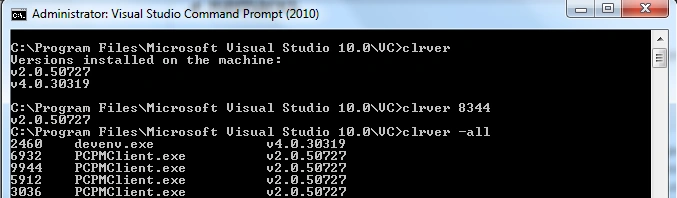
- clrver - List all versions of installed CLRs.
- clrver processId - shows version of the CLR used by that process.
- clrver -all - List all managed processes along with CLR's version used by it.
Example
Join the conversation! Your thoughts help the community grow.