

One of the nicest features in visual studio controls is the ability to auto compete what we are typing in ComboBox and other controls, that what I will to explain to use it efficiently.
1. Let's create the following UI :
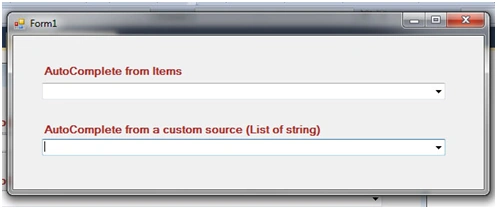
2. Make the following changes :
ComboBox1
Set comboBox1 property : AutoCompeteSource to ListItems
Set comboBox1 property : AutoCompeteMode to SuggestAppend
Fill the items list of the comboBox1 by : Algeria,Maroco,Tunisia,Egypt,France,Italy,Germany,,India,China
ComboBox2
Set comboBox1 property : AutoCompeteSource
to CustomSource
Set comboBox1 property : AutoCompeteMode to SuggestAppend
And leave the items list blank
The code behind the form:
using System;
using System.Collections.Generic;
using System.ComponentModel;
using System.Data;
using System.Drawing;
using System.Linq;
using System.Text;
using System.Windows.Forms;
namespace ComboBoxAutoComplete
{
public partial class Form1 : Form
{
//create a list of strings to use as custom Autocompete source with combobox2
List<string> customSource = new List<string> { "Algers", "Paris", "Tokyo", "Rome" };
public Form1()
{
InitializeComponent();
}
private void Form1_Load(object sender, EventArgs e)
{
//assign the list to AutoCompleteCustomSource of the combobox2
comboBox2.AutoCompleteCustomSource.AddRange(customSource.ToArray());
}
}
}
So what do we have done.
For the comboBox1 it auto completes from the its list Items using the mode SuggestAppend and it is not necessary to use it you can try the other options.
The comboBox2 uses a string list to auto
complete .
Join the conversation! Your thoughts help the community grow.