

<Menu IsMainMenu="True">
<MenuItem Header="_File" />
<MenuItem Header="_Edit" />
<MenuItem Header="_Review" />
</Menu>
The MenuItem is a HeaderedItemsControl. The content of the Header property is the caption of the menu. The Itemsof a MenuItems are sub menus. The Icon property is the second content on the left of the caption.
<Grid>
<Menu IsMainMenu="True" >
<MenuItem Header="_File" />
<MenuItem Header="_Edit" >
<MenuItem Header="_Cut" Command="Cut">
<MenuItem.Icon>
<Image Source="cut.jpg" Width="10"></Image>
</MenuItem.Icon>
</MenuItem>
<MenuItem Header="_Copy" Command="Copy">
<MenuItem.Icon>
<Image Source="copy.jpg" Width="10"></Image>
</MenuItem.Icon>
</MenuItem>
</MenuItem>
<MenuItem Header="_View" />
</Menu>
</Grid>
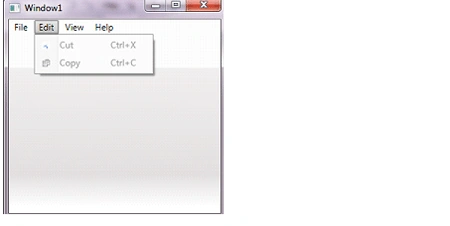
The Icon property is used to draw a little image on the left. We can resize it with the help of width property. We can use Alt+ E to open the edit menu.
We can make a menu item checkable by setting its IsCheckable property to true.
MenuItem Header="_Save">
<MenuItem Header="Save" IsCheckable="True" />
</MenuItem>
To add a keyboard shortcut to a menu item, add a underscode (_) in front of the character For example ( _Edit). This automatically sets the InputGestureText to an appropriate value. But we can also override this to proposed text by setting this property to a text of our choice.
Complete Program:
<Window x:Class="WpfApplication1.Window1"
xmlns="http://schemas.microsoft.com/winfx/2006/xaml/presentation"
xmlns:x="http://schemas.microsoft.com/winfx/2006/xaml"
Title="Window1" Height="300" Width="300">
<Grid>
<Menu IsMainMenu="True" >
<MenuItem Header="_File" />
<MenuItem Header="_Edit" >
<MenuItem Header="_Cut" Command="Cut">
<MenuItem.Icon>
<Image Source="cut.jpg" Width="10"></Image>
</MenuItem.Icon>
</MenuItem>
<MenuItem Header="_Copy" Command="Copy">
<MenuItem.Icon>
<Image Source="copy.jpg" Width="10"></Image>
</MenuItem.Icon>
</MenuItem>
</MenuItem>
<MenuItem Header="_View" />
<MenuItem Header="_Help" />
</Menu>
</Grid>
</Window>
Join the conversation! Your thoughts help the community grow.