

In this blog, we will learn how we can merge the table data using a merging statement. Before I share, I would like to explain in which cases we can use the merging statements. MERGE statement works best when two tables have a complex mixture of matching characteristics; for example, inserting a row if it does not exist, or updating the row if it does match. When simply updating one table based on the rows of another table, improved performance and scalability can be achieved with basic INSERT, UPDATE, and DELETE statements.
Step 1
Create "Products table", i.e., target table contains the changes which we are going to apply from the Source table.
Create "Products table", i.e., target table contains the changes which we are going to apply from the Source table.
- CREATE TABLE Products
- (
- ProductID INT PRIMARY KEY,
- ProductName VARCHAR(100),
- Rate MONEY
- )
- GO
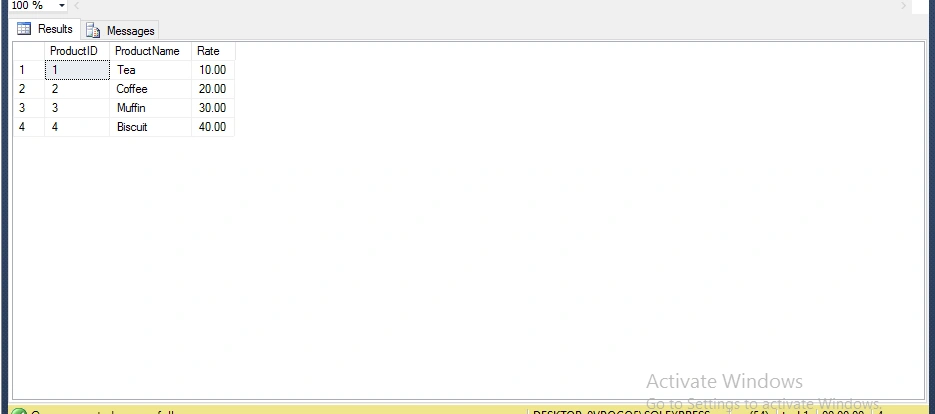
Now, insert the data into Products Table.
- INSERT INTO Products
- VALUES
- (1, 'Tea', 10.00),
- (2, 'Coffee', 20.00),
- (3, 'Muffin', 30.00),
- (4, 'Biscuit', 40.00)
- GO
The table will be something like this.
Step 3
Now, create UpdatedProducts table; i.e., Source table which the table data will be merged into with the target table; i.e., with Products table.
Now, create UpdatedProducts table; i.e., Source table which the table data will be merged into with the target table; i.e., with Products table.
- CREATE TABLE UpdatedProducts
- (
- ProductID INT PRIMARY KEY,
- ProductName VARCHAR(100),
- Rate MONEY
- )
- GO
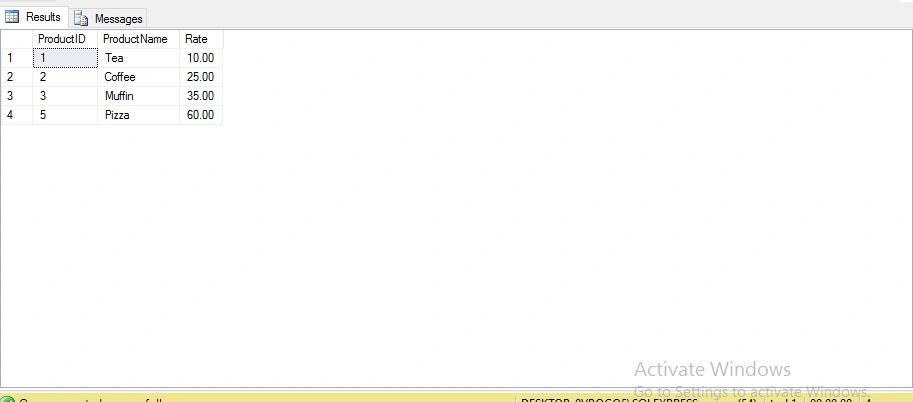
Now, insert data into UpdateProudcts table.
- INSERT INTO UpdatedProducts
- VALUES
- (1, 'Tea', 10.00),
- (2, 'Coffee', 25.00),
- (3, 'Muffin', 35.00),
- (5, 'Pizza', 60.00)
- GO
-
The result will be something like this.
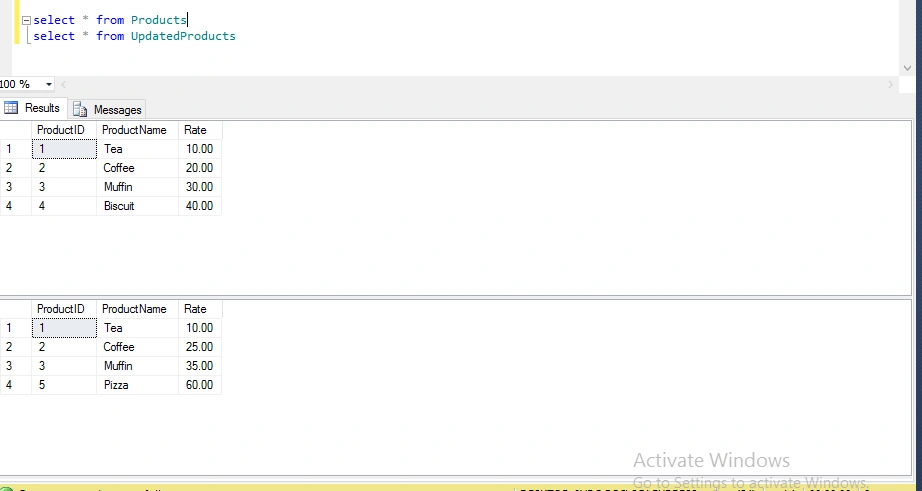
Now, observe the two table that we created.
Step 5
Now, the Merge statement comes into the picture to make the changes which you want in your table.
Syntax
Initially, synchronize the target table with refreshed data from the source table.
- MERGE Products AS TARGET
- USING UpdatedProducts AS SOURCE
- ON (TARGET.ProductID = SOURCE.ProductID)
- WHEN MATCHED AND TARGET.ProductName <> SOURCE.ProductName
- OR TARGET.Rate <> SOURCE.Rate THEN
- UPDATE SET TARGET.ProductName = SOURCE.ProductName,
- TARGET.Rate = SOURCE.Rate
- WHEN NOT MATCHED BY TARGET THEN
- INSERT (ProductID, ProductName, Rate)
- VALUES (SOURCE.ProductID, SOURCE.ProductName, SOURCE.Rate)
- WHEN NOT MATCHED BY SOURCE THEN
- DELETE
- OUTPUT $action,
- DELETED.ProductID AS TargetProductID,
- DELETED.ProductName AS TargetProductName,
- DELETED.Rate AS TargetRate,
- INSERTED.ProductID AS SourceProductID,
- INSERTED.ProductName AS SourceProductName,
- INSERTED.Rate AS SourceRate;
- SELECT @@ROWCOUNT;
- GO
- select * from Products
- select * from UpdatedProducts
- MERGE Products AS TARGET
- USING UpdatedProducts AS SOURCE
- ON (TARGET.ProductID = SOURCE.ProductID)
- WHEN MATCHED AND TARGET.ProductName <> SOURCE.ProductName
- OR TARGET.Rate <> SOURCE.Rate THEN
- UPDATE SET TARGET.ProductName = SOURCE.ProductName,
- TARGET.Rate = SOURCE.Rate
- WHEN NOT MATCHED BY TARGET THEN
- INSERT (ProductID, ProductName, Rate)
- VALUES (SOURCE.ProductID, SOURCE.ProductName, SOURCE.Rate)
- WHEN NOT MATCHED BY SOURCE THEN
- DELETE
- OUTPUT $action,
- DELETED.ProductID AS TargetProductID,
- DELETED.ProductName AS TargetProductName,
- DELETED.Rate AS TargetRate,
- INSERTED.ProductID AS SourceProductID,
- INSERTED.ProductName AS SourceProductName,
- INSERTED.Rate AS SourceRate;
- SELECT @@ROWCOUNT;
- GO
When we execute the Products table, UpdatedProducts table, and the Merge statement, the output will be something like this.
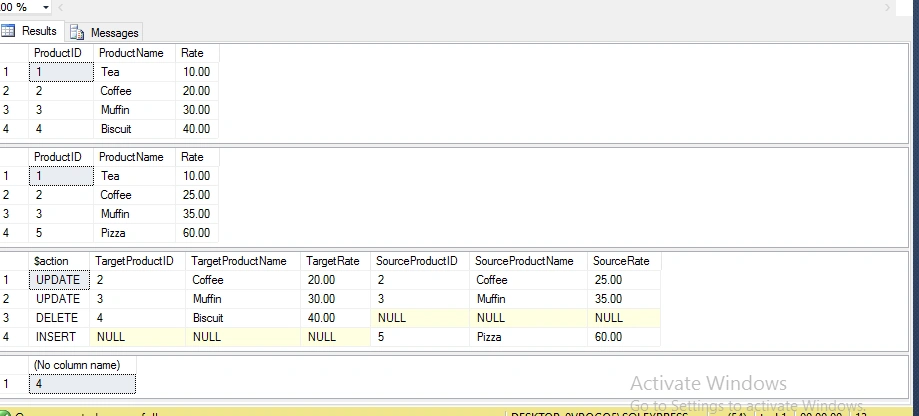
In the above result, TargetProductID is the target column on which the action is performed.
Ketan JadavPosted Sep 6, 2017, 1:10 AM
Good informative post. you need lot of code in stored procedure but here only a statement is enough good.