
Introduction

In this blog, we are going to discuss how to send SMS using third party APIs.
Step 1
First we need to create an account. Please click on the below link and complete your registration process.
Step 2
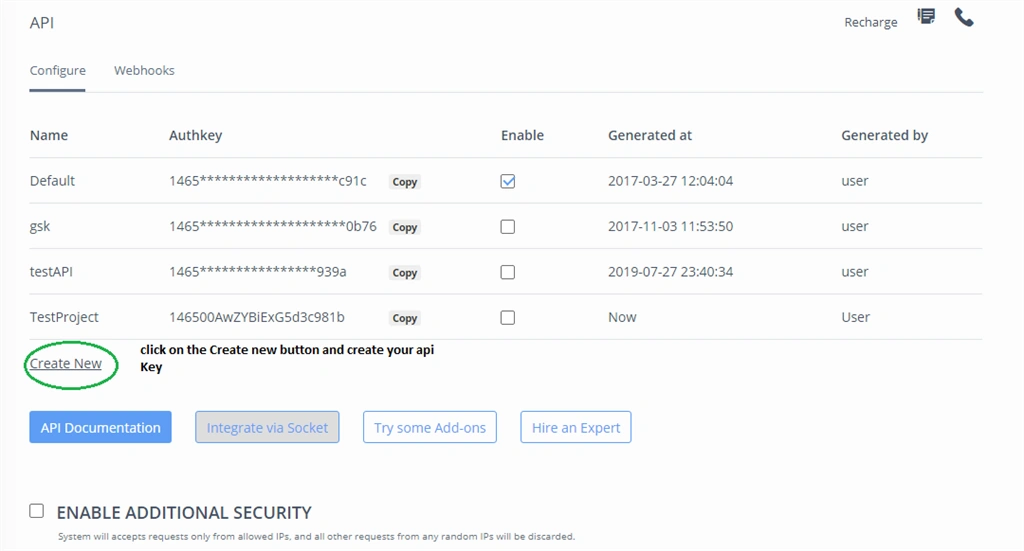
After login, we need to create API key. Please check the below figure.
Step 3
Let's discuss about API.
We need to consume the below API with proper query parameters.
The API URL is,
  1. https://api.msg91.com/api/sendhttp.php?mobiles=Mobile no.&authkey=$authentication_key&route=4&sender=TESTIN&message=Hello! This is a test message&country=91
Query parameters are:
  • mobiles - In this parameter, we need to pass mobile number.
  • authkey - In this parameter, we need to pass the API key.
  • route - This parameter differentiates the SMS type such as transactional or promotional
  • sender - Receiver will see this as sender id.
  • message - In this parameter, we need to pass the actual message.
By using the below code we can send SMS to the respective mobile number.
Code Snippet
  1. public static string SendSMS(string MobileNumber, string Message)
  2. {
  3. //Your authentication key
  4. string authKey = "";
  5. //Multiple mobiles numbers separated by comma
  6. string mobileNumber = MobileNumber;
  7. //Sender ID,While using route4 sender id should be 6 characters long.
  8. string senderId = "TESTIN";
  9. //Your message to send, Add URL encoding here.
  10. string message = HttpUtility.UrlEncode(Message);
  11. string route = "4";
  12. //Prepare you post parameters
  13. StringBuilder sbPostData = new StringBuilder();
  14. sbPostData.AppendFormat("authkey={0}", authKey);
  15. sbPostData.AppendFormat("&mobiles={0}", mobileNumber);
  16. sbPostData.AppendFormat("&message={0}", message);
  17. sbPostData.AppendFormat("&sender={0}", senderId);
  18. sbPostData.AppendFormat("&route={0}", route);
  19. //Call Send SMS API
  20. string sendSMSUri = "https://control.msg91.com/api/sendhttp.php";
  21. //Create HTTPWebrequest
  22. HttpWebRequest httpWReq = (HttpWebRequest)WebRequest.Create(sendSMSUri);
  23. //Prepare and Add URL Encoded data
  24. UTF8Encoding encoding = new UTF8Encoding();
  25. byte[] data = encoding.GetBytes(sbPostData.ToString());
  26. //Specify post method
  27. httpWReq.Method = "POST";
  28. httpWReq.ContentType = "application/x-www-form-urlencoded";
  29. httpWReq.ContentLength = data.Length;
  30. using (Stream stream = httpWReq.GetRequestStream())
  31. {
  32. stream.Write(data, 0, data.Length);
  33. }
  34. //Get the response
  35. HttpWebResponse response = (HttpWebResponse)httpWReq.GetResponse();
  36. StreamReader reader = new StreamReader(response.GetResponseStream());
  37. string responseString = reader.ReadToEnd();
  38. //Close the response
  39. reader.Close();
  40. response.Close();
  41. return responseString;
  42. }

Summary


In this blog, we learned how to send SMS directly using a C# application by integrating MSG91 SMS API.
I hope you found it useful. Eat-> Code->Sleep->Repeat.