
We all know that the AngularJS built-in $limitTo filter is used to limit the number of records or string to display in an array or a collection. For this reason, in my previous article, I have used this $limitTo filter for implementing the pagination in an HTML table, but there, we can see that I have used a static number,i.e., 5.
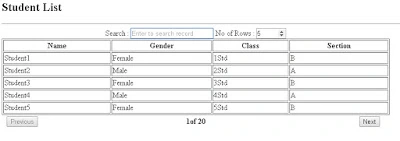
This article demonstrates how to set that limit to dynamic for a limit of record to display in pagination. Go through the below code example for more details.
- <HTML ng-app = "myapp">
- <TITLE> AngularJS Learning(Pagination with $limitTo filter)</TITLE>
- <script src="https://ajax.googleapis.com/ajax/libs/angularjs/1.5.6/angular.min.js"></script>
- <script>
- var myapp=angular.module("myapp",[]);
- myapp.filter('displayPageData', function() {
- return function(input, start) {
- start = +start; //parse to int
- return input.slice(start);
- }
- });
- myapp.controller("myappcont",function($scope,$filter){
- $scope.currentPage = 0;
- $scope.searchText='';
- $scope.pageSize=10;
- $scope.students=[];
- for (var i=1; i<=100; i++) {
- if( i % 2 == 0){
- $scope.students.push({Name:"Student"+i,Gender:"Male",Class:i+"Std",Section:"A"});
- }
- else{
- $scope.students.push({Name:"Student"+i,Gender:"Female",Class:i+"Std",Section:"B"});
- }
- }
- $scope.numberOfPages=function(){
- var pageno=($filter('filter')($scope.students, $scope.searchText)).length/$scope.pageSize;
- if(pageno==0){
- pageno++;
- }
- return pageno;
- }
- $scope.numberOfItems=function(){
- return ($filter('filter')($scope.students, $scope.searchText)).length; }
- });
- </script>
- <BODY ng-controller="myappcont">
- <h2>Student List</h2>
- <hr/>
- <table border="1" style="width:60%">
- <caption>
- Search : <input type="text" placeholder="Enter to search record" ng-model="searchText"/>
- No of Rows : <input type="number" step=5 min=5 max=20 ng-model="pageSize"/>
- </caption>
- <thead>
- <tr>
- <th>Name</th>
- <th>Gender</th>
- <th>Class</th>
- <th>Section</th>
- </tr>
- </thead>
- <tbody>
- <tr ng-repeat="student in students|filter:searchText|displayPageData:currentPage*pageSize|limitTo:pageSize">
- <td>{{student.Name}}</td>
- <td>{{student.Gender}}</td>
- <td>{{student.Class}}</td>
- <td>{{student.Section}}</td>
- </tr>
- </tbody>
- </table>
- <table width="60%">
- <tr>
- <th width="10%">
- <button alignment="left" ng-disabled="currentPage == 0" ng-click="currentPage=currentPage-1">Previous</button>
- </th>
- <th width="80%">{{currentPage+1}}of {{numberOfPages()| number:0}}</th>
- <th width="10%">
- <button alignment="left" ng-disabled="currentPage >= numberOfItems()/pageSize-1" ng-click="currentPage=currentPage+1">Next</button>
- </th>
- </tr>
- </table>
- </BODY>
- </HTML>
Sagar Pandurang KapPosted Dec 26, 2017, 12:36 AM
Interesting stuff.Nice one..