

Introduction
Many times, we need to perform some basic CRUD operation in a SharePoint Online list item.
I have written a few code samples to help you perform the CRUD operations on SharePoint List using PnP PowerShell.
Step 1
Download SharePoint Online Management Shell from here.
Step 2
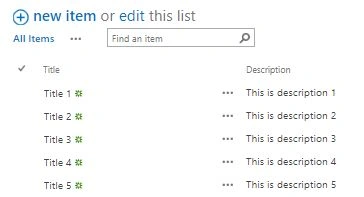
Create a list in SP Online or you can use an existing list for operations with a description added as a column in the list. And add some records to the list.
Step 3
- //Add below Script to Connect to SharePoint Online.
- #
- Site Collection URL
- $siteurl = "Your Site URL"#
- User Credentials
- $credential = Get - Credential# Connects and Creates Context
- Connect - PnPOnline - Url $siteurl - Credentials $credential
- //Add below Script to retrieve data from SharePoint list.
- # Retrive List Item
- $listItems = Get - PnPListItem - List "MyCustomList" - Fields "Title", "Description"
- foreach($listItem in $listItems) {
- Write - Host "Id : "
- $listItem["ID"]
- Write - Host "Title : "
- $listItem["Title"]
- Write - Host "Description : "
- $listItem["Description"]
- Write - Host "------------------------------------"
- }
- //Retrieve data from SharePoint list based on CAML Query
- # Retrive List Item Using CAML Query
- $listItems = Get - PnPListItem - List "MyCustomList" - Query "<View><Query><Where><Eq><FieldRef Name='Title'/><Value Type='Text'>Title 1</Value></Eq></Where></Query></View>"
- foreach($listItem in $listItems) {
- Write - Host "Id : "
- $listItem["ID"]
- Write - Host "Title : "
- $listItem["Title"]
- Write - Host "Description : "
- $listItem["Description"]
- Write - Host "------------------------------------"
- }
- //Add data in SharePoint list
- # Add List Item
- Add - PnPListItem - List "MyCustomList" - Values @ {
- "Title" = "Added Title from Powershell";
- "Description" = "This is description which was added from Powershell"
- }
- //Update data in SharePoint list
- # Update List Item Using Item ID
- Set - PnPListItem - List "MyCustomList" - Identity 6 - Values @ {
- "Title" = "Updated Title from Powershell"
- }
- //Update data in SharePoint listUsing CAML Query
- # Update List Item Using CAML Query
- $item = Get - PnPListItem - List "MyCustomList" - Query "<View><Query><Where><Eq><FieldRef Name='Title'/><Value Type='Text'>Title 1</Value></Eq></Where></Query></View>"
- if ($item - ne $null) {
- Set - PnPListItem - List "MyCustomList" - Identity $item - Values @ {
- "Title" = "Updated Title"
- }
- }
- //Delete data in SharePoint list
- #Delete List Item
- Remove - PnPListItem - List "MyCustomList" - Identity 6 - Force
You can use the above PowerShell script as per your requirement. You can also refer to the file attached with this blog for your reference.
Cheers!!
Vinay AyinapurapuPosted Nov 11, 2020, 1:20 PM
Nice article
saidi reddyPosted Apr 26, 2019, 2:17 AM
Nice Article suman