Introduction
In this article, I will explain about printing the values in Python. In previous blogs, I have explained about the Simple Strings with insert and delete. Here, I am explaining how to add the values that print on the Run module.
Software requirement
Python 2.7.11
Simple program
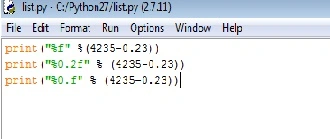
- print("%f" %(4235-0.23))
- print("%0.2f" % (4235-0.23))
- print("%0.f" % (4235-0.23))
Explanation
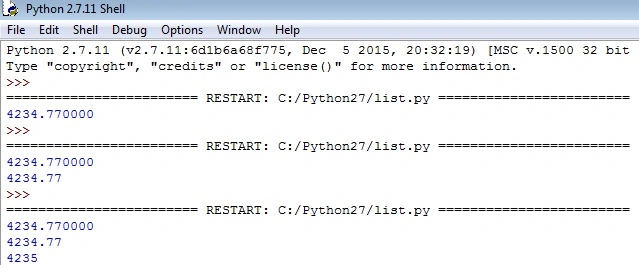
First, the %f is used to find the decimal point in the number. Then, %0.2f is used for displaying the two digits after the decimal. Then, the %0.f is used for not displaying the decimal values.
Lets us see the difference
In this statement, it will show the decimal point and the floating numbers after the decimal.
output
- print("%0.2f" % (4235-0.23))
In this statement, it will display only two numbers after the decimal point.
Output
- print("%0.f" % (4235-0.23))
In this statement, it will display only the number, not the digits after the decimal point.
Output
Final Program
Final Output





Koshila SenadhiraPosted Dec 1, 2022, 11:17 AM
Interesting Article!
Vignesh ManiPosted Jul 9, 2016, 5:44 PM
Good one