

In this blog, we are going to see some common errors that we may face as beginners to React Native.
It is prerequisite that React native is already set up on our machine. If it is not, please go through this article:
Whenever I start any new programming language or framework I get stuck on things andI wish that issue would never come again, but in fact, it always comes.
I am writing this blog based on the most common headaches and issues/errors that I get stuck on in React Native.
This article will surely help you to find a simple solution or trick as well to resolve these issues/errors.

- mkdir android/app/src/main/assets
- react-native bundle --platform android --dev false --entry-file index.js --bundle-output android/app/src/main/assets/index.android.bundle --assets-dest android/app/src/main/res
- react-native run-android
Metro Bundler encountered an internal error

Step 1
- watchman watch-del-all
- rm -rf node_modules && npm install
- rm -rf /tmp/metro-bundler-cache-*` or `npm start -- --reset-cache
Step 4
- rm -rf /tmp/haste-map-react-native-packager-*
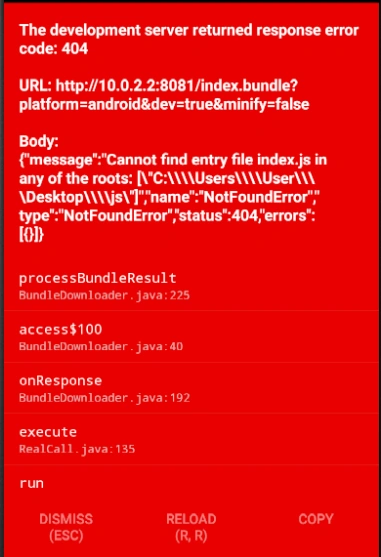
The development server returned respose error code:404
Step 1
- del %appdata%\Temp\react-native-* & cd android & gradlew clean & cd .. & del node_modules/ & npm cache clean --force & yarn install & react-native run-android
Step 2
- npm install --save react@*
Step 3
- npm install react-navigation@https://github.com/react-community/react-navigation.git --save
Conclusion
This is how we can sort out these common issues in React Native.
I hope you like this blog.
Join the conversation! Your thoughts help the community grow.