

Modern APIs need authentication that is secure, simple, and reliable. JWT is commonly used, but PASETO (Platform-Agnostic Security Tokens) is a safer option because it reduces the chances of security misconfigurations.
In this blog, we will build a simple ASP.NET Core Web API secured with PASETO and create three endpoints: Login, Get Profile, and Order Details.
History of PASETO (Platform-Agnostic Security Tokens)
PASETO was created around 2018 by security engineer Scott Arciszewski to address real-world security problems and common mistakes found in JSON Web Tokens (JWT). Although JWT is widely used, its flexibility—such as allowing different encryption algorithms—has led to security issues like algorithm confusion attacks and unsafe implementations.
PASETO takes a different approach. It removes unsafe options and uses only strong, modern cryptographic methods with clear versioning (like v2 and v4). This makes it secure by default. Instead of giving many choices, PASETO focuses on safety and simplicity, so developers are less likely to make mistakes that could weaken security. This is why it is becoming more popular in modern API security design.
What PASETO is
It’s a compact string token you can send over HTTP (headers, cookies, URLs).
It contains JSON data (claims) like user ID, roles, expiration, etc.
It is either:
Encrypted (so nobody can read it), or
Signed (so nobody can tamper with it)
Think of it as a safer, simpler replacement for JWT.
Structure of a PASETO token
Typical format:
<version>.<purpose>.<payload>.<optional_footer>
Example:
v2.local.<encrypted_data>
· version → protocol version (v1, v2, v3, v4)
· purpose →
ü local = encrypted (private)
ü public = signed (verifiable)
· payload → your data (claims)
· footer (optional) → metadata (like key id)
How it’s used (auth flow)
User logs in (username/password)
Server generates a PASETO token
Client stores it (cookie/local storage)
Client sends it with requests
Server verifies/decrypts it and authorizes access
PASETO vs JWT (why it exists)
PASETO was created to fix common JWT issues:
Problems with JWT
Too many algorithm choices → easy to misconfigure
Vulnerable to attacks (e.g., algorithm confusion)
Complex validation logic
PASETO improvements
Fixed, secure cryptography (no bad choices)
No algorithm confusion attacks
Simpler and safer defaults
Built-in encryption support
Important Best Practices
Always use:
v4.local → for encrypted tokens (recommended for auth)
Keep key:
32 bytes minimum
stored securely (Azure Key Vault, env vars, etc.)
Always include:
exp (expiration)
iat (issued at)
Use Case
A customer logs in using credentials. The API validates the user and issues a PASETO token (v4.local). This token is then used to access protected endpoints.
Source code can be downloaded form GitRepo
Example Implementation:
Here’s a clean, production-style implementation of 3 endpoints using PASETO in ASP.NET Core:
POST /auth/login → issue token
GET /api/orders → protected
GET /api/profile → protected
Install the package
dotnet add package Paseto.CoreAdd Key in appsettings.json
 "Paseto": {
   "SymmetricKey": "JK8VNp7fVj9xVz2wHZQ8rQ7dL3mY5kT6pN8sR4uV2wY="
}Note: In real-time project, make sure that the key will be stored in Key Vault.
This must be 32+ bytes base64 key
Models
public record LoginRequest(string Username, string Password);

record LoginResponse
{
    public string Token { get; set; } = string.Empty;
    public DateTime ExpiresAt { get; set; }
    public string Username { get; set; } = string.Empty;
}

record UserProfile
{
    public int Id { get; set; }
    public string Username { get; set; } = string.Empty;
    public string Email { get; set; } = string.Empty;
    public string FullName { get; set; } = string.Empty;
    public DateTime CreatedAt { get; set; }
}

record Order
{
    public int Id { get; set; }
    public string ProductName { get; set; } = string.Empty;
    public int Quantity { get; set; }
    public decimal TotalAmount { get; set; }
    public DateTime OrderDate { get; set; }
}
Paseto Service
using Paseto;
using Paseto.Builder;
using Paseto.Cryptography.Key;
using Paseto.Protocol;

namespace AuthenticateUsingPaseto.Service
{
    public class PasetoService
    {
        private readonly PasetoSymmetricKey _symmetricKey;
        public PasetoService(
            IConfiguration configuration
            )
        {
            _symmetricKey = new PasetoSymmetricKey(
                Convert.FromBase64String(configuration["Paseto:SymmetricKey"] ?? throw new InvalidOperationException("Paseto:SymmetricKey configuration is missing")),
                new Version4()
            );

        }
        public string GenerateToken(string userId, string email)
        {
            var token = new PasetoBuilder()
                .Use(ProtocolVersion.V4, Purpose.Local)
                .WithKey(_symmetricKey)
                .Subject(userId)
                .AddClaim("email", email)
                .AddClaim("role", "customer")
                .IssuedAt(DateTime.UtcNow)
                .Expiration(DateTime.UtcNow.AddHours(1))
                .Encode();

            return token;
        }
        //VALIDATE TOKEN
        public PasetoTokenValidationResult ValidateToken(string token)
        {
            var validationParameters = new PasetoTokenValidationParameters
            {
                ValidateLifetime = true
            };

            var result = new PasetoBuilder()
                .Use(ProtocolVersion.V4, Purpose.Local)
                .WithKey(_symmetricKey)
                .Decode(token, validationParameters);

            return result;
        }
    }
}
Endpoints
using AuthenticateUsingPaseto;
using AuthenticateUsingPaseto.Model;
using AuthenticateUsingPaseto.Service;
using Microsoft.AspNetCore.Authentication;
using System.Security.Claims;

var builder = WebApplication.CreateBuilder(args);

// Add services to the container.
// Learn more about configuring OpenAPI at https://aka.ms/aspnet/openapi
builder.Services.AddOpenApi();
builder.Services.AddSingleton<PasetoService>();
builder.Services.AddAuthentication("PasetoScheme")
    .AddScheme<AuthenticationSchemeOptions, PasetoAuthenticationHandler>("PasetoScheme", null);
builder.Services.AddAuthorization();

var app = builder.Build();

// Configure the HTTP request pipeline.
if (app.Environment.IsDevelopment())
{
    app.MapOpenApi();
}

app.UseHttpsRedirection();

app.UseAuthentication();
app.UseAuthorization();

// Login endpoint
app.MapPost("/login", (LoginRequest request, PasetoService pasetoService) =>
{
    // Validate credentials (placeholder logic)
    if (request.Username == "demo" && request.Password == "password")
    {
        var userId = "user123";
        var email = "[email protected]";

        var token = pasetoService.GenerateToken(userId, email);

        return Results.Ok(new LoginResponse
        {
            Token = token,
            ExpiresAt = DateTime.UtcNow.AddHours(1),
            Username = request.Username
        });
    }

    return Results.Unauthorized();
});

// Get profile endpoint
app.MapGet("/profile", (ClaimsPrincipal user) =>
{
    var userId = user.FindFirst(ClaimTypes.NameIdentifier)?.Value;
    var email = user.FindFirst("email")?.Value;

    return Results.Ok(new UserProfile
    {
        Id = 1,
        Username = userId ?? "unknown",
        Email = email ?? "[email protected]",
        FullName = "Demo User",
        CreatedAt = DateTime.UtcNow.AddMonths(-6)
    });
}).RequireAuthorization();

// Get order information endpoint
app.MapGet("/orders", (ClaimsPrincipal user) =>
{
    var userId = user.FindFirst(ClaimTypes.NameIdentifier)?.Value;

    // In a real app, you'd get orders for the authenticated user
    var orders = new List<Order>
    {
        new Order { Id = 1, ProductName = "Product A", Quantity = 2, TotalAmount = 99.99m, OrderDate = DateTime.UtcNow.AddDays(-5) },
        new Order { Id = 2, ProductName = "Product B", Quantity = 1, TotalAmount = 49.99m, OrderDate = DateTime.UtcNow.AddDays(-2) }
    };

    return Results.Ok(orders);
}).RequireAuthorization();

app.Run();
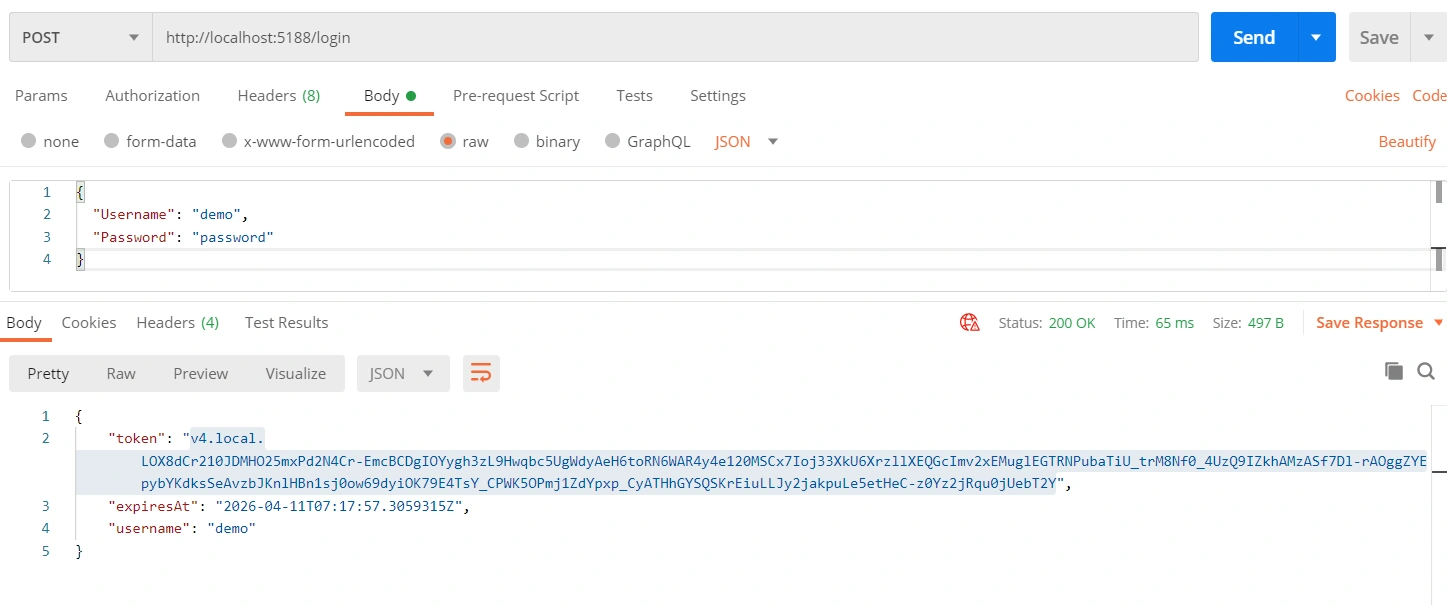
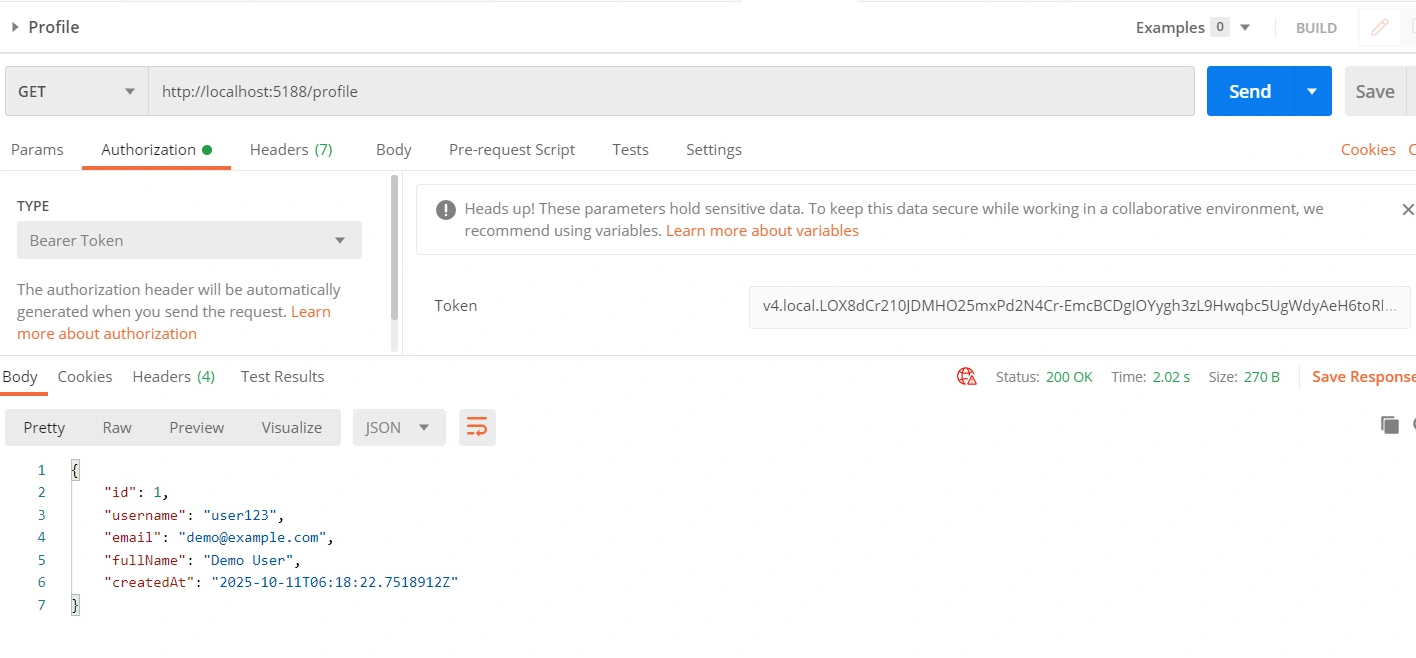
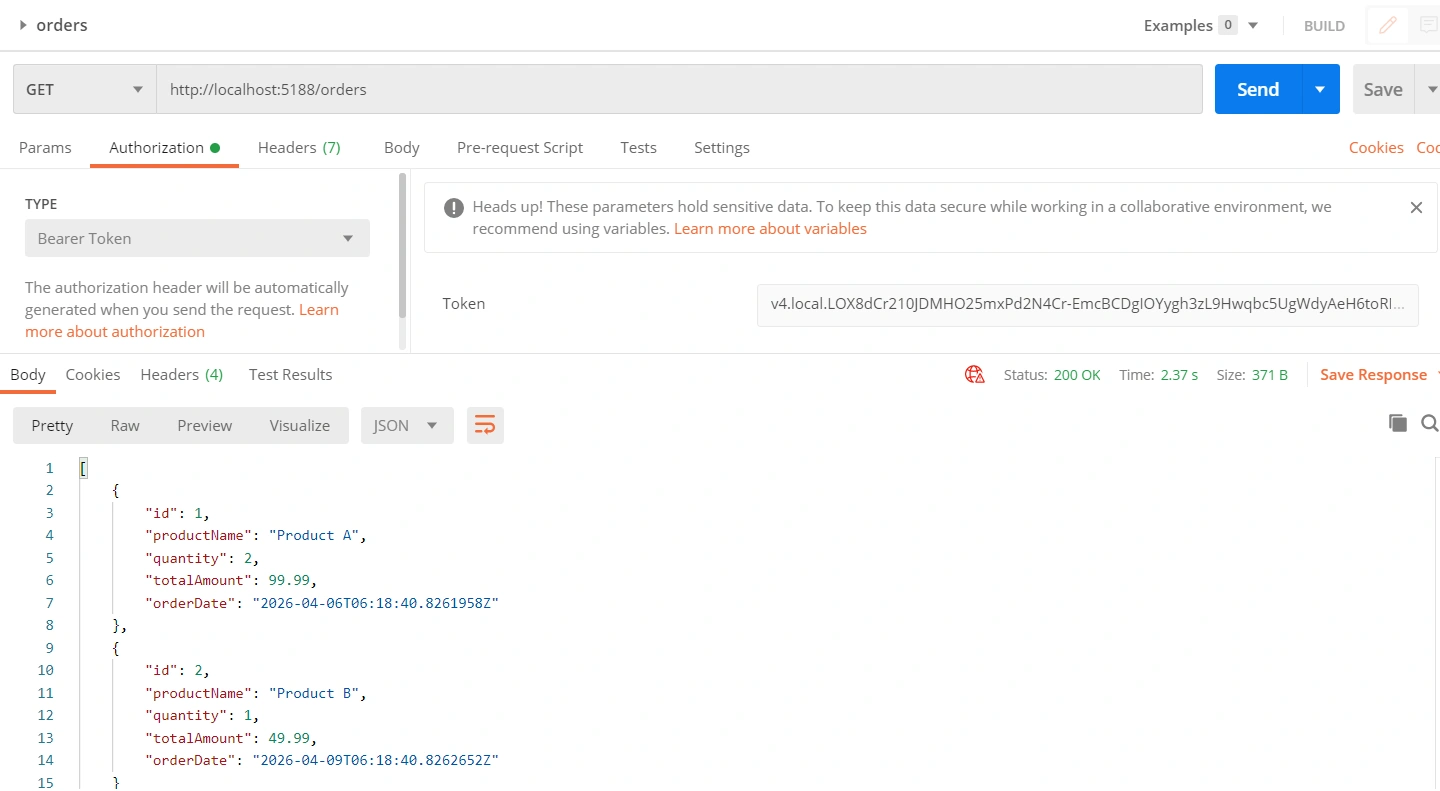
Execute the code and trigger the endpoints via postman
Postman collection is available here.
Execute the Login
Execute Profile
Execute Orders
Conclusion
PASETO (Platform-Agnostic Security Tokens) is a modern and secure way to handle authentication using tokens. Unlike JWT, which is flexible but can sometimes lead to mistakes and security issues, PASETO is built to be secure by default and easy to use. It uses strong encryption and avoids risky options, so developers are less likely to make errors.
In real-world use, PASETO works well in modern APIs, especially in microservices or internal systems where you control how tokens are created and validated. It also supports encrypted tokens (like v4.local), which help protect sensitive data by keeping it hidden.
JWT is still widely used, especially when working with third-party systems and standards like OAuth2 or OpenID Connect. However, PASETO is becoming popular as a simpler and safer option for custom authentication.
In short, if you want better security, simplicity, and full control, PASETO is a great choice for building strong and future-ready authentication in your APIs.
Happy Coding!
Join the conversation! Your thoughts help the community grow.