

This is how to send message to running two different windows application using c#.
One application send message to another application using windows handle.
It will find all running application and then it will send message to particular windows that we are define in your project.
One application send message to another application using windows handle.
It will find all running application and then it will send message to particular windows that we are define in your project.
With the help of this dll we get handle of running windows
[DllImport("user32.dll", CharSet = CharSet.Auto)]
static extern int SendMessage(IntPtr hwnd, int wMsg, int wParam, ref COPYDATASTRUCT lParam);
private const int WM_COPYDATA = 0x4A;
int hWnd;
public static int NewWnd;
[StructLayout(LayoutKind.Sequential)]
struct COPYDATASTRUCT
{
public int dwData;
public int cbData;
public int lpData;
}
Receive Message using code (Receive Form)
Receive Message using code (Receive Form)
protected override void WndProc(ref Message m)
{
switch (m.Msg)
{
case WM_COPYDATA:
COPYDATASTRUCT CD = (COPYDATASTRUCT)m.GetLParam(typeof(COPYDATASTRUCT));
byte[] B = new byte[CD.cbData];
IntPtr lpData = new IntPtr(CD.lpData);
Marshal.Copy(lpData, B, 0, CD.cbData);
string strData = Encoding.Default.GetString(B);
listBox1.Items.Add(strData);
break;
default:
base.WndProc(ref m);
break;
}
}
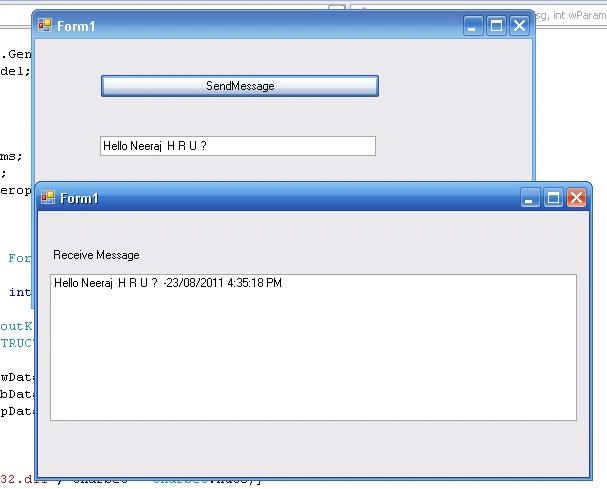
For demo application please download project.
ali panahiPosted Aug 26, 2020, 7:55 AM
Not working for me
Pratik GuptaPosted Nov 5, 2018, 6:58 AM
I have send message but not display receive box
Pratik GuptaPosted Nov 5, 2018, 6:57 AM
I have install send and get project insatall but not work
Pratik GuptaPosted Nov 5, 2018, 6:57 AM
Not work this project computer
Khoa HồPosted Oct 12, 2014, 8:28 PM
Great article! Thanks