

In some Web Applications, we need to show real time data to the end users, which means if any changes occur (new data available) in the Server, it needs to show an end user. For instance, you are doing chat in Facebook in one tab of your Browser. You opened another tab in the same Browser and send a message to the same user (with whom, you are doing chat in the previous chat). You will see that message will appear in both the tabs and it is called real-time push.
In order to accomplish the functionality, mentioned above, the client sends interval basis AJAX requests to the Server to check, if the data is available or not. ServerSentEvents(SSE) API helps ensure the Server will push the data to the client when the data is available in the Server.
What are Server Sent Events?
SSE is an acronym and stands for Server Sent Events. It is available in HTML5 EventSource JavaScript API. It allows a Web page to get the updates from a Server when any changes occurs in the Server. It is mostly supported by the latest Browsers except Internet Explorer(IE).
Using code
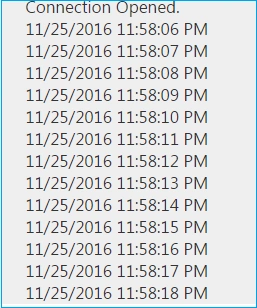
We are going to implement a requirement like there is a link button and click on it and it displays current time each second on an interval basis.
In order to achieve the same, we need to add the following action in HomeController. It sets response content type as text/event-stream. Next, it loops over the date and flushes the data to the Browser.
- public void Message()
- {
- Response.ContentType = "text/event-stream";
- DateTime startDate = DateTime.Now;
- while (startDate.AddMinutes(1) > DateTime.Now)
- {
- Response.Write(string.Format("data: {0}\n\n", DateTime.Now.ToString()));
- Response.Flush();
- System.Threading.Thread.Sleep(1000);
- }
- Response.Close();
- }
First, it adds a href link, which calls initialize() method to implement SSE. Second, it declares a div, where the data will display. Thirdly, it implements Server Sent Events(SSE) through JavaScript with the steps, mentioned below.
Join the conversation! Your thoughts help the community grow.