

Here I am Showing You That How You Can Get & Set Property Using Shortcut In Visual Studio.
write "prop" as shown in below image: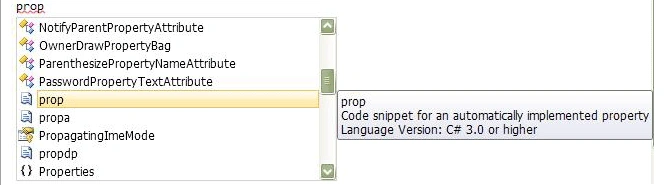
Then it will automatically display intelligence & from that select "prop" & then press TAB key from your keyboard then it will automatically add a code snippet of get & set property.
public
int MyProperty { get;
set; }
After that you can get & set your property like below code on button click
event:
private void button1_Click(object sender, EventArgs e)
{
private int
newvar;
public int
MyProperty
{
get
{
return newvar;
}
set
{
newvar=<<Set Here your Value in
integer>>;
}
}
}
You can also set & get property in other data
type by changing the data type instead of "int" use your data type.
Viktor BuiakovPosted May 22, 2014, 11:49 AM
I wounded, where i can find list of all shotcuts? Google didn't help me :(