

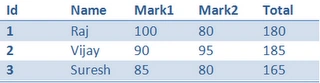
Now, the table needs to be sorted in descending order, based on Total Column. Below are the steps to do the same:
Cheers,
Venkatesan Prabu .J
Head, KaaShiv InfoTech
- Create a clone of the above table.
- Specify the Data Type in clone table, for the sort column as needed. Eg. System.Int32 for integer column.
- Import each row from original table to clone table.
- Commit the changes in clone table.
- Create a DataView on clone table.
- Specify the sort column and sort order for the DataView.
- Bind DataView to GridView.
DataTable dtMarks1 = dtMarks.Clone();
dtMarks1.Columns["Total"].DataType = Type.GetType("System.Int32");
foreach (DataRow dr in dtMarks.Rows)
{
dtMarks1.ImportRow(dr);
}
dtMarks1.AcceptChanges();
DataView dv = dtMarks1.DefaultView;
dv.Sort = "Total DESC";
GridView1.DataSource = dv;
GridView1.DataBind();
Cheers,
Venkatesan Prabu .J
Head, KaaShiv InfoTech
Delwar HossainPosted Jan 6, 2020, 2:37 PM
Dt.DefaultView.Sort = "Location";dt= dt.DefaultView.ToTable();