

Introduction
In this blog, you will learn about productivity tools and code formatting extensions in a React App using Visual Studio Code. This will help you to achieve faster development.
Step 1
Install Visual Studio Code. If you already have it installed, install a prettier code formatter. It is an opinionated code formatter that enforces a consistent style by parsing your code and re-printing it with its own rules. It takes the maximum line length into account, wrapping code when necessary.
https://marketplace.visualstudio.com/items?itemName=esbenp.prettier-vscode
Step 2
Now Go to File > Preferences > Settings
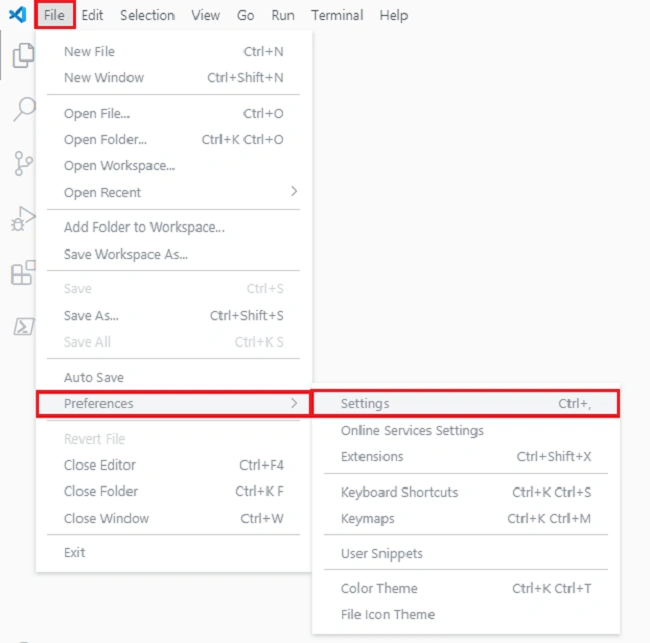
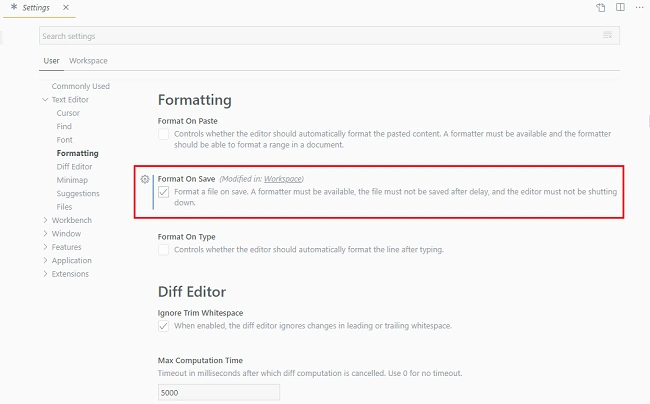
Step 3
Install simple react snippets, an essential collection of React Snippets and commands.
These snippets were selected carefully from my own day-to-day React use. Not everything in React is included here. This is a hand-selected set of snippets that work the way that you would expect, not just a copy of the documentation.
https://marketplace.visualstudio.com/items?itemName=burkeholland.simple-react-snippets
To import a react module type imr and tab. It will import your react module.
imr - Import React
- import React from 'react';
To create a class, type cc and tab. It will create a class component.
cc - Class Component
- class | extends Component {
- state = { | },
- render() {
- return ( | );
- }
- }
To create a class with a constructor, type ccc and tab. It will create a class component with a constructor.
ccc - Class Component With Constructor
- class | extends Component {
- constructor(props) {
- super(props);
- this.state = { | };
- }
- render() {
- return ( | );
- }
- }
- export default |;
|
Snippet
|
Renders
|
|
imr
|
Import React
|
|
imrc
|
Import React / Component
|
|
imrs
|
Import React / useState
|
|
imrse
|
Import React / useState useEffect
|
|
impt
|
Import PropTypes
|
|
impc
|
Import React / PureComponent
|
|
cc
|
Class Component
|
|
ccc
|
Class Component With Constructor
|
|
cpc
|
Class Pure Component
|
|
sfc
|
Stateless Function Component
|
|
cdm
|
componentDidMount
|
|
uef
|
useEffect Hook
|
|
cwm
|
componentWillMount
|
|
cwrp
|
componentWillReceiveProps
|
|
gds
|
getDerivedStateFromProps
|
|
scu
|
shouldComponentUpdate
|
|
cwu
|
componentWillUpdate
|
|
cdu
|
componentDidUpdate
|
|
cwu
|
componentWillUpdate
|
|
cdc
|
componentDidCatch
|
|
gsbu
|
getSnapshotBeforeUpdate
|
|
ss
|
setState
|
|
ssf
|
Functional setState
|
|
usf
|
Declare a new state variable using State Hook
|
|
ren
|
render
|
|
rprop
|
Render Prop
|
|
hoc
|
Higher Order Component
|
Laxmidhar SahooPosted Jul 19, 2020, 3:31 AM
Thanks for the information