
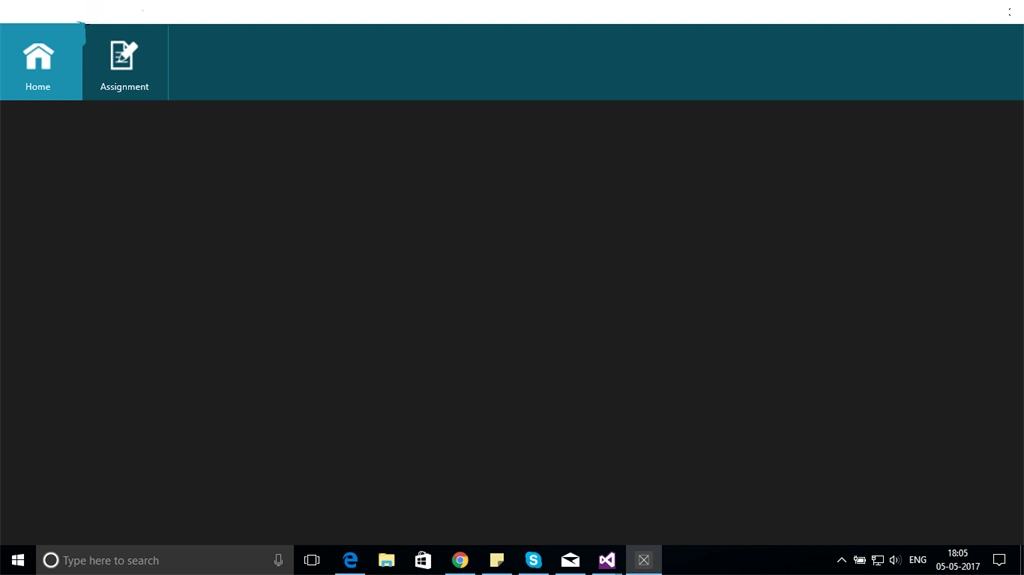
If you have checked many Windows Store apps that use the top app bar, there is no sample available for it. If you have checked, it is given for HTML only. So today, I am going to show you how we can create the same type of app bar using XAML. I have also attached the code with this blog. Let's start.
Step 1
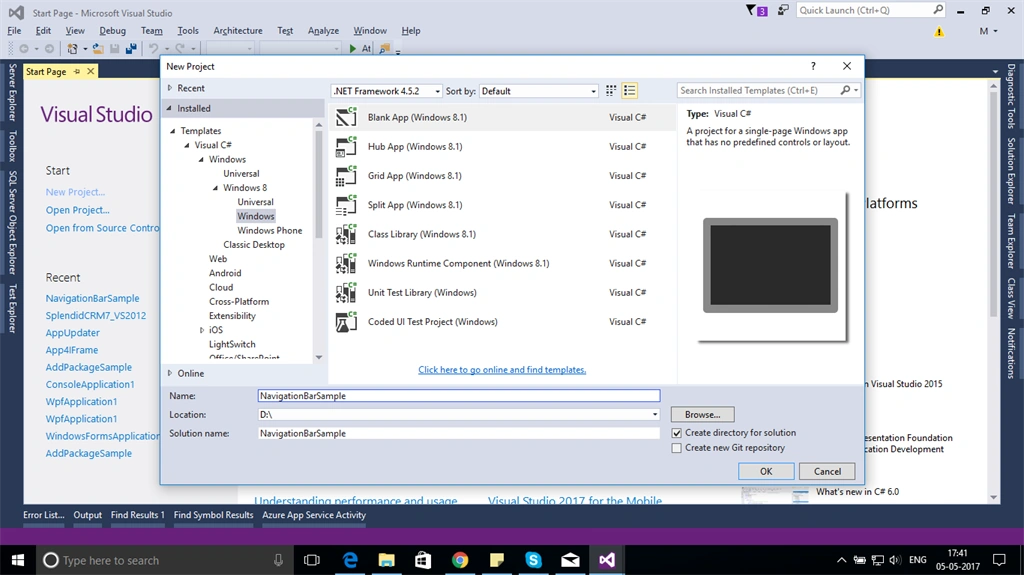
Create Windows 8.1 blank template.
Create Windows 8.1 blank template.
Step 2
Add user control to it.
Right click on project -> Add -> new Item -> User control.
Now, we are done with adding user control. Let's start with creating an app bar.
For creating an app bar, let's add GridView inside Grid in your usercontrol. In the Grid, we can add multiple items so I am taking a Grid to create app bar. You can also take a listview.
I have added a lot of things in GridView, that I will explain later. So, the code will look like below.
- <Grid Background="{ThemeResource applicationPageBackgroundThemeBrush}">
- <GridView x:Name="grdView" ItemsSource="{Binding NavigationItemList}" Margin="0,-4,0,8" Height="124" SelectionMode="None" IsItemClickEnabled="true" IsSwipeEnabled="false" Background="#0B4A58"
- Width="{Binding WindowWidth}" ItemClick="grdView_ItemClick"
- ItemTemplate="{StaticResource NavigationDataTemplate}" ItemContainerStyle="{StaticResource GridViewItemStyle}">
- <GridView.ItemsPanel>
- <ItemsPanelTemplate>
- <WrapGrid Orientation="Horizontal"/>
- </ItemsPanelTemplate>
- </GridView.ItemsPanel>
- </GridView>
- </Grid>
To display data in GridView, we need some collection and we have to set that with Itemssource property of GridView.
ItemTemplate is where we define the controls that we have to show in GridView and bind the controls.
I have used WrapGrid inside ItemsPanelTemplate as we need to show items horizontally.
Now, I will show what template and style I have added for it. I have created this style using expression blend. Add this style and template in your usercontrol.
- <UserControl.Resources>
- <DataTemplate x:Key="NavigationDataTemplate">
- <StackPanel Orientation="Horizontal" Background="{Binding Color}" Width="140" Height="124" Margin="-11,0,0,0">
- <Border BorderBrush="Transparent" VerticalAlignment="Center" Width="138" Height="124" >
- <StackPanel VerticalAlignment="Center">
- <Image Source="{Binding image}" Height="60" Width="60"></Image>
- <TextBlock Text="{Binding Title}" FontSize="15" Foreground="White" HorizontalAlignment="Center" Padding="0 10 0 0"/>
- </StackPanel>
- </Border>
- <Line Stroke="#1A8FAE" StrokeThickness="2" X1="0" X2="0" Y1="0" Y2="130"></Line>
- </StackPanel>
- </DataTemplate>
- <Style x:Key="GridViewItemStyle" TargetType="GridViewItem">
- <Setter Property="FontFamily" Value="{ThemeResource ContentControlThemeFontFamily}"/>
- <Setter Property="FontSize" Value="{ThemeResource ControlContentThemeFontSize}"/>
- <Setter Property="Background" Value="Transparent"/>
- <Setter Property="TabNavigation" Value="Local"/>
- <Setter Property="IsHoldingEnabled" Value="True"/>
- <Setter Property="Margin" Value="0,0,2,2"/>
- <Setter Property="Template">
- <Setter.Value>
- <ControlTemplate TargetType="GridViewItem">
- <GridViewItemPresenter x:Name="gridViewItemPresenter" ContentMargin="4" ContentTransitions="{TemplateBinding ContentTransitions}"
- CheckSelectingBrush="{ThemeResource ListViewItemCheckSelectingThemeBrush}"
- DragForeground="{ThemeResource ListViewItemDragForegroundThemeBrush}"
- DragOpacity="{ThemeResource ListViewItemDragThemeOpacity}"
- DragBackground="{ThemeResource ListViewItemDragBackgroundThemeBrush}"
- DisabledOpacity="{ThemeResource ListViewItemDisabledThemeOpacity}"
- HorizontalContentAlignment="{TemplateBinding HorizontalContentAlignment}"
- Padding="{TemplateBinding Padding}"
- PointerOverBackgroundMargin="1"
- ReorderHintOffset="{ThemeResource ListViewItemReorderHintThemeOffset}"
- SelectedForeground="{ThemeResource ListViewItemSelectedForegroundThemeBrush}"
- SelectedBorderThickness="{ThemeResource GridViewItemCompactSelectedBorderThemeThickness}"
- VerticalContentAlignment="{TemplateBinding VerticalContentAlignment}">
- <VisualStateManager.VisualStateGroups>
- <VisualStateGroup x:Name="SelectionStates">
- <VisualState x:Name="UnselectedSwiping"/>
- <VisualState x:Name="UnselectedPointerOver"/>
- <VisualState x:Name="Selecting"/>
- <VisualState x:Name="Selected"/>
- <VisualState x:Name="SelectedSwiping"/>
- <VisualState x:Name="Unselecting"/>
- <VisualState x:Name="Unselected"/>
- <VisualState x:Name="SelectedUnfocused"/>
- </VisualStateGroup>
- </VisualStateManager.VisualStateGroups>
- </GridViewItemPresenter>
- </ControlTemplate>
- </Setter.Value>
- </Setter>
- </Style>
- </UserControl.Resources>
Join the conversation! Your thoughts help the community grow.