

Introduction
In this blog, I am going to create a Message widget in the application. It will be used to display small text content in the Python GUI application.
Software requirement
Python 3.5 and IDLE (Python 3.5)
Programming code
- #Message Display application
- from tkinter
- import * root = Tk()
- root.title("Message App")
- # Message content
- Msg_content = "Welcome to My GUI Application by-PR"
- #Create Message Fuction
- msg = Message(root, text = Msg_content)
- msg.config(font = ('', 20, 'bold'))
- msg.pack()
- root.mainloop()
- First, I am importing the Tkinter module.
- Next, I have assigned a class and variables.
- Then, given the application title and create message content.
- Next, define the message function and configure message style in the code.
- Finally, I have started the Windows event loop by calling the main loop method and executed the code.
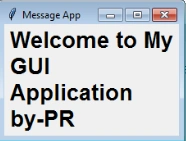
The message has appeared on the application screen.
Output
Join the conversation! Your thoughts help the community grow.