
Using min and max attributes in HTML5
The min and max attributes are used with number and date input types to provide restriction for input. min attribute specifies a minimum value and max attributes specify a maximum value for the input field. Now we use these attributes into form. We write the following code:
Now we run this code. The output will look like below:
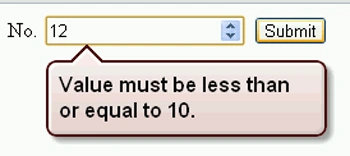
 We note here, textbox accepts only values between 1 and 10. If we enter other
value and click on the submit button, then the message is displayed as below
figure:
We note here, textbox accepts only values between 1 and 10. If we enter other
value and click on the submit button, then the message is displayed as below
figure:
- <!DOCTYPE HTML>
- <html>
- <body>
- <form method="post">
- No.
- <input type="number" name="num" min="1" max="10" />
- <input type="submit" />
- </form>
- </body>
- </html>


Join the conversation! Your thoughts help the community grow.