

Introduction
With the release of .NET 10, Minimal APIs have received a significant upgrade that closes one of the few remaining gaps between them and traditional MVC Controllers.
For a long time, developers appreciated the simplicity, performance, and low ceremony of Minimal APIs—but one key feature was missing: automatic model validation. Unlike Controllers, Minimal APIs required manual checks or external libraries (such as FluentValidation) to ensure incoming data was valid.
.NET 10 changes the game by introducing native validation support using System.ComponentModel.DataAnnotations, making Minimal APIs safer and more production-ready out of the box.
The source code can be downloaded from GitHub
Old Way (Pre- .NET 10)
Before .NET 10, validating input in a Minimal API meant doing everything manually inside the endpoint.
app.MapPost("/users", (User user) =>
{
    if (string.IsNullOrEmpty(user.Name))
    {
        return Results.BadRequest("Name is required");
    }
    if (!user.Email.Contains("@"))
    {
        return Results.BadRequest("Invalid email");
    }

    // Process user...
    return Results.Ok(user);
});
Problems with this approach
❌ Repetitive boilerplate code
❌ Validation logic mixed with business logic
❌ Inconsistent error responses
❌ Easy to forget validation in new endpoints
This pattern quickly becomes difficult to maintain as your API grows.
The New Way (.NET 10)
.NET 10 introduces first-class validation for Minimal APIs, powered by a source generator that makes validation both fast and efficient—without reflection-heavy pipelines.
Step 1. Define the Model with Data Annotations
Use standard attributes like [Required], [EmailAddress], [Range], etc.
using System.ComponentModel.DataAnnotations;
public record User(
    [Required] string Name,
    [Required, EmailAddress] string Email,
    [Range(18, 99)] int Age
);
No custom code. No filters. Just declarative validation.
Step 2. Enable Validation in Program.cs
In Program.cs, simply need to add the validation services.
var builder = WebApplication.CreateBuilder(args);

// Enable built-in validation
builder.Services.AddValidation();
This activates the validation pipeline for all Minimal API endpoints.
Step 3. Create the Endpoint
Now, the endpoint can focus purely on business logic. If the input data is invalid, the framework will automatically intercept the request and return a 400 Bad Request.
app.MapPost("/users", (User user) =>
{
    // If we get here, 'user' is valid!
    return Results.Ok($"User {user.Name} created.");
});
If the incoming request is invalid:
The endpoint never executes
The framework automatically returns 400 Bad Request
A standardized ProblemDetails response is sent to the client
How It Works
When you call AddValidation():
.NET 10 registers a validation filter
All endpoint parameters are validated before execution
Data Annotations are evaluated using a source-generated validator
Invalid requests short-circuit with a consistent ProblemDetails response
This behavior matches what Controllers have offered for years—without sacrificing the Minimal API model.
Output: Automatic Validation in Action
The behavior of built-in validation is clearly visible when testing the endpoint using Scalar.
In the screenshot below, an invalid request is sent to the /users endpoint with:
A missing Name
An invalid Email format
An Age value outside the allowed range
As soon as the request is executed, the framework automatically rejects it before the endpoint handler runs.
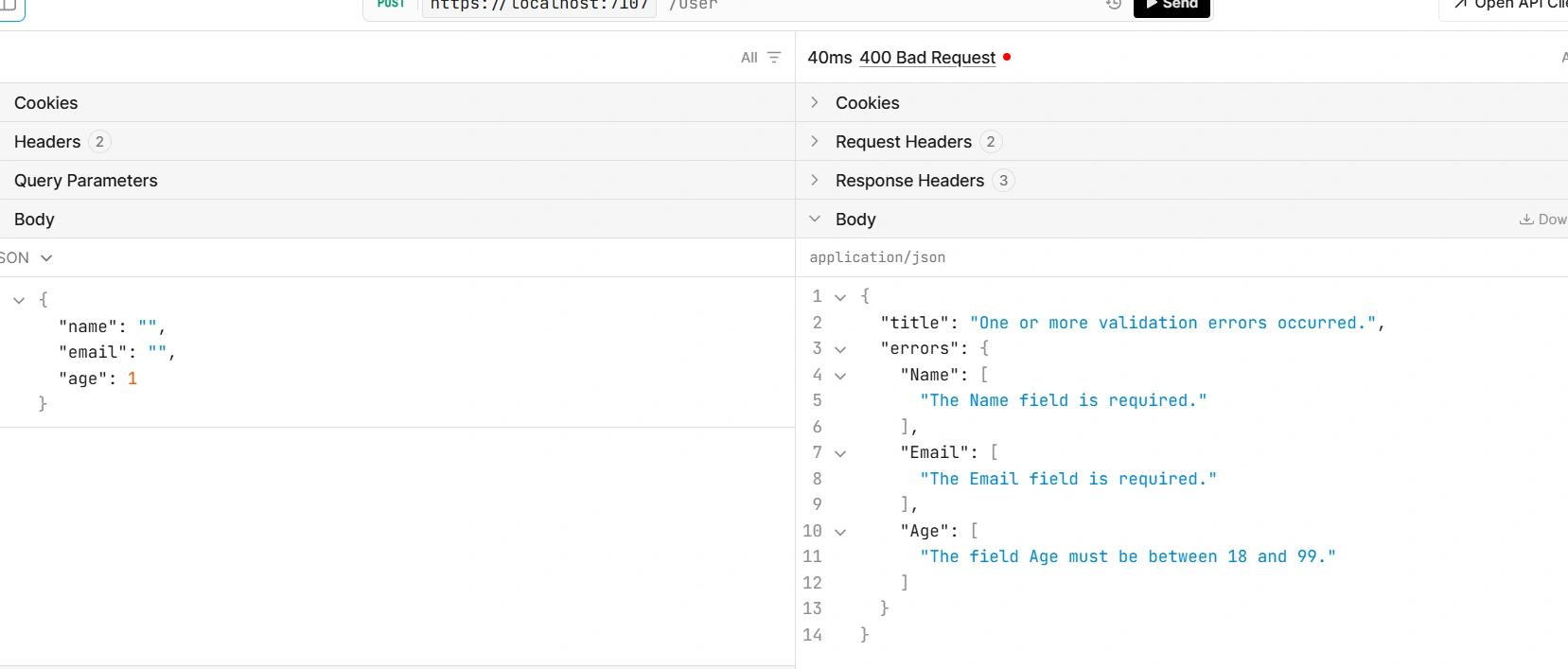
This confirms that validation in .NET 10 Minimal APIs behaves exactly like Controller-based APIs, while keeping the endpoint implementation clean and focused on business logic.
Conclusion
Validation support in .NET 10 makes Minimal APIs cleaner, safer, and truly production-ready.
By eliminating manual validation code:
Your endpoints stay focused on business logic
Your APIs behave consistently
Your codebase is easier to maintain and extend.
If you’re building APIs in .NET 10, enabling validation should be considered a default best practice.
Happy coding!
Join the conversation! Your thoughts help the community grow.