

What is an encapsulation?
Encapsulation is an Object Oriented programming base concept. Encapsulation means protect important data inside the class which we do not want to be exposed outside the class.
Encapsulation process means binding the data members (variable, properties) and member function (Methods) in a single unit. Class is one of the best an example of an encapsulation.
Why do we need an encapsulation?
An encapsulation complements abstraction. Encapsulation hides private or unwanted data from outside the class. An abstraction displays only important features of a class. (Unwanted means other class and assemblies).With encapsulation, we can make variables, properties and methods private, so it is not accessible to all but accessible through the proper channels only to protect it from the accidental corruption from the other classes.
Let’s take the example of the mobile; we are taking a photo with the camera, we just show picture in mobile display, do not think about how to work with the mobile camera, mobile RAM or circuits? We just click a button on display and take a photo. In this case, mobile display is useful to us and not a mobile inside feature functionality. Hence, the mobile inside feature is an encapsulation.

[Image Source from Google]
Advantages of an encapsulation:
An encapsulation field of a class basically can be a write only or a read only. A class can change the data type of its fields anytime but the users of this class do not need to change any code. Encapsulation can protect your data from the accidental corruption. It provides better control of class field.
Data encapsulation is implemented by using access modifiers. It defines the scope and visibility of a class member. Type of access modifiers are shown below.
- Public- Access to all the code in the program.
- Private- Access to only members of the same class.
- Protected- Access to the members of the same class and its derived classes.
- Internal- Access to the current assembly.
- Protected Internal- Access to the current assembly and the types derived from containing class.
Code example
Go to Visual Studio - Go to Console Application.
First, we will learn about the property in a class, as shown in the example given below.
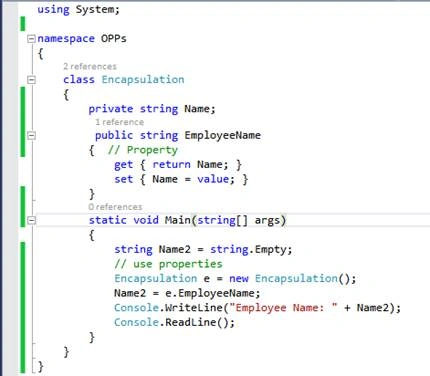
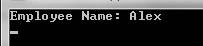
In the example given above, i.e. create a class Encapsulation and define a Name variable as the string. We are also using here GET and SET property to Name variable. Set debug break point and run the code (press F5).




Naveen BishtPosted Jul 14, 2017, 6:47 AM
Nicely explain thanks for sharing
Naveen BishtPosted Feb 15, 2017, 9:04 PM
i love this blog very nicely explain. thanks for sharing please keep posted like same other OOPs concept :)