
Today, while I am installing hadoop on my local system I found an issue that I am not able to install ubuntu 64bit OS while my host is 64bit windows 10 operating system.
After installing successful Oracle VM virtual box I am trying to install ubuntu 64bit, I can’t find that option.
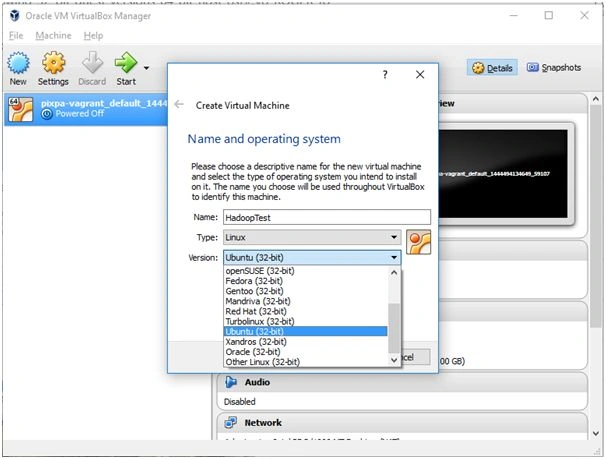
This was annoying because I do have 64 bit OS and I could not use.
Let’s make some change in BIOS. Restart the system and press F10 for BIOS.
Go to system configuration tab. You will find visualization technology as disabled.

Turn it Enabled. Select virtualization technology row and press enter.
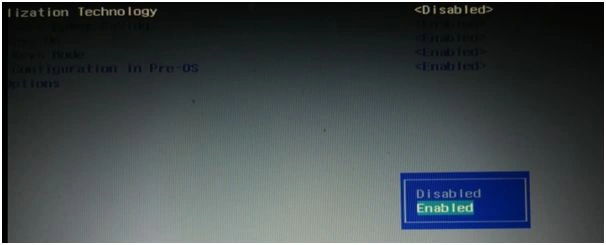
Press enter.
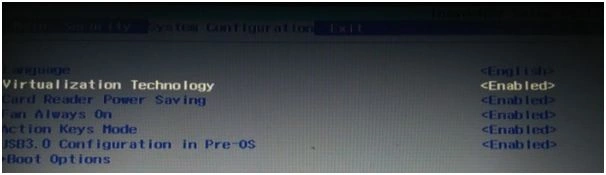
Press F10 for save the changes and exit.

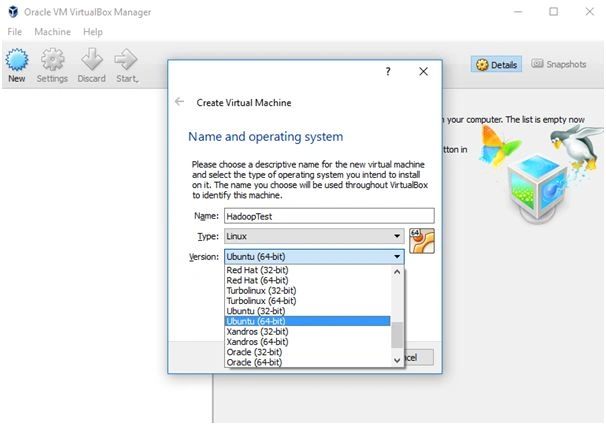
Now I am able to select ubuntu 64 bit when I create virtualbox.
Hope enjoy this article.

Enable Virtualization Technology To Install 64-bit OS In VirtualBox
Join the conversation! Your thoughts help the community grow.
Sign in to leave a comment
It is the same account you read, post and publish with — and you will come straight back to this page.
Kinex MediaPosted Apr 25, 2016, 6:47 AM
Thanks
Kiran ThakurPosted Jan 16, 2016, 5:32 AM
nice share..
Santhakumar MunuswamyPosted Jan 9, 2016, 3:05 AM
Thanks for nice share