

In this article, we will discuss how to encode and decode the textbox values in a Windows form.
Step 1
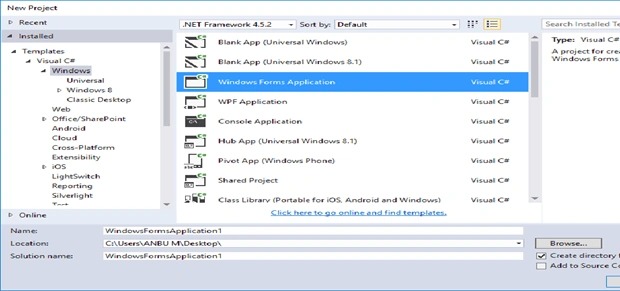
Click New >> Project >> Visual C# >> Windows >> Windows Forms Application. Enter your project name and click OK.
Step 2
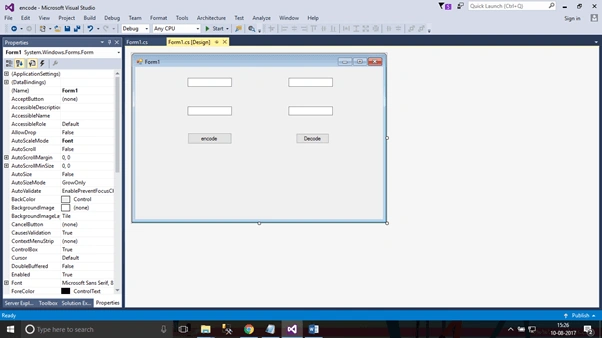
Click View -> Toolbox for using the toolbox to design the Form in the Window application.
Step 3
Click the Button properties and add the button1_Click Event to make the function accurate.
- privatevoid button1_Click(object sender, EventArgs e) {
- string _string = textBox1.Text;
- string _encode = "";
- for (inti = 0; i < _string.Length; i++) {
- _encode += (char)(_string[i] + 10);
- }
- textBox2.Text = _encode;
- }
- privatevoid button2_Click(object sender, EventArgs e) {
- string _decodestring = textBox3.Text;
- string _decode = "";
- for (inti = 0; i < _decodestring.Length; i++) {
- _decode += (char)(_decodestring[i] - 10);
- }
- textBox4.Text = _decode;
- }
Step 4
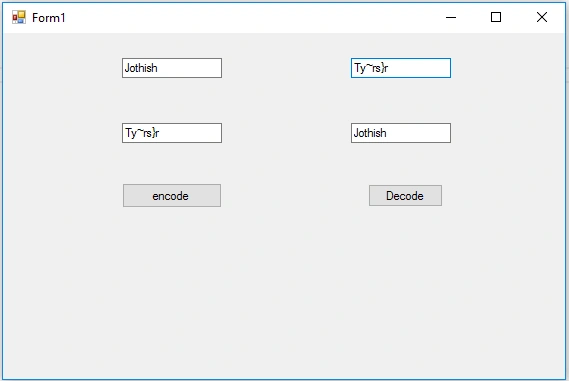
Press F5 or "Build and Run" the application to get the data encrypted and decrypted.
Join the conversation! Your thoughts help the community grow.