Hello Team,
In my project, I have the Room page and booking page, so at the booking page when I select the bookingFrom to bookingTo date, and the Room number I expected the room amount to multiple by the number of days book, but things are not working that way, kindly check it for me.
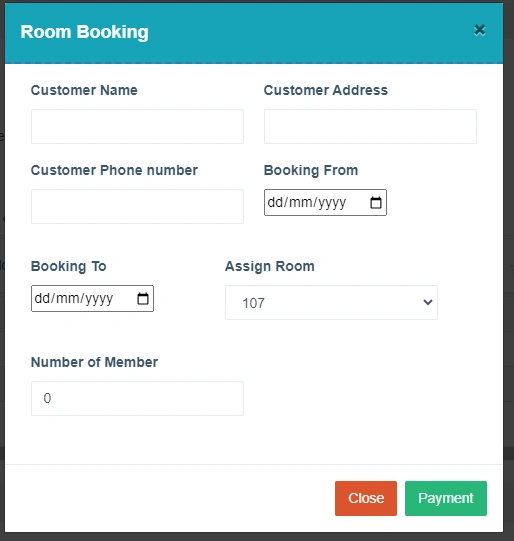
Database

Home Controller
public ActionResult RoomBooking()
{
    var objBookingViewModel = new BookingViewModel();
    var room = objHotelDbEntities.Rooms.ToList();
    objBookingViewModel.ListOfRoom = room.Select(obj => new SelectListItem

    {
        Text = obj.RoomNumber,
        Value = obj.RoomId.ToString(),
        Selected = false
    });
    objBookingViewModel.BookingFrom = DateTime.Now;
    objBookingViewModel.BookingTo = DateTime.Now.AddDays(1);
    return View(objBookingViewModel);
}


public ActionResult SaveRoomBooking(BookingViewModel objBookingViewModel)
{
    int numberOfDays = Convert.ToInt32((objBookingViewModel.BookingFrom - objBookingViewModel.BookingTo).TotalDays);
    Room objRoom = objHotelDbEntities.Rooms.Single(model => model.RoomId == objBookingViewModel.AssignRoomId);
    decimal RoomPrice = objRoom.RoomPrice;
    decimal TotalAmount = objRoom.RoomPrice * numberOfDays;

    RoomBooking roomBooking = new RoomBooking()
    {
        BookingFrom = objBookingViewModel.BookingFrom,
        BookingTo = objBookingViewModel.BookingTo,
        AssignRoomId = objBookingViewModel.AssignRoomId,
        Address = objBookingViewModel.Address,
        CustomerName = objBookingViewModel.CustomerName,
        PhoneNo = objBookingViewModel.PhoneNo,
        NoOfMembers = objBookingViewModel.AssignRoomId,
        TotalAmount = objBookingViewModel.TotalAmount

    };
    objHotelDbEntities.RoomBookings.Add(roomBooking);
    objHotelDbEntities.SaveChanges();

    objRoom.BookingStatusId = 3;
    objHotelDbEntities.SaveChanges();
    return Json(new{message="Hotel Booking is Successfully Created.",success=true}, JsonRequestBehavior.AllowGet);
}
Jignesh KumarPosted Apr 29, 2024, 10:01 AM
Hello,
Put a debugger in this method, Your BookingFrom and bookingTo date not saving the correct way due to all other calculations not working.
check this line :
int numberOfDays = Convert.ToInt32((objBookingViewModel.BookingTo - objBookingViewModel.BookingFrom).TotalDays);
first thing to check this one: objBookingViewModel.BookingTo
what values you are getting in both date fields ?
If you make date fields work correctly then all other depends on that.
Emmmanuel FIADUFEPosted May 4, 2024, 10:21 AM
Thank you team,
I change the format for the date textbox and everything is working now
Jignesh KumarPosted May 3, 2024, 3:55 AM
Hello,
In your latest updated code still you are getting your both date fields empty. Did you check your both date input why is it coming empty ?
you need to check these two line properly :
Please do these check for above line,
Step - 1 : objBookingViewModel.BookingFrom what is datatype of this field in your class ?
step - 2 : check by debugging why $("#txtBookingFrom").text() text input you are not getting value ?
Prasad RaveendranPosted May 2, 2024, 11:12 PM
Ensure that the date format used in the date picker matches the format expected by your
BookingViewModel. You are using the formatdd-MMM-yyyyin your view model ("{0:dd-MMM-yyyy}"), so make sure the date picker provides dates in this format.Use browser developer tools to inspect the elements and check if the values are being populated correctly into the date picker inputs. You can also use
console.logstatements to log the values fetched by jQuery to debug further.Jaimin ShethiyaPosted May 2, 2024, 12:43 PM
Hello Emmmanuel,
Can you please double check on the javascript code, or in that add debugger ang check what value are you got in the javascript side.
I believe you are not as expected value from the javascript side.
Thanks
Jignesh KumarPosted May 2, 2024, 4:08 AM
Could you please attach debugger here and what values you getting in these two fields after click on save button,
Jignesh KumarPosted May 1, 2024, 3:58 AM
Hello Emmmanuel,
You need to pass date field with Text(), please do below change that will work, instead of .val() you need to use .text() for date field
Prasad RaveendranPosted May 1, 2024, 1:17 AM
It seems like there might be a couple of issues in your code. Let's address them:
Date Calculation Issue: In your
SaveRoomBookingaction method, you're calculating the number of days incorrectly. Instead of(objBookingViewModel.BookingFrom - objBookingViewModel.BookingTo), it should be(objBookingViewModel.BookingTo - objBookingViewModel.BookingFrom)to get the correct number of days.TotalAmount Calculation Issue: You're calculating the
TotalAmountusingobjBookingViewModel.TotalAmount, which seems incorrect. It should be calculated based on the room price and the number of days.NoOfMembers Assignment Issue: You're assigning
objBookingViewModel.AssignRoomIdtoNoOfMembers, which seems incorrect. It should be assigned based on the number of members input.Here's how you can modify your
SaveRoomBookingmethod:Make sure to correct these issues and test your code again. If you encounter any further issues, feel free to ask!
Jignesh KumarPosted Apr 30, 2024, 4:04 AM
Have you check while SaveRoomBooking method what are the values for BookingTo and BookingFrom fields value?
you are not getting value from your form data.
SaveRoomBooking(BookingViewModel objBookingViewModel)
Could you please share more details for your click button from where you are calling the "SaveRoomBooking" method?
Jaimin ShethiyaPosted Apr 30, 2024, 3:09 AM
The date value is not coming properly from the request that case also happen here.
Jaimin ShethiyaPosted Apr 30, 2024, 3:07 AM
Hello,
Please put the debugger in your action method, amd checked what date value you are getting then you have more idea what the things are happen in your code side.
If possible then share the debugging screenshot so we can check and provide to you appropriate solution as well.
Thanks.
Emmmanuel FIADUFEPosted Apr 29, 2024, 5:30 PM
Hello Kumar,
I modified the code as you said but the error is still the same