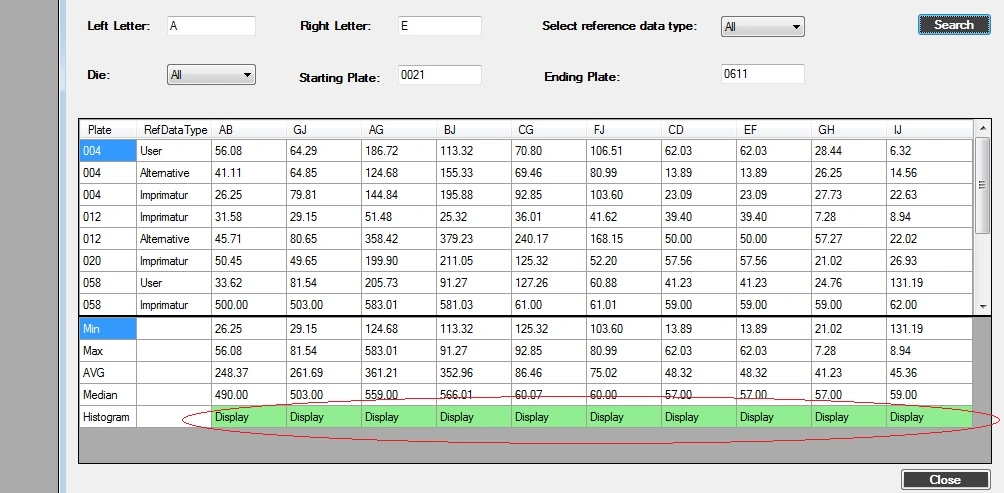
Iam a newbie to this field and iam having some challenging task with my windows forms application where i want to convert the existing cells of the entire row in the datgridview to be converted as buttons which are presently in text format. i know about the DataGridViewButtonColumn property for using buttons as column but i want it to be done for row now. iam also attaching an image for the same.
Kindly help me with the code.
Thanks,
Ram
Kunal VaishyaPosted Jul 11, 2013, 1:44 AM
I feel you need this tell me , please refer may be help full if another thing you want to then please tell us in more details
DataGridview1.DataSource = lstData;
DataGridview1.Columns["ID"].Visible = false;
DataGridview1.Columns["Name"].Visible = false;
DataGridview1.Columns["Name"].DisplayIndex = 0;
DataGridview1.Columns["Age"].DisplayIndex = 1;
DataGridview1.Columns["Address"].DisplayIndex = 2;
DataGridview1.Columns["ContactNo"].DisplayIndex = 3;
DataGridViewButtonColumn btnColumn = new DataGridViewButtonColumn();
btnColumn.HeaderText = "Action";
btnColumn.Text = "Action";
btnColumn.UseColumnTextForButtonValue = true;
DataGridview1.Columns.Insert(5,btnColumn);
Please refer this link to check out put of Grid Design
http://social.msdn.microsoft.com/Forums/en-US/fe5a00e2-6788-447b-974f-df2ac84841cb/add-button-column-in-a-databound-datagridview