Hello Team,
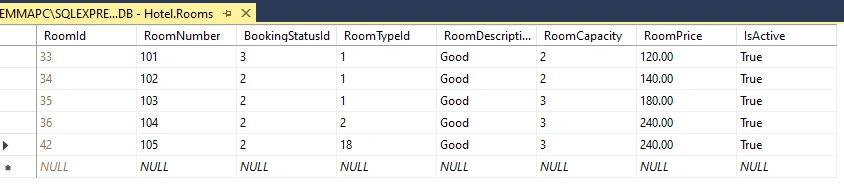
Am trying to bind this tables in my controller so that I can update my data in my modal view but is not working, I put debugger in my javascript function which shows the room ID value has been selected but it doesn't push the data to my modal view.
public JsonResult bindRoomForUpdate(int? RoomId)
{
var dataList = objHotelDbEntities.Rooms.Include("RoomType").Include("tblBookingStatus").ToList();
var modifiedData = dataList.AsEnumerable().Where(a => a.RoomId == RoomId).Select(x => new RoomDetailViewModel
{
RoomId = x.RoomId,
RoomNumber = x.RoomNumber,
BookingStatusId = x.BookingStatusId,
RoomTypeId = x.RoomType.RoomTypeId,
RoomTypeName = x.RoomType.RoomTypeName,
RoomCapacity = x.RoomCapacity,
RoomDescription = x.RoomDescription,
RoomPrice = x.RoomPrice,
IsActive = x.IsActive
}).FirstOrDefault();
return Json(modifiedData, JsonRequestBehavior.AllowGet);
}
Javascript function
function bindRoomForUpdate($RoomId) {
var objRoomViewModel = new Object();
debugger
$("#txtRoomId").val($RoomId);
if ($RoomId != 0)
{
jQuery.ajax({
url: '@Url.Action("bindRoomForUpdate", "Home")' + "?RoomId=" + $RoomId + "&ddbookingStatus=abc",
data: JSON.stringify({
RoomId: $RoomId
}),
type:"Get",
dataType: "JSON",
contentType: "application/json, charset=utf-8",
data: objRoomViewModel,
success: function(objRoomViewModel) {
if (objRoomViewModel != null) {
debugger
$("#txtRoomId").val(objRoomViewModel.RoomId);
$("#txtroomNumber").val(objRoomViewModel.RoomNumber);
$("#ddroomType").val(objRoomViewModel.RoomTypeId);
$("#ddbookingStatus").val(objRoomViewModel.BookingStatusId);
$("#txtRoomCapacity").val(objRoomViewModel.RoomCapacity);
$("#txtRoomDescription").val(objRoomViewModel.RoomDescription);
$("#txtPrice").val(objRoomViewModel.RoomPrice);
}
}
});
}
else{
$("#txtroomNumber").val('');
$("#ddbookingStatus").val(1);
$("#ddroomType").val(1);
$("#txtRoomCapacity").val('');
$("#txtRoomDescription").val('');
$("#txtPrice").val('');
$("#txtroomNumber").val('');
$("#txtRoomId").val(0);
}
$("#exampleModal").modal("show");
$("#btnSave").hide();
$("#btnEdit").show();
}
Tahir AnsariPosted May 11, 2024, 2:50 AM
Let's troubleshoot step by step:
1. Controller Method
- Ensure that the `RoomId` parameter is correctly passed to the method.
- Verify that the LINQ query is correctly filtering the data based on the `RoomId`.
- Check if the `RoomDetailViewModel` is correctly populated with data.
2. JavaScript Function
- Confirm that the AJAX request is correctly formatted and is hitting the controller method.
- Check if the returned JSON data is in the expected format.
- Make sure that the DOM elements are correctly selected and their values are being set.
Jignesh KumarPosted May 12, 2024, 8:57 AM
Hello,
Is your debugger hitting after an ajax call?
If yes, You have data in your view model, put an alert for the view model and check data are there for all fields,
chek what values you are getting in alert.