Hello Team,
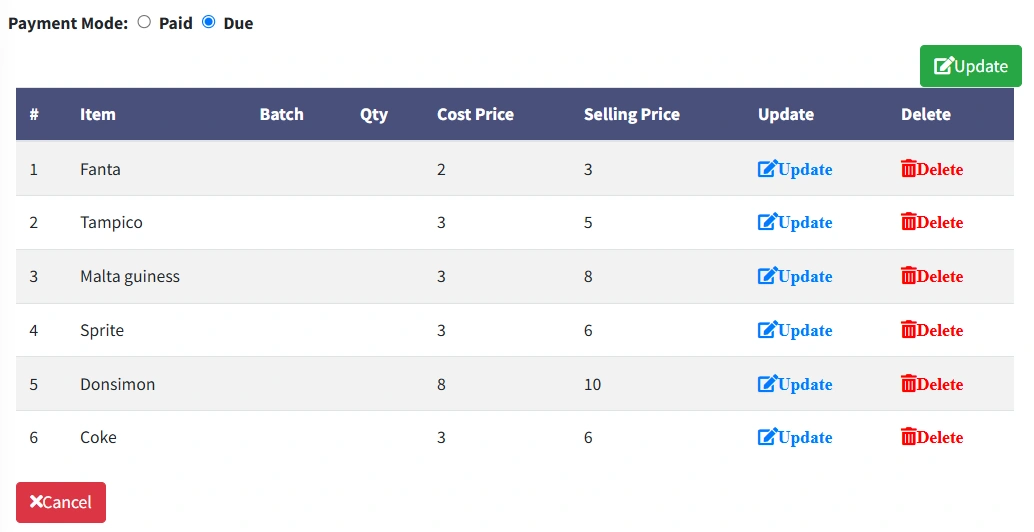
I have two form view, the first form view encapsulate the second form view, so the logic is, the SupplierId should filter the the record per purchase, so when I click on Detail button on form view one then it will open form view two for me, but as at now the supplierId is not passing.
supplierId is a foreign key in the tblPurchase.
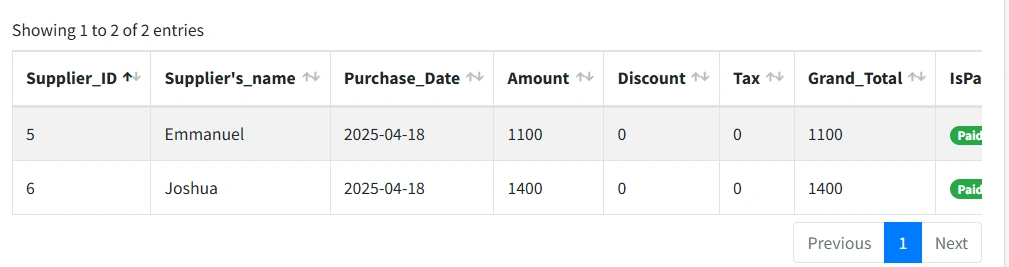
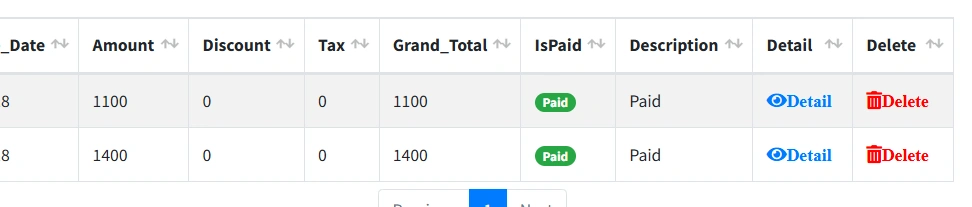
FORM VIEW TWO
function GetAllPurchaseDetails(supplierId) {
$.ajax({
type: 'GET',
url: '/Home/GetAllPurchasesDetails',
data: { supplierId: supplierId },
dataType: 'json',
success: function (data) {
console.log("Response Data: ", data); // Log for debugging
$("#itemTableBody").empty();
let tdContent = '';
// Iterate over the data if it's available
data.forEach(function (purchase) {
if (purchase.PurchaseDetails) {
purchase.PurchaseDetails.forEach(function (detail) {
tdContent += '
'
'
'
'
'
'
'
'
'
});
}
});
$('#itemTableBody').append(tdContent);
},
error: function (xhr, status, error) {
console.error("AJAX Error:", xhr.responseText);
alert("Error loading purchase details!");
}
});
}
public ActionResult GetAllSupplier()
{
try
{
var purchases = objRestaurantDBEntities.tblPurchases
// Eagerly load the related tblSupply entity
.Include(x => x.tblSupply)
.Select(x => new PurchasesViewModel
{
PurchaseID = x.PurchaseID,
StockInDate = x.StockInDate,
SupplierId = x.SupplierId,
// Null check for tblSupply before accessing Name
Name = x.tblSupply != null ? x.tblSupply.Name : "N/A",
Total = x.Total,
Discount = x.Discount,
Tax = x.Tax,
GrandTotal = x.GrandTotal,
IsPaid = x.IsPaid,
Description = x.Description
})
.ToList();
return Json(purchases, JsonRequestBehavior.AllowGet);
}
catch (Exception ex)
{
return Json(new { error = ex.Message }, JsonRequestBehavior.AllowGet);
}
}
public ActionResult GetAllPurchasesDetails(int supplierId)
{
try
{
var supplierPurchases = objRestaurantDBEntities.tblPurchases
.Where(p => p.SupplierId == supplierId)
.Select(p => new
{
PurchaseID = p.PurchaseID,
StockInDate = p.StockInDate,
SupplierId = p.SupplierId,
Name = p.tblSupply != null ? p.tblSupply.Name : "N/A",
Total = p.Total,
Discount = p.Discount,
Tax = p.Tax,
GrandTotal = p.GrandTotal,
IsPaid = p.IsPaid,
Description = p.Description,
PurchaseDetails = p.tblPurchaseDetails.Select(pd => new
{
PurchaseDetailID = pd.PurchaseDetailID,
ItemId = pd.ItemId,
ItemName = pd.tblItem != null ? pd.tblItem.ItemName : "N/A",
Qty = pd.Qty,
CostPrice = pd.CostPrice,
SellingPrice = pd.SellingPrice,
Batch = pd.Batch
}).ToList()
})
.ToList();
return Json(supplierPurchases, JsonRequestBehavior.AllowGet);
}
catch (Exception ex)
{
System.Diagnostics.Debug.WriteLine("ERROR: " + ex.Message);
return new HttpStatusCodeResult(500, "Error fetching purchase details.");
}
}
and this is my error message when I run the code //Error loading purchase details!
Emmmanuel FIADUFEPosted Apr 22, 2025, 10:14 PM
Hello team,
Please any help on this will be highly appreciated
Sophia CarterPosted Apr 21, 2025, 12:38 PM
It seems like you are facing an issue where the SupplierId is not being passed correctly from the first form view to the second form view in your application. The logic you described involves filtering records per purchase based on the SupplierId when moving from the first form view to the second.
Looking at your code snippets, it appears that you are using an AJAX call to pass the supplierId to the `GetAllPurchasesDetails` action in your HomeController. However, the issue might be related to how the supplierId is being passed or handled in your application.
Here are a few steps you can take to troubleshoot and potentially resolve the issue:
1. Check AJAX Call Parameters: Ensure that the `supplierId` parameter is being correctly passed in the AJAX call to the `GetAllPurchaseDetails` function. You can debug this by logging the `supplierId` before making the AJAX call to see if it has the correct value.
2. Verify Route and Controller Logic: Double-check the route and controller logic in your application to make sure that the `GetAllPurchasesDetails` action in your HomeController is correctly receiving and processing the `supplierId` parameter.
3. Inspect Server-Side Code: Review the `GetAllPurchasesDetails` action in your HomeController to ensure that it correctly filters and retrieves the purchase details based on the `supplierId` provided.
4. Debugging and Error Handling: If the error persists, make use of debugging tools like browser developer tools and server-side debugging to pinpoint where the issue might be occurring. Additionally, ensure that error handling mechanisms are in place to catch and display any potential errors that occur during the AJAX call.
By thoroughly reviewing these aspects of your code and the flow of data between your form views and controller actions, you should be able to identify the root cause of the issue and implement the necessary adjustments to ensure that the SupplierId is correctly passed and utilized in fetching the purchase details.