Hi,
Actucally I am looking for how to get dialog box reasult with key down event?
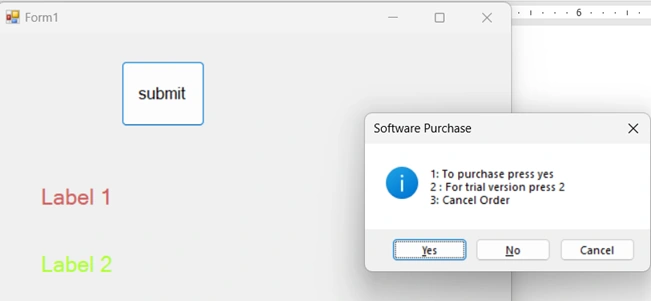
After pressing submit button , Message dialog box woking fine..But i want numbers 1,2,3 shoild work similar like below ..
if (dr == DialogResult.Yes)
{
label2.Text = " You have purchased the software , congratualtions";
} /// working fine
but how to get dr data in keydown event of same button
if(e.KeyCode == Keys.NumPad1) {
label2.Text = " You have purchased the software , congratualtions";
}
Naimish MakwanaPosted Dec 3, 2024, 5:26 AM
To achieve this, you can handle the
KeyDownevent for your form or button and check for specific key presses. Here's an example of how you can integrate theDialogResultwith theKeyDownevent:KeyDownevent of your form or button.NumPad1,NumPad2,NumPad3).Here's a sample code snippet to demonstrate this:
In this example:
submitButton_KeyDownmethod handles theKeyDownevent and updates the label based on the key pressed.ShowDialogAndHandleResultmethod shows a dialog box and updates the label based on the dialog result.submitButton_Clickmethod calls the dialog method when the button is clicked.This way, you can handle both the dialog result and key presses to update the label accordingly.
Thanks
sasikala sPosted Dec 2, 2024, 6:06 AM
To hanlde Key even/Key Down event in a Windows Forms application and use them to interact with a message dialog box, you can handle the
KeyDownevent of the form or the specific control you want to capture the key presses from. Here's a simple example to guide you:Show the Dialog Box: When the submit button is clicked, show the dialog box.
Handle KeyDown Event: Capture the key presses in the form.
Here’s a sample code snippet to illustrate this: