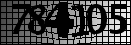
Using the Leadtools image processing libraries (www.Leadtools.com), you only need to use the MaximumCommand and the DespeckleCommand, which takes all of the thin black areas away and then removes all of the 1 pixel dots left over. If you are planning on turning this into a 1bpp black and white image to perform OCR on, you can use the LineRemoveCommand instead which has more options for control. Here's the code I used:
using (RasterCodecs codecs = new RasterCodecs())
{
using (RasterImage image = codecs.Load(inputFile))
{
// Remove thin objects (lines)
MaximumCommand maxCommand = new MaximumCommand(2);
maxCommand.Run(image);
// Remove left over dots
DespeckleCommand despeckleCommand = new DespeckleCommand();
Derek StevensPosted Apr 8, 2021, 9:43 PM
Saber ShaikhPosted May 8, 2015, 12:30 AM
http://aspnettutorialscode.blogspot.in/2015/05/create-your-own-captcha-image-generator.html