Hello Team,
I am trying to print current sales but the sytem ended up printing both the current and the previous sales from database, am using the report printview
private void SaveBill()
{
try
{
if (DGVClientBill.Rows.Count > 0)
{
// update product qty
if (MessageBox.Show("Please confirm if you want to save this record?", stitle, MessageBoxButtons.YesNo, MessageBoxIcon.Question) == DialogResult.Yes)
{
for (int i = 0; i < DGVClientBill.Rows.Count; i++)
{
con.Open();
SqlCommand cmd = new SqlCommand("insert into tblSales(SDate,SProductName,SPrice,SQty, SAmount,SCustomer)values(@sDate,@sProductName,@sPrice,@sQty, @sAmount,@sCustomer)", con);
cmd.Parameters.AddWithValue("@sDate", dtBillindDate.Value.ToString("dd-MM-yyyy"));
cmd.Parameters.AddWithValue("@sProductName", DGVClientBill.Rows[i].Cells["dgvProduct"].Value.ToString());
cmd.Parameters.AddWithValue("@sPrice", DGVClientBill.Rows[i].Cells["dgvSellingPrice2"].Value.ToString());
cmd.Parameters.AddWithValue("@sQty", DGVClientBill.Rows[i].Cells["dgvQunatity"].Value.ToString());
cmd.Parameters.AddWithValue("@sAmount", Convert.ToDecimal(DGVClientBill.Rows[i].Cells["dgvTotal"].Value.ToString()));
cmd.Parameters.AddWithValue("@sCustomer", txtCustomer.Text);
cmd.ExecuteNonQuery();
con.Close();
}
MessageBox.Show("Bill successfully saved !", "POS", MessageBoxButtons.OK, MessageBoxIcon.Information);
}
}
}
catch (Exception Ex)
{
con.Close();
MessageBox.Show(Ex.Message);
}
}
Print Button
private void button2_Click(object sender, EventArgs e)
{
SaveBill();
frmPrintReceipt frm = new frmPrintReceipt(this);
frm.LoadReport();
frm.ShowDialog();
DGVClientBill.Rows.Clear();
}
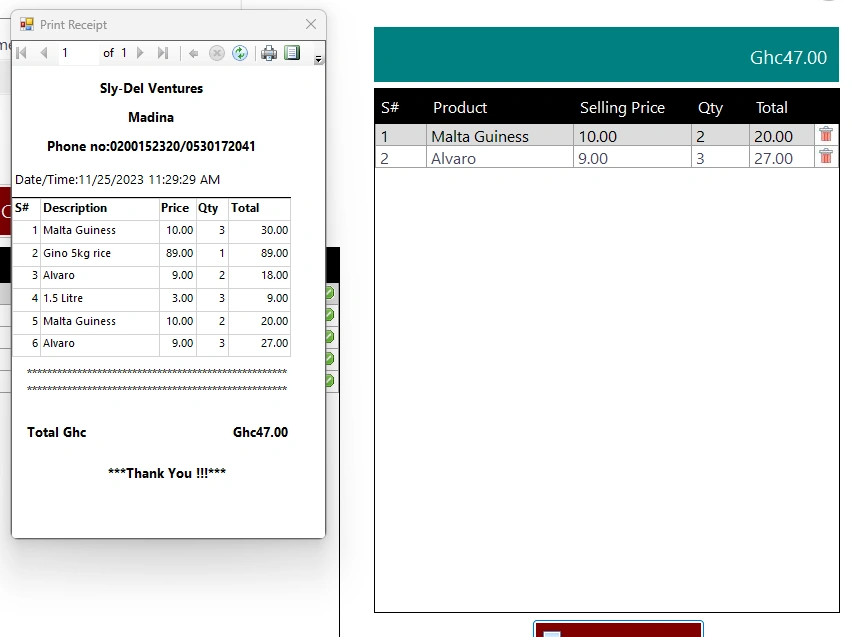
Amit MohantyPosted Dec 7, 2023, 7:55 AM
If you have predefined dtReceipt with you provided structure in frmPrintReceipt form then try this:
Anandu G NathPosted Dec 20, 2023, 6:22 AM
After the data saved into the database then only you can able to print the data .
if there concern please comment
Emmmanuel FIADUFEPosted Dec 6, 2023, 4:56 PM
I bind DGVClientBill DataGridView to frmPrintReceipt as indicated in the code, but my question is how do I include my dataTable content and as well the DGVClientBill DataGridView content here please, thank you
frmBilling fm;
public frmPrintReceipt(frmBilling fmliist)
{
InitializeComponent();
this.fm = fmliist;
}
foreach (DataGridViewColumn dgvColumn in fm.DGVClientBill.Columns)
{
dataTable.Columns.Add(dgvColumn.HeaderText);
}
foreach (DataGridViewRow dgvRow in fm.DGVClientBill.Rows)
{
DataRow dataRow = dataTable.NewRow();
foreach (DataGridViewCell dgvCell in dgvRow.Cells)
{
// Use DBNull.Value for empty cells
dataRow[dgvCell.ColumnIndex] = dgvCell.Value ?? DBNull.Value;
}
dataTable.Rows.Add(dataRow);
}
And this is my DGVClientBill DataGridView
dgvIDD
dgvProduct
dgvSellingPrice2
dgvQunatity
dgvTotal
Emmmanuel FIADUFEPosted Dec 6, 2023, 4:07 PM
Thank you Amity,
Please do I need to use my DataTable content here, because after applying your code, this what came
dataRow[dgvCell.ColumnIndex] = dgvCell.Value ?? DBNull.Value;
when I modify it like this, I get an error like the name SProductName does not exist in the current context, dataRow[dgvCell.ColumnIndex] = dgvCell.Value ?? SProductName;
and this is my DataTable
Amit MohantyPosted Dec 4, 2023, 10:20 AM
If you want to use DVBClientBill to print the sales receipt, then store the DVBClientBill data to a datatable and use that datable in your LoadReport().
Emmmanuel FIADUFEPosted Dec 3, 2023, 2:11 PM
May be the another option to get order sales receipt printed is to use DVBClientBill as data source but can someone here assist me how to go about it please
Emmmanuel FIADUFEPosted Nov 30, 2023, 3:39 PM
Could it be like there is an issue with where convert(varchar(10), SDate, 102) = convert(varchar(10), getdate(), 102)
Because when I remove it, it load all the sales data as stated earlier
Emmmanuel FIADUFEPosted Nov 30, 2023, 3:34 PM
Hello Hello Samantaray,
It is the same condition please
Satyaprakash SamantarayPosted Nov 30, 2023, 12:40 PM
Hi Emmanuel,
Based on which condition u want records in report viewer
Check ur right side image where the 2 records are loading. You need to check what condition that 2 records are loading. The same condition u need to put in below code in loadreport ()
da.SelectCommand = new SqlCommand("select SNum,SDate,SProductName,SPrice,SQty,SAmount, SCustomer from tblSales where "put ur condition"
Emmmanuel FIADUFEPosted Nov 30, 2023, 11:47 AM
Hi Samantaray, thank you for help, the receipt came but didn't show any data,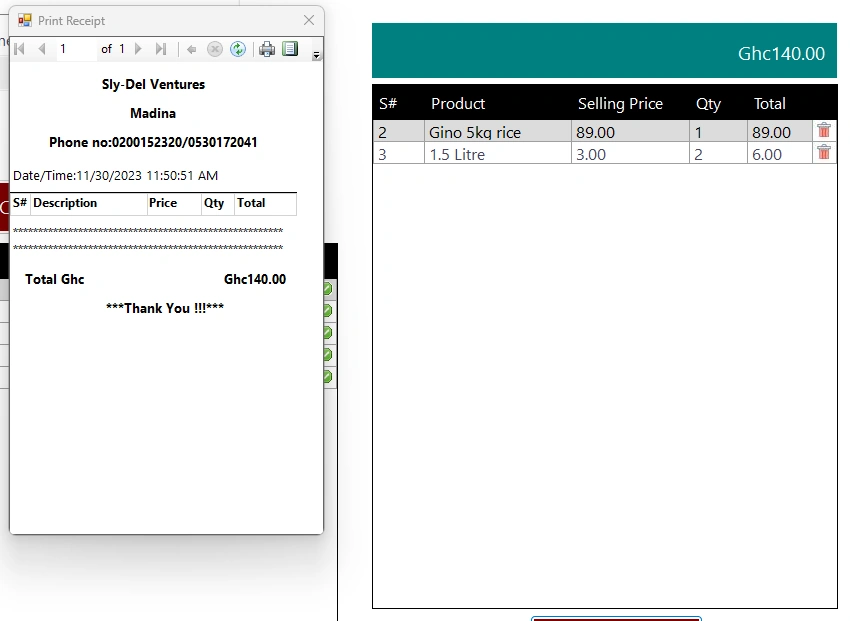
Satyaprakash SamantarayPosted Nov 29, 2023, 5:17 PM
Hi Emmanuel,
Modify the select statement using filter in ur loadreport() code as below. Here filter is based on current date like this u can filter records as per requirement. The below code as reference.
Emmmanuel FIADUFEPosted Nov 29, 2023, 4:05 PM
Hello Samantaray,
I tried to seperate the print button from SaveBill button but it didn't work,
How do i filter current sales with the data, I will happy if you can give me example here
Emmmanuel FIADUFEPosted Nov 28, 2023, 5:55 PM
Ohk Samantaray I will check and revert
Satyaprakash SamantarayPosted Nov 28, 2023, 4:11 PM
Hi Emmanuel,
As I said earlier, put a filter in the below query of code
da.SelectCommand = new SqlCommand("select SNum, SDate,SProductName,SPrice,SQty,SAmount, SCustomer from tblSales", con);
Here u can filter based on date. So, it will show current sales on report viewer instead of all records.
Emmmanuel FIADUFEPosted Nov 28, 2023, 2:34 PM
How do I go about please
Amit MohantyPosted Nov 28, 2023, 10:45 AM
The issue is the query(select SNum,SDate,SProductName,SPrice,SQty,SAmount,SCustomer from tblSales), which is fetching all data present in the tblSales table. You have to fetch selected data by using some condition.
Emmmanuel FIADUFEPosted Nov 28, 2023, 10:20 AM
public void LoadReport()
{
ReportDataSource rptReportDataSource;
try
{
this.reportViewer1.LocalReport.ReportPath = Application.StartupPath + @"\rptReceipt.rdlc";
this.reportViewer1.LocalReport.DataSources.Clear();
DataSet ds = new DataSet();
SqlDataAdapter da = new SqlDataAdapter();
con.Open();
da.SelectCommand = new SqlCommand("select SNum, SDate,SProductName,SPrice,SQty,SAmount, SCustomer from tblSales", con);
da.Fill(ds.Tables["dtReceipt"]);
con.Close();
ReportParameter pTotal = new ReportParameter("pTotal", fm.lblGrandTotal.Text);
ReportParameter pStore = new ReportParameter("pStore", store);
ReportParameter pAddress = new ReportParameter("pAddress", address);
ReportParameter pPhone = new ReportParameter("pPhone", phone);
reportViewer1.LocalReport.SetParameters(pTotal);
reportViewer1.LocalReport.SetParameters(pStore);
reportViewer1.LocalReport.SetParameters(pAddress);
reportViewer1.LocalReport.SetParameters(pPhone);
rptReportDataSource = new ReportDataSource("DataSet1", ds.Tables["dtReceipt"]);
reportViewer1.LocalReport.DataSources.Add(rptReportDataSource);
reportViewer1.SetDisplayMode(Microsoft.Reporting.WinForms.DisplayMode.PrintLayout);
reportViewer1.ZoomMode = ZoomMode.Percent;
reportViewer1.ZoomPercent = 100;
}
catch (Exception ex)
{
MessageBox.Show(ex.Message);
}
}
}
}
Amit MohantyPosted Nov 28, 2023, 5:38 AM
Please provide the code for LoadReport() method.
Satyaprakash SamantarayPosted Nov 27, 2023, 10:49 PM
Check your button click event that savebill method for inserting records but as per requirement u need to generate the report only.
To print the sales order, u need to check loadreport() and showdialog() method.
Check your code in button2_Click() event. Because that performs both save records as well as print records. That's why it is printing both the current and the previous sales from database.
You need to use one button for savebill() method and other for loadreport().
For better findings u need to use breakpoint in each methods under button2 click event. In loadreport() method u need to use filter to generate reports for current sales.
Emmmanuel FIADUFEPosted Nov 27, 2023, 5:45 PM
Hello Satyaprakash,
I am trying to print current sales but the sytem ended up printing both the current and the previous sales from database.
I just want to print the sales order not the one already saved in the database
Satyaprakash SamantarayPosted Nov 27, 2023, 4:46 PM
The Report Viewer provides print report option in the toolbar to print a copy of the report. The page setup dialog allows you to set the paper size or other page setup properties. To see print margins, click Print Layout on the toolbar.
Refer link and modify your code as per requirement
Click here >> https://tinyurl.com/3xdm6kfx