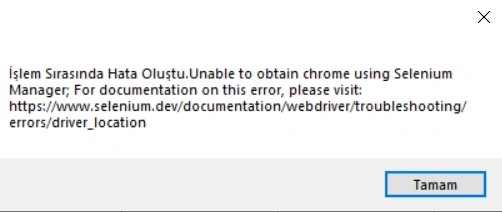
I am using selenium in my windows form project. In visual stuido, it works without problems. It does not work after setup. It is giving this error.
My codes are here.
I am using selenium in my windows form project. In visual stuido, it works without problems. It does not work after setup. It is giving this error.
My codes are here.
Know the answer? Post it — somebody with the same question will find it here.
Sign in to answer this question
It is the same account you read, post and publish with — and you will come straight back to this page.
Mehmet FatihPosted Aug 19, 2023, 5:47 PM
I have solved the problem by adding this line by myself..
string path = "";
var driverService = ChromeDriverService.CreateDefaultService(path);
Mehmet FatihPosted Aug 18, 2023, 5:50 AM
Deepak, thanks for your intrest. I tried all of them. I updated all selenium all libraries, packages, and dependencies. I checked permissions etc. I think it is related to path of choromedriver. Selenium manager can't find the way.
Deepak RawatPosted Aug 18, 2023, 4:53 AM
Check for Dependencies: Ensure that all necessary dependencies and drivers are properly included in your setup. Selenium requires web drivers specific to the browser you're using (e.g., ChromeDriver for Chrome, GeckoDriver for Firefox). Make sure these drivers are included in your project setup and their paths are correctly set.
Driver Path: If you're using web drivers, double-check that their paths are set correctly. Sometimes, if the path is incorrect or not properly configured, it can result in errors.
Permissions: Verify that the user running the application has the necessary permissions to access and execute the required files. Sometimes, permission issues can prevent the application from accessing external resources like web drivers.
Appropriate Browser Version: Ensure that the browser version on the deployment machine matches the version for which the web driver was intended. Web drivers might be version-specific and might not work with different browser versions.
Firewall and Network Issues: Sometimes, firewalls or network configurations can block the communication between your application and the browser. Make sure your application is allowed to access the internet and communicate with the browser.
Exception Handling: Wrap your Selenium code in appropriate try-catch blocks and log any exceptions that are being thrown. This can provide more detailed information about the specific issue that's causing the error.
Environment Variables: Some web drivers require setting environment variables. Make sure these variables are set correctly in your deployment environment.
Debugging: If possible, try to run the application in debug mode on the deployment machine. This can help you step through the code and identify where the error is occurring.
Logging: Implement detailed logging in your application to track the flow of execution and identify where it's failing.
Compatibility Mode: If your application is running on a different version of Windows than your development machine, there might be compatibility issues. Try running the application in compatibility mode.
Update Dependencies: Ensure that all libraries, packages, and dependencies related to Selenium are up to date in your project.