With Selenium, I upload the students' pictures in the folder, respectively, according to the student information in the datagridview. The program works smoothly, but it gives an error for students whose pictures are not in the folder. How can we skip students whose pictures are not in the folder?
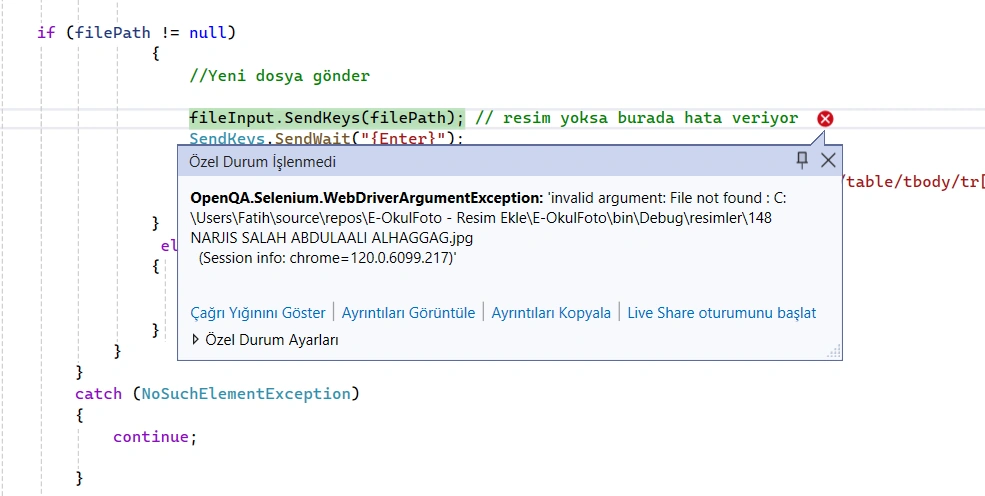
    drv.SwitchTo().Window(drv.WindowHandles.ToList().Last());

    for (int i = 0; i < dataGridView1.Rows.Count; i++)
    {
        try
        {
            var val0 = dataGridView1.Rows[i].Cells[0].Value?.ToString();//students’numbers

            if (val0 != null && val0 != string.Empty)
            {


                    string filePath = System.IO.Path.Combine(System.Windows.Forms.Application.StartupPath, "resimler", jpgname + ".jpg");
                    Actions actions = new Actions(drv);
                    IWebElement uploadPhotoBtn = drv.FindElement(By.XPath("//*[@id='flResimSec']"));
                    Thread.Sleep(3000);


                    WebDriverWait wait = new WebDriverWait(drv, TimeSpan.FromSeconds(10));
                    IWebElement fileInput = wait.Until(drv =>
                    {
                        var element = drv.FindElement(By.XPath("//input[@type='file']"));
                        return element.Displayed ? element : throw new NoSuchElementException();
                    });


    if (filePath != null)
                {

                    fileInput.SendKeys(filePath); // I am getting error here
                    SendKeys.SendWait("{Enter}");
                    SendKeys.SendWait("{ESC}");
                }
                 else
                {
                    continue;

                }
            }
        }
        catch (NoSuchElementException)
        {
            continue;

        }

    }
}
Jithu ThomasPosted Jan 14, 2024, 11:15 AM
drv.SwitchTo().Window(drv.WindowHandles.ToList().Last());
for (int i = 0; i < dataGridView1.Rows.Count; i++)
{
try
{
var val0 = dataGridView1.Rows[i].Cells[0].Value?.ToString(); // students’ numbers
if (!string.IsNullOrEmpty(val0))
{
string jpgname = val0; // Assuming jpgname is derived from the student number
string filePath = Path.Combine(Application.StartupPath, "resimler", jpgname + ".jpg");
// Check if the file exists
if (File.Exists(filePath))
{
Actions actions = new Actions(drv);
IWebElement uploadPhotoBtn = drv.FindElement(By.XPath("//*[@id='flResimSec']"));
Thread.Sleep(3000);
WebDriverWait wait = new WebDriverWait(drv, TimeSpan.FromSeconds(10));
IWebElement fileInput = wait.Until(drv =>
{
var element = drv.FindElement(By.XPath("//input[@type='file']"));
return element.Displayed ? element : throw new NoSuchElementException();
});
fileInput.SendKeys(filePath);
SendKeys.SendWait("{Enter}");
SendKeys.SendWait("{ESC}");
}
else
{
// File does not exist, skip this student
continue;
}
}
}
catch (NoSuchElementException)
{
// Handle NoSuchElementException if needed
continue;
}
}
Mehmet FatihPosted Jan 14, 2024, 11:38 AM
Thanks a lot for your help, Jithu Thomas.. Your are vry kind.