ALTER PROCEDURE [dbo].[UIPKGUSER_spVerifyCredentials]
    @inUsername varchar(100),
    @inPassword varchar(100),
    @outUserCount int output,
    @outRoleName varchar(100) output
AS
BEGIN
    SET NOCOUNT ON;

    select @outUserCount = COUNT(*)
    from tbluser
    where username = @inUsername
        and password = @inPassword;

    if (@outUserCount > 0)
    begin
        select @outRoleName = rolename
        from tbluser
        where username = @inUsername
            and password = @inPassword;
    end
    else
        SET @outRoleName = '';

END
HERE IS CONNECTION string :-
DatabaseHelper.ConnectionString = ConfigurationManager.ConnectionStrings["DefaultDB"].ConnectionString;
SEND ME LOGIN Right Code
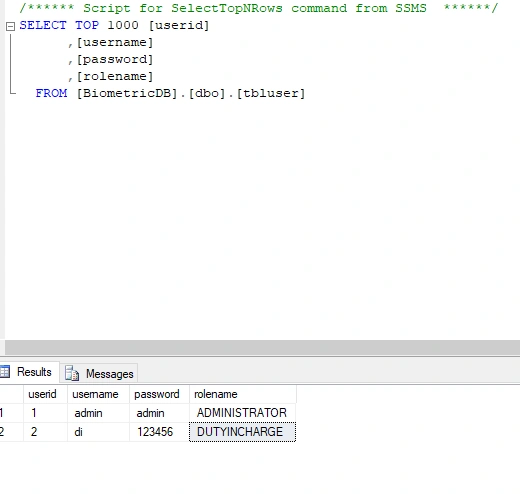
This is Table

Muhammad Imran AnsariPosted Apr 25, 2022, 2:42 AM
Guest UserPosted Apr 26, 2022, 8:30 PM
Guest UserPosted Apr 26, 2022, 9:49 AM
string RoleName = Convert.ToString(cmd.Parameters["@outRoleName"].Value); \\ how to this Role Use for admin and dutyincharge
Guest UserPosted Apr 25, 2022, 12:17 PM
Guest UserPosted Apr 25, 2022, 12:16 PM
How To Use Role Name
string RoleName = Convert.ToString(cmd.Parameters["@outRoleName"].Value);
this is right code or worng code...
if (RoleName[3].ToString() == "ADMINISTRATOR")
{
DatabaseHelper.type = "A";
}
else if (RoleName[3].ToString() == "DUTYINCHARGE")
{
DatabaseHelper.type = "U";
}
Guest UserPosted Apr 24, 2022, 8:54 PM
Muhammad Imran AnsariPosted Apr 22, 2022, 6:56 AM
Amit MohantyPosted Apr 22, 2022, 6:41 AM
Guest UserPosted Apr 22, 2022, 6:22 AM
Amit MohantyPosted Apr 22, 2022, 5:58 AM
Gajendra JangidPosted Apr 22, 2022, 4:50 AM