To resolve the issue with the DiagnosticTrace class, you may need to investigate the root cause of the exception. This can be done by looking at the exception details, including the stack trace and any inner exceptions. Once you have identified the root cause of the exception, you can take steps to resolve it, such as updating configuration settings, reinstalling .NET framework, or fixing application code.
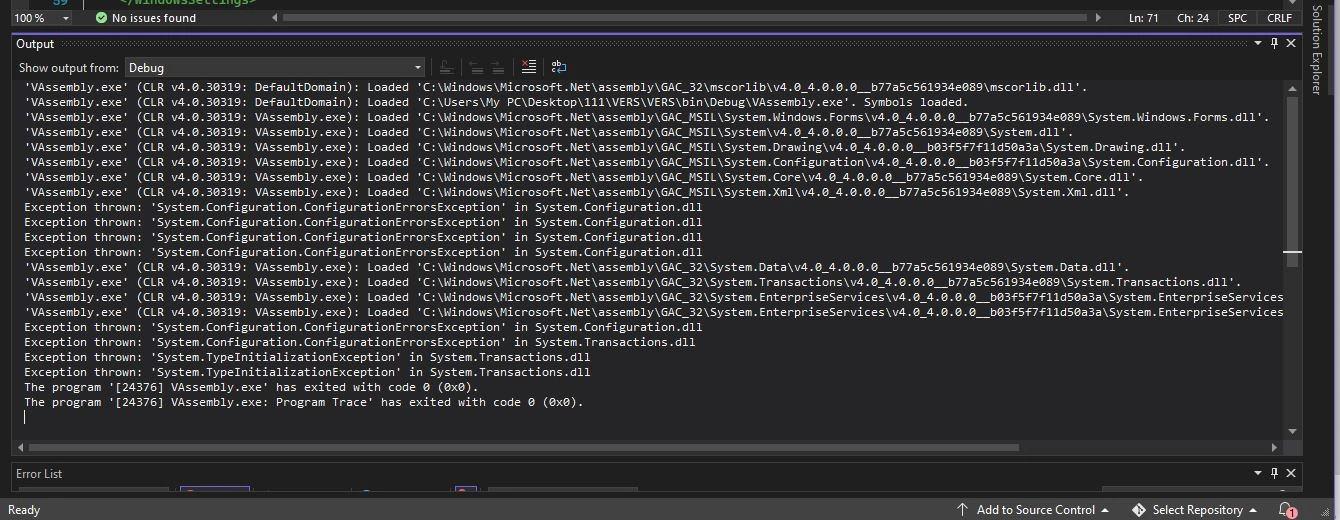
I think there is an issue with the initialization of the DiagnosticTrace class in the System.Transactions.Diagnostics namespace. The DiagnosticTrace class is used for tracing and logging in .NET applications.
The configuration setting is used to enable Just-In-Time (JIT) debugging in Windows Forms applications. JIT debugging is a process that allows developers to debug their applications at runtime when an exception occurs.
Tuhin PaulPosted Apr 18, 2023, 3:17 PM
To resolve the issue with the
DiagnosticTraceclass, you may need to investigate the root cause of the exception. This can be done by looking at the exception details, including the stack trace and any inner exceptions. Once you have identified the root cause of the exception, you can take steps to resolve it, such as updating configuration settings, reinstalling .NET framework, or fixing application code.Tuhin PaulPosted Apr 18, 2023, 3:12 PM
I think there is an issue with the initialization of the DiagnosticTrace class in the System.Transactions.Diagnostics namespace. The DiagnosticTrace class is used for tracing and logging in .NET applications.
The